web
You’re offline. This is a read only version of the page.
close
Skip to main content

Announcements

News and Announcements icon
Community site session details

Community site session details

Session Id :
Power Platform Community / Forums / Power Automate / Using flow to send a m...
Power Automate
Unanswered

Using flow to send a message to teams, but with a subject line?

(0) ShareShare
ReportReport
Posted on by Microsoft Employee

Please see the image attached:
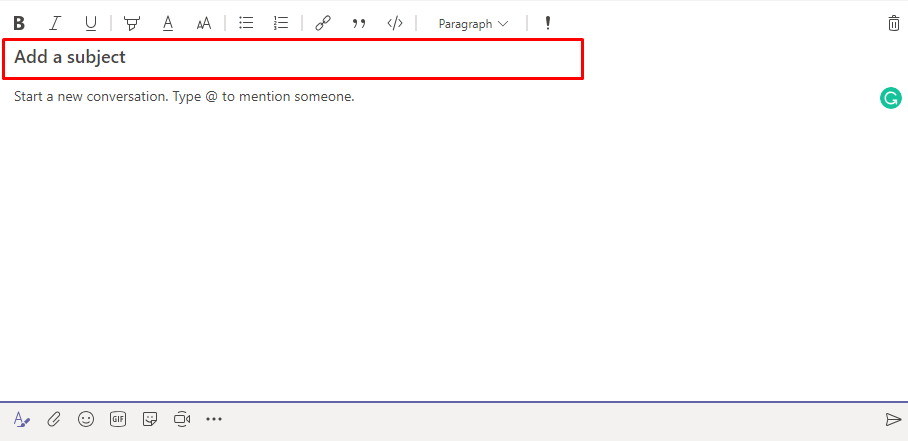
 

When you click the A at the bottom left of a post, it allows for someone to add a subject to a message that is going to a channel on Microsoft Teams. We are attempting to create a flow that alerts users of cancellations, but we need it to have a subject if at all possible. I'm not seeing the option in the teams flow action, but was curious if it's a command within the message, or if it's just not possible?


Thanks in advance.

Categories:
I have the same question (0)
  • v-yamao-msft Profile Picture
    Microsoft Employee on at

    Hi @Anonymous,


    Thanks for your feedback.

    I am afraid that it is currently not possible to post a Microsoft Teams message with a Subject via Microsoft Flow. Please post a request on Flow Ideas Forum about this issue, I will suggest other customers who have the same request to vote your idea at here:

    https://powerusers.microsoft.com/t5/Flow-Ideas/idb-p/FlowIdeas


    Best regards,

    Mabel

  • GabrielStJohn Profile Picture
    Microsoft Employee on at

    Hello, @Anonymous!

    Thank you for posting on the Flow Community Forum! If you have already posted your idea to the Flow Community Ideas Forum or found an existing idea to upvote, then you need to post the URL to the idea’s thread as a reply to this thread. Then click "Accept as Solution" on the reply if you approve it as a solution to your issue so that other users may vote for the Flow Idea and identify the information easily within this thread.

    Thank You for being an active member of the Flow Community!

    -Gabriel
    Flow Community Manager

  • jayprakash Profile Picture
    12 on at

    This is possible by MS flow. Here is the solutions: 


    But We are facing issue by power app. Is there anyone have solution regarding how to add Subject line by powerapps ?

    MicrosoftTeams.PostMessageToChannel("Team ID","Channel ID", {subject:"hello jp", body:{content:"test",contentType:1}})


    Wrote : - Jayprakash Birla

Under review

Thank you for your reply! To ensure a great experience for everyone, your content is awaiting approval by our Community Managers. Please check back later.

Helpful resources

Quick Links

Introducing the 2026 Season 1 community Super Users

Congratulations to our 2026 Super Users!

Kudos to our 2025 Community Spotlight Honorees

Congratulations to our 2025 community superstars!

Leaderboard > Power Automate

#1
David_MA Profile Picture

David_MA 262 Super User 2026 Season 1

#2
Haque Profile Picture

Haque 227

#3
Expiscornovus Profile Picture

Expiscornovus 225 Most Valuable Professional

Last 30 days Overall leaderboard
