web
You’re offline. This is a read only version of the page.
close
Skip to main content

Notifications

Announcements

Community site session details

Community site session details

Session Id :
Power Platform Community / Forums / Power Automate / windows authentication...
Power Automate
Unanswered

windows authentication doesn't work in data flow

(0) ShareShare
ReportReport
Posted on by

I have my table in powerbi desktop, and I want to put it to powerbi data flow. I simply copy the query and in the data flow:
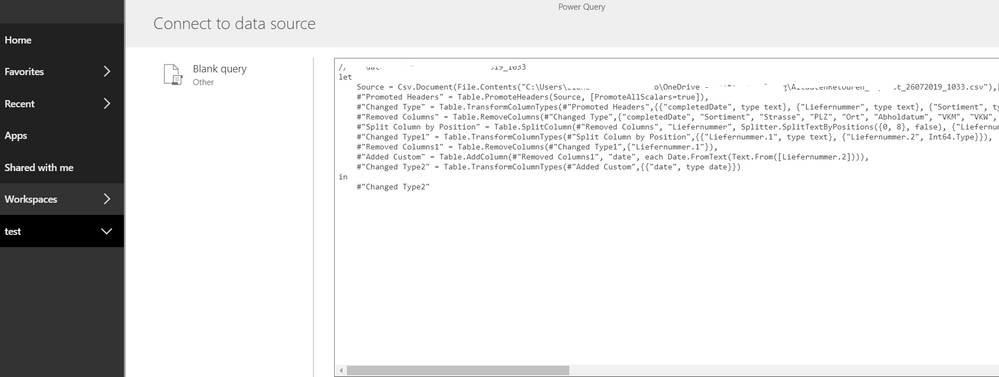
1.PNG

then I get the following error:2.PNG


and then when I click on edit credintials, I have this: 3.PNG
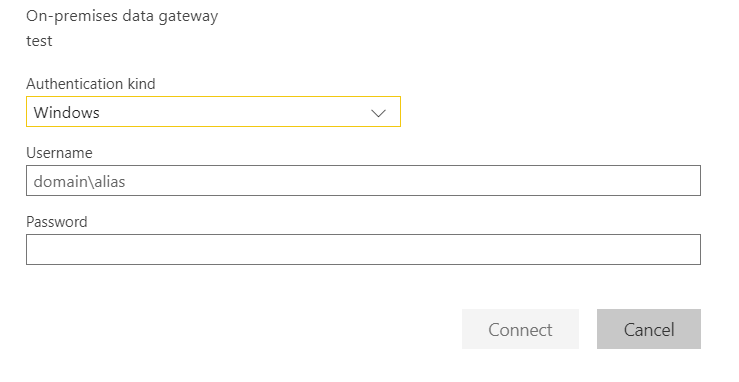
 

Then no matter what I enter in the windows authentication, it doesn't work, I tried the following:

- my email

- my windows log_in

- AzureAD\myUsername

- fileserver\sharedfile\username

- I started my browser as 'run as an administrator'


none of them are working. Can someone tell me what is wrong, please !!!!!

Categories:
I have the same question (0)
  • ibarrau Profile Picture
    21 on at

    Hi. You probably need an On Premise Data Gateway installed on the pc in order to connect DataFlows to an on premise data source like the csv with that path.

    Then you can connect that way.

  • Community Power Platform Member Profile Picture
    on at

    @ibarrau 
    I already installed a gateway

  • ibarrau Profile Picture
    21 on at

    Is that gateway configured with the source (csv file) ?

    You should type the same credentials you use for login your pc.


  • Community Power Platform Member Profile Picture
    on at

    @ibarrau 

    how should I configure the gateway with (scv)format?

  • Community Power Platform Member Profile Picture
    on at

    @ibarrau 
    Oh my god!!!!!!!!
    I can not believe that it is working !!!!!

  • Verified answer
    ibarrau Profile Picture
    21 on at

    After installing the gateway with you account, you can go to configuration and Manage gateways like this:


    image.png


    There you can add a source and check if the autentication works. Once you manage to connect there you will be able to use the same credentials on dataflows.


Under review

Thank you for your reply! To ensure a great experience for everyone, your content is awaiting approval by our Community Managers. Please check back later.

Helpful resources

Quick Links

Forum hierarchy changes are complete!

In our never-ending quest to improve we are simplifying the forum hierarchy…

Ajay Kumar Gannamaneni – Community Spotlight

We are honored to recognize Ajay Kumar Gannamaneni as our Community Spotlight for December…

Leaderboard > Power Automate

#1
Michael E. Gernaey Profile Picture

Michael E. Gernaey 522 Super User 2025 Season 2

#2
Tomac Profile Picture

Tomac 364 Moderator

#3
abm abm Profile Picture

abm abm 243 Most Valuable Professional

Last 30 days Overall leaderboard




