web
You’re offline. This is a read only version of the page.
close
Skip to main content

Announcements

News and Announcements icon
Community site session details

Community site session details

Session Id :
Power Platform Community / Forums / Power Automate / Why does "Get items" (...
Power Automate
Answered

Why does "Get items" (SharePoint) get items from the submitted form response?

(1) ShareShare
ReportReport
Posted on by 35
Hello. I just started to use Power Automate, and I can't figure it out by myself. So, it would be great if anyone here can help!
 
I have an empty Microsoft Lists list. The list is very simple and it has only a few columns. I also created a form by using Microsoft Forms, and it has only two questions.
 
Here is the entire flow:
 
 
The parameters of each action is as follows:
 
 
When the list is empty, my expectation is that the Outputs of the "Get items" action is empty so that I can create an item according to the form submission. But, the "Get items" action outputs the content of the form submission even when the list is empty. I can't figure out why.
 
I tried to use the "Get response details" action after the "Get items" action to avoid the issue, but I use the responder's email address in Filter Query of the "Get items" action and the responder's email address is not available if I put the "Get response details" action after the "Get items" action. So, I think "Get response details" needs to be in front of "Get items".
 
Does anyone have any ideas why "Get items" outputs data from the submitted form? How can I avoid it?
 
Thank you very much!
 
Kaz
 
 
Categories:
I have the same question (0)
  • trice602 Profile Picture
    16,239 Super User 2026 Season 1 on at
    Hi,
     
    One of the many ways to do this, and easy to understand, is to use the length() expression.  Here in my example, if the length of my array is equal to one, then I found my matching item, else it would be empty in your case.
     
    So if the length is 1, the userID exists and I will update item.  If the length is not equal to one, then I will create item.


    So in my example, I have 5 items and no matches so the results are false.
     
     
    Now, in my next test, I am using a filter query in the get items action, Title eq 'Test Issue2' and I know there is only one and expect the results to be true but let's check the output.
     
     
    So summary, if you want to check if the item exists using the filter query userID eq 'responder's email dynamic content' then use the length() expression shown above to see if one item was returned.  Then use the conditional action to see if the length of the output is equal to 1.
     

    ------------------------------------------------


    ⭐ If this was helpful, please like and mark as a verified answer to help others find this too!


    Always glad to help! 💯💯💯💯💯


    Tom


    Follow me on LinkedIn - Thomas Rice, PMP | LinkedIn

  • KS-24012212-0 Profile Picture
    35 on at
    (I'm new here, and I don't find the reply button under trice602's reply... The button is under my original post. So, it sounds I'm replying to my post..., I'm sorry that I'm doing something not right)
     
    Thank you, @trice602, for the reply. I appreciate it. I didn't put my condition parameter in my original post because I thought the issue was before the condition. 
     
    My condition parameter was:

     
    But, I changed it to the following as you suggested.
     
     
    Anyway, here is happening (I tried after deleting items from the list. In other words, the list was empty):
     
    As you expect, the flow went to the False route as you see below:

     
    And here is the list:

     
    I mean two items are created instead of one. I delete one of them, and tried again to update the item.
     
    The flow went to the True route as you see below:

     
    And here is the list:

     
    As you see, instead of updating the previous item, the new one was added to the list.
     
    The parameters for "Update item" is as follows:

    and the parameters for "Create item" is as follows:

     
    As you see above, I use the outputs from "Get items" for "Update item". If I change them to the outputs from "Get response details" just like I do in "Create item". The result is:

     
    In other words, the list item is updated, but another was is also created.
     
    Do you have any idea how I can avoid adding the extra item in both False (Create item) and True (Update item)?
     
    Thank you!
     
  • David_MA Profile Picture
    14,605 Super User 2026 Season 1 on at
    You may want to rephrase your post as what I see so far doesn't seem to make much sense. Some questions:
    • What is the purpose of the SharePoint Get items action?
    • In your second post you show a screen shot of your conditions, but don't show what the expression is or explain what the conditions are checking. What is the condition checking and the expressions used?
    • Once I know what the condition is checking for, then I will probably understand why you are either updating or creating an item in SharePoint. However, what is the relationship of the SharePoint list to a Microsoft Forms submission? They're two different things.
    If you simply want to add an item to your SharePoint list when a new Microsoft Forms response is submitted, get rid of everything in your flow after the get response details action. Replace it with a SharePoint create item action. It's as simple as that.
  • KS-24012212-0 Profile Picture
    35 on at
    Thank you, @David_MA, for your response.

    The list is for each team members to update their availabilities. So, if there are 5 team members for example, the list should always show the 5 team members and their availabilities.
     
    When a team member submits the form (includes only "Availability" and "Notes") for the first time, a list item should be created for the team member. But, when the team member submits the form next time (or any future submits), the list item of this person should be updated (instead of creating the second list item for this particular team member).
     
    > What is the purpose of the SharePoint Get items action?
     
    I want "Get Items" to find if this user already has an entry in the list (If yes, update. If no, create)
     
    > In your second post you show a screen shot of your conditions, but don't show what the expression
    > is or explain what the conditions are checking. What is the condition checking and the expressions used?
     
    The condition is checking if the previous "Get items" returns 0 (the specific user didn't have an list item in the list) or 1 (the specific user does have an list item in the list), and the expression is:
     
      "expression": {
        "and": [
          {
            "equals": [
              "@length(body('Get_items')?['value'])",
              1
            ]
          }
        ]
      },
     
    > Once I know what the condition is checking for, then I will probably understand why you are either updating
    > or creating an item in SharePoint. However, what is the relationship of the SharePoint list to a Microsoft
    > Forms submission? They're two different things.
     
    Team members should submit the form (Microsoft Forms) daily and the SharePoint list should be updated daily according to the form submissions (their first submissions should create list items).
     
    FYI. When I had the following result (before the test, there was only one item is the list. The existing one was updated, but another list item was also created/added. I mean the second item should NOT be created/added):
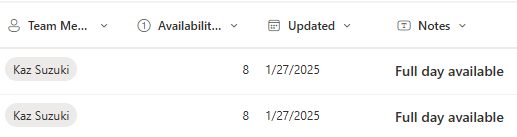
     
    The output of the "Update item" was as follows:
     
    {
      "@odata.etag": "\"3\"",
      "ItemInternalId": "43",
      "ID": 43,
      "Title": "Full day available",
      "TeamMember": {
        "@odata.type": "#Microsoft.Azure.Connectors.SharePoint.SPListExpandedUser",
        "Claims": "i:0#.f|membership|ksuzuki@companydomain.com",
        "DisplayName": "Kaz Suzuki",
        "Email": "ksuzuki@companydomain.com",
        "Picture": "https://companydomain.sharepoint.com/sites/SolutionsInnovation100-Test-Availability/_layouts/15/UserPhoto.aspx?Size=L&AccountName=ksuzuki@companydomain.com"
      },
      "TeamMember#Claims": "i:0#.f|membership|ksuzuki@companydomain.com",
      "Availabilityin_x0025_": 8,
      "Updated": "2025-01-27",
      "UserID": "ksuzuki@companydomain.com",
      "Modified": "2025-01-27T14:46:29Z",
      "Created": "2025-01-27T14:30:20Z",
      "Author": {
        "@odata.type": "#Microsoft.Azure.Connectors.SharePoint.SPListExpandedUser",
        "Claims": "i:0#.f|membership|ksuzuki@companydomain.com",
        "DisplayName": "Kaz Suzuki",
        "Email": "ksuzuki@companydomain.com",
        "Picture": "https://companydomain.sharepoint.com/sites/SolutionsInnovation100-Test-Availability/_layouts/15/UserPhoto.aspx?Size=L&AccountName=ksuzuki@companydomain.com",
        "Department": null,
        "JobTitle": null
      },
      "Author#Claims": "i:0#.f|membership|ksuzuki@companydomain.com",
      "Editor": {
        "@odata.type": "#Microsoft.Azure.Connectors.SharePoint.SPListExpandedUser",
        "Claims": "i:0#.f|membership|ksuzuki@companydomain.com",
        "DisplayName": "Kaz Suzuki",
        "Email": "ksuzuki@companydomain.com",
        "Picture": "https://companydomain.sharepoint.com/sites/SolutionsInnovation100-Test-Availability/_layouts/15/UserPhoto.aspx?Size=L&AccountName=ksuzuki@companydomain.com",
        "Department": null,
        "JobTitle": null
      },
      "Editor#Claims": "i:0#.f|membership|ksuzuki@companydomain.com",
      "{Identifier}": "Lists%252fMembers%2bGeneral%2bAvailabilities%252f43_.000",
      "{IsFolder}": false,
      "{Thumbnail}": {
        "Large": null,
        "Medium": null,
        "Small": null
      },
      "{Link}": "https://companydomain.sharepoint.com/sites/SolutionsInnovation100-Test-Availability/_layouts/15/listform.aspx?PageType=4&ListId=099d88e2%2D5202%2D4aee%2Db7d1%2D1f9d8a1ebab9&ID=43&ContentTypeID=0x0100F5A47305E7E3A54B821597EC14791820005EC0943254B51B408C37BEC026F62581",
      "{Name}": "Full day available",
      "{FilenameWithExtension}": "Full day available",
      "{Path}": "Lists/Members General Availabilities/",
      "{FullPath}": "Lists/Members General Availabilities/43_.000",
      "{HasAttachments}": false,
      "{VersionNumber}": "3.0"
    }
     
  • Suggested answer
    David_MA Profile Picture
    14,605 Super User 2026 Season 1 on at
    Based on what you've said and shown, I think the issue is with the filter query on the Get items action. If the internal name of your people field where you store the e-mail address of the person who submitted the MS Form is UserID, the correct format to pull the e-mail address value would be: UserID/EMail

    People fields are an array of data that include more than one value, so you need to specify that you want the e-mail address. 

    Note: Ensure that this field in the SharePoint list is set to users only and only allows one value. Otherwise, you will have more issues.
  • KS-24012212-0 Profile Picture
    35 on at
    Thank you, David_MA, again!
     
    Fist of all, I'm new and I don't know how to ensure that at this time...
     
    Ensure that this field in the SharePoint list is set to users only and only allows one value.
     
    So, for now, I tested just changing the filter query as you suggested.
     
    I changed the filter query of "Get items" from
     
    (Actual input parameter:  "$filter": "UserID eq 'ksuzuki@companydomain.com'") 
     
    to
     
    (Actual input parameter: "$filter": "UserID/EMail eq 'ksuzuki@companydomain.com'")
     
    and tested again with the following list (only one item with my entry item):

    I had the following error (probably, I misunderstood your suggestion):

     
    The output says:
    {
      "status": 400,
      "message": "The query is not valid.\r\nclientRequestId: ddceb398-3559-4466-ad9f-f0a47b8c3c21\r\nserviceRequestId: 2a4a7ca1-001f-7000-b423-e71adb96b56a"
    }
     
    But, because of this error, I found something very interesting. Because of this error, the flow stopped there, and no subsequent actions were not performed as shown below:

     
    I mean neither "Update item" nor "Create item" were not triggered. But, the form entry was added to the list as shown below:

     
    Here is the output body of "Get response details":
    {
      "responder": "ksuzuki@companydomain.com",
      "submitDate": "1/29/2025 2:27:30 PM",
      "rbba128c53fca40e1a124142cdd82e904": "Half day available.",
      "rff25db378d384ea58244f1f84a25fffb": "4"
    }

    Why just getting the form response created a new list item? The "Get response details" action doesn't know about the associated list yet. The first time I specify the list is in the "Get items" action. Does it mean the "Get items" action created this list item? How can I prevent it? Probably, it has something to do with what you wrote ("Ensure that this field in the SharePoint list is set to users only and only allows one value."). How can I set it in that case?
     
    Thank you!
     
    Kaz


  • KS-24012212-0 Profile Picture
    35 on at
    Please hold on. I found something not right. I will come back here after I try something later today.
  • KS-24012212-0 Profile Picture
    35 on at
    So, again, I'm new here with Power Automate and Microsoft Forms and Lists as well, and I think I don't understand how they work together yet...
     
    Anyway, here is what I did this time:
     
    - Created a new list on Microsoft Lists
    - Created a new form on Microsoft Forms
     
    At this point, they didn't know each other. So, nothing happened to the list (I mean the list is empty) after I submitted the form.
     
    - Created a flow on Power Automate as shown below:
     
     
    I have not run the flow yet, but after I submit the form. The submitted content was added to the list:
     
     
    In short, the form and the list have been associated when I created the flow, and without running the flow, list items are created by form submissions.
     
    How can I stop that? I want list items were either created or updated only when the flow is run.
     
  • trice602 Profile Picture
    16,239 Super User 2026 Season 1 on at
    Hey there!
     
    I am following up on this post why does "get items" (sharepoint) get items from the submitted form response?  in this category general discussion from 01/24/2025.  I know the post is a little older, but it is a common question here so wanted to take a moment and follow-up. I see there have been 8 replies and 1 likes and asking if your question has been answered.  If so, please help the community out by completing one or more of the following actions!  Thanks in advance!
     
    Easy as 1-2-3 ‼️💯⭐😎🆒🙏
     
    1) Mark a reply as a verified answer - this is essential, and it helps others with the same general question find this thread. ✅
    2) You can also mark one of more replies as a verified answer.  Please take a moment and give the author credit for volunteering their time. ✌️
    3) Like one or more replies.  Kudos always greatly appreciated! 👍
     
    Pro tip:  if you found your own solution or workaround, feel free to add a reply to your own post and mark it as the solution too!  The goal is to get this thread marked with a verified answer by anyone that finds one or more replies helpful!
     
    Again, thanks in advance for reading and responding, always glad to help!  Tom 💯💯💯💯💯
  • trice602 Profile Picture
    16,239 Super User 2026 Season 1 on at
    If I can help with anything else please let me know or tag me in a future post, I enjoy reading and answering questions.  Always glad to help!  Tom 💯💯💯💯💯

Under review

Thank you for your reply! To ensure a great experience for everyone, your content is awaiting approval by our Community Managers. Please check back later.

Helpful resources

Quick Links

Introducing the 2026 Season 1 community Super Users

Congratulations to our 2026 Super Users!

Kudos to our 2025 Community Spotlight Honorees

Congratulations to our 2025 community superstars!

Congratulations to the April Top 10 Community Leaders!

These are the community rock stars!

Leaderboard > Power Automate

#1
Vish WR Profile Picture

Vish WR 801

#2
Valantis Profile Picture

Valantis 602

#3
Haque Profile Picture

Haque 581

Last 30 days Overall leaderboard



