web
You’re offline. This is a read only version of the page.
close
Skip to main content

Announcements

News and Announcements icon
Community site session details

Community site session details

Session Id :
Power Platform Community / Forums / Power Automate / SharePoint / Adobe Sig...
Power Automate
Unanswered

SharePoint / Adobe Sign - Trouble with Dynamic Content

(0) ShareShare
ReportReport
Posted on by 14

I am trying to setup a Flow for sending new SharePoint documents to Adobe Sign to collect signatures. I have hit a wall trying to get the "File Content" for uploading to Adobe. Even though I "Get File Content" one step before it still says that there is no dynamic content.
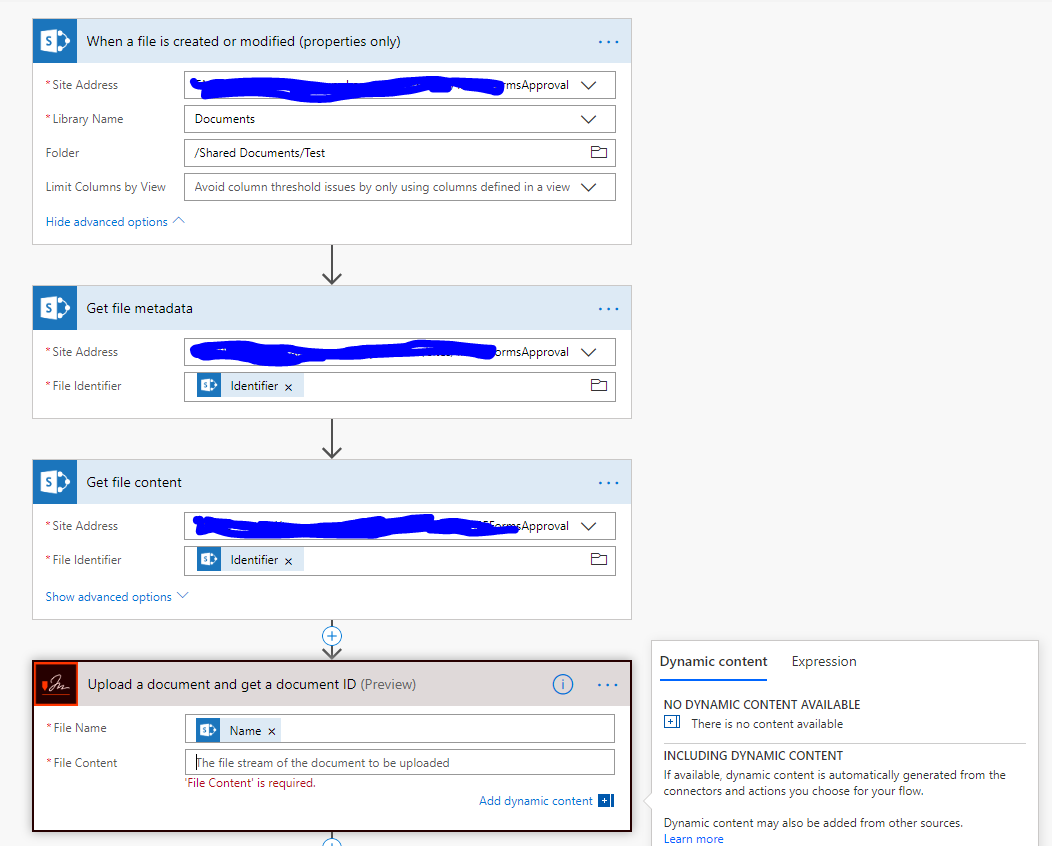


Any help would be apreciated.


Rocky

Categories:
I have the same question (0)
  • Brad_Groux Profile Picture
    4,556 on at

    I believe the action step you are missing is Get file properties before the Get file content step. 

    Gets the properties saved in the columns in the library for the item specified by the item id. You can add a "Get file content" step and use the "File identifier" property returned by this action to get to the contents of the file. When using this with the On-Premises Data Gateway, the name of the library to connect to may need to be entered manually.

    If this reply has answered your question or solved your issue, please mark this question as answered. Answered questions helps users in the future who may have the same issue or question quickly find a resolution via search. If you liked my response, please consider giving it a thumbs up. THANKS!

  • v-yamao-msft Profile Picture
    Microsoft Employee on at

    Hi @Rocky1313 ,


    Could you please just try again with it?


    I have made a similar flow for testing, the dynamic content could be selected from action Get file content.

    1.PNG


    Best regards,

    Mabel


  • Rocky1313 Profile Picture
    14 on at

    Mabel,


    I added a parallel branch right before the Adobe sign actions. The compose action is able to use "File Content" dynamic content. But the Adobe Sign "Upload Document..." action stil has no dynamic content available. 


    Not sure where to go from here. The content is avaiable in the Flow, but the Adobe action is refusing to see it.


  • v-yamao-msft Profile Picture
    Microsoft Employee on at

    Hi @Rocky1313 ,


    Thanks for updating.


    Sorry for that I don’t have account for Adobe to test this issue.


    Please try to input the following code under Expression tab of the File content field to see if it will work:

    body('Get_file_content')['$content']

    1.PNG


    Best regards,

    Mabel


Under review

Thank you for your reply! To ensure a great experience for everyone, your content is awaiting approval by our Community Managers. Please check back later.

Helpful resources

Quick Links

Introducing the 2026 Season 1 community Super Users

Congratulations to our 2026 Super Users!

Kudos to our 2025 Community Spotlight Honorees

Congratulations to our 2025 community superstars!

Leaderboard > Power Automate

#1
David_MA Profile Picture

David_MA 250 Super User 2026 Season 1

#2
Expiscornovus Profile Picture

Expiscornovus 222 Most Valuable Professional

#3
Haque Profile Picture

Haque 174

Last 30 days Overall leaderboard



