web
You’re offline. This is a read only version of the page.
close
Skip to main content

Notifications

Announcements

Community site session details

Community site session details

Session Id :
Power Platform Community / Forums / Power Automate / Add user to SharePoint...
Power Automate
Answered

Add user to SharePoint list using Send HTTP Request

(0) ShareShare
ReportReport
Posted on by 183
I am working on a flow to add users to new lists.

Long story, I have a list (A) for a user to add names using a Person column. This kick starts the workflow to use a bunch of differnet Send HTTP reuquests to sharepoint to create a new list based off a template list/remove the default Groups/Visitors memberships. 
 
I've got everything working, with the exception of adding the specifically added user to the new list with a custom permission. I was able to get the custom permission ID as well as the user ID for the SharePoint ID. But the Send HTTP request keeps failing and I'm starting to strike out on this one.
 
This is the step I'm stuck on:
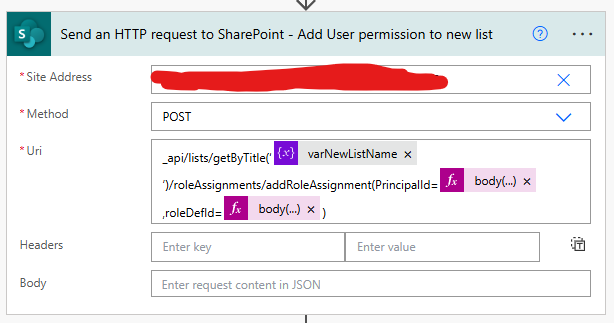
 
The PrincipalId is pulling from a Filter array on the group members of the site (which I am having a previous step add the user to the members group). and ther roleDefId is pulling the ID from the custom permission group.
Categories:
I have the same question (0)
  • DJ_Jamba Profile Picture
    2,837 Super User 2025 Season 2 on at
    Difficult to see what the error is, but first of all, if you're pulling the Id of the user from an array, you need to get the first Id from that array (even if there's only 1 record in it).

    So first try this for the PrincipalId value:
     
    first(body('NAME_OF_FILTER ARRAY_ACTION'))?['Id']
     
      
  • NathanFra Profile Picture
    183 on at
    I'm already grabing the first record from my filter
    body('Filter_array')[0]['ID']

    This is the error I am getting on the Send HTTP Request

    The expression "lists/getByTitle(‘LISTNAME’)/roleAssignments/addRoleAssignment(PrincipalId=27,roleDefId=1073741926)" is not valid.
    clientRequestId: 913f68aa-d4a1-47c2-897e-55df11046c71
    serviceRequestId: c98492a1-2059-8000-6552-9ee033068691
     
    I am getting the roleDefId via the follwoing:
     
    using the following expression to use the roleDefId:
    body('Send_an_HTTP_request_to_SharePoint_-_Get_Custom_Permission_group')?['d']?['Id']
  • Verified answer
    tom_riha Profile Picture
    10,185 Most Valuable Professional on at
    Hello @NathanFra,
     
    the closing apostrophe after the varNewListName seems wrong, it looks to me like a different character you probably copied from somewhere that could be causing the problem. Remove both the apostrophes around the varNewListName and type them in again, maybe it'll help.
     
     
    ----------------------------------------------------------------------------------
    Did the answer solve your problem? Please click "Does this answer your question" and give it a like to help others in the community find the solution too!
     
    You can find more of my solution on the blog: https://tomriha.com

Under review

Thank you for your reply! To ensure a great experience for everyone, your content is awaiting approval by our Community Managers. Please check back later.

Helpful resources

Quick Links

Forum hierarchy changes are complete!

In our never-ending quest to improve we are simplifying the forum hierarchy…

Ajay Kumar Gannamaneni – Community Spotlight

We are honored to recognize Ajay Kumar Gannamaneni as our Community Spotlight for December…

Leaderboard > Power Automate

#1
Michael E. Gernaey Profile Picture

Michael E. Gernaey 501 Super User 2025 Season 2

#2
Tomac Profile Picture

Tomac 323 Moderator

#3
abm abm Profile Picture

abm abm 237 Most Valuable Professional

Last 30 days Overall leaderboard



