web
You’re offline. This is a read only version of the page.
close
Skip to main content

Announcements

News and Announcements icon
Community site session details

Community site session details

Session Id :
Power Platform Community / Forums / Power Automate / Flow is not getting Sa...
Power Automate
Answered

Flow is not getting Saved - even though i have not made any changes to the flow

(0) ShareShare
ReportReport
Posted on by 231
Hi,
I have created a flow long time back and i am not making any changes to it. The flow uses a recorder to record some Web browser activity. It then donloads the files into desired folder on my Local PC. 
However, every time i close the Desktop flow, after running the flow following message appears:-
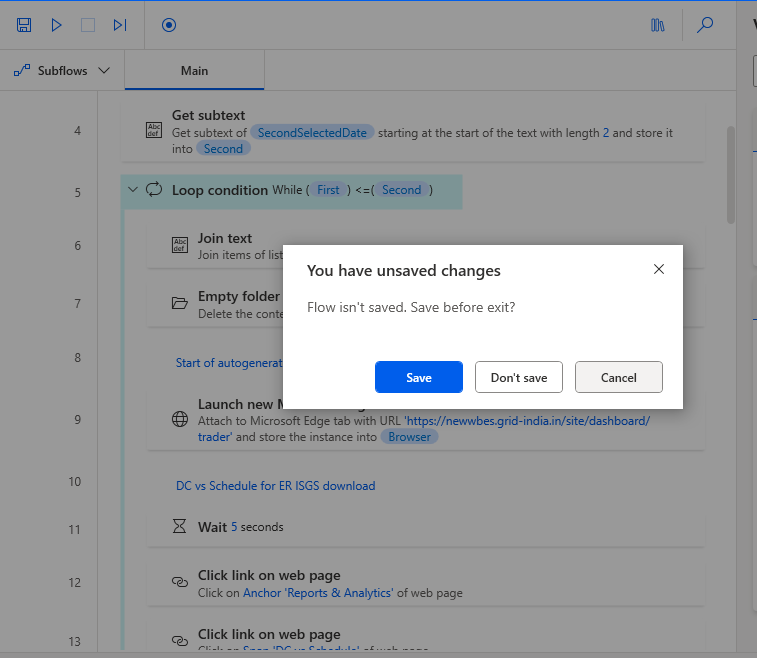
 
And even if , i don't run the flow, and just click the flow and try to get out of it , without executing flow, the same problem appears.
Please help
I have the same question (0)
  • Verified answer
    eetuRobo Profile Picture
    4,484 Super User 2026 Season 1 on at
    So even if you open the flow in edit just for a second and close it right away it asks if you want to save the changes? Thats weird. What version do you have? Can you try it with a different flow. Does it happen with other flows or just that specific one? If it doesn't happen with other flows try creating a new flow where you copy all the actions and save the flow. Then test if the same problem occurs. If that fixes it then it might be just that specific flow being somehow bugged out or something.

    If you change anything at all in the flow like change variable values (even input variables) it asks if you want to save before closing. 
    Is it this more about how inconvenient it is to always press "Don't save" or "Save" when you close the flow or does it actually affect the flow somehow?

    If you just want to run the flow and your are not debugging it then its recommended to run it without opening the flow on edit. It will be much faster too. That way you also don't accidentally change anything in the flow.
  • SA_VOH Profile Picture
    231 on at
    Thanks, i worked with your suggested solution, 1st para only and it worked.

Under review

Thank you for your reply! To ensure a great experience for everyone, your content is awaiting approval by our Community Managers. Please check back later.

Helpful resources

Quick Links

Introducing the 2026 Season 1 community Super Users

Congratulations to our 2026 Super Users!

Kudos to our 2025 Community Spotlight Honorees

Congratulations to our 2025 community superstars!

Congratulations to the March Top 10 Community Leaders!

These are the community rock stars!

Leaderboard > Power Automate

#1
Haque Profile Picture

Haque 605

#2
Valantis Profile Picture

Valantis 340

#3
11manish Profile Picture

11manish 284

Last 30 days Overall leaderboard
