web
You’re offline. This is a read only version of the page.
close
Skip to main content

Announcements

News and Announcements icon
Community site session details

Community site session details

Session Id :
Power Platform Community / Forums / Power Automate / Updating a managed met...
Power Automate
Answered

Updating a managed metadata column of a document set based on a simelar field from a list item

(1) ShareShare
ReportReport
Posted on by 25

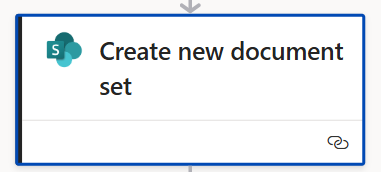
If you want to create on a uniformed way document sets based on a state in a Microsoft List, you can now use the power automate sharepoint action "Create a new document set"User's image
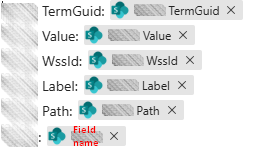
Earlier, I used "Get item" in order to obtain all dynamic data fields of a selected item. In that list is a "Brand" column which is configured as a managed metadata column linked to a tenant level term store term set. That way I can use the following dynamic data
User's image

When I use the action "Create a new document" set, i get the metadata fields of the document set. For every managed metadata field, i see the internal name of the field followed by "Value". So for the managed metadata field "Brand", i see in the power automate action "Brand Value" with a dropdown feature in which i see the terms of the connected term set. So far, so good.

Next, I take the dynamic data value from the get items action e.g. "Brand Value" and put it in the document set "Brand Value" field.

Testing it, gave in raw input the Dynamic value formatted als Label|termguid.

Nevertheless, in real result the Brand managed metadata field stayed blank.

Next, I was thinking, perhaps I must first create the document set and a little later go updating the properties. I did the same in the update action, and I get the error "Action 'Update_file_properties' failed: The data returned from the tagging UI was not formatted correctly"

Next I created a Compose action to construct something I found on the net
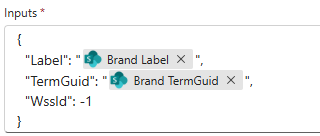
User's image

But even that, did not work.

What is wrong? How can I realize bringing over the content of a managed metadata field in a list to the same named and configured managed metadata field in a library in a document set.

Who helps me?

(I earlier posted it Updating a managed metadata column of a document set in Power Automate based on a managed metadata column value from a list item - Microsoft Q&A but was invited to post it here)

Categories:
I have the same question (0)
  • Expiscornovus Profile Picture
    33,830 Most Valuable Professional on at
     
    I have used a HTTP request with the update driveitem method for this in the past.
     
    That might be worth a try in your setup as well?
     
    Below is an example based on a blog I created a couple of years ago:
     
    The format of the MMS field (Customer) was the below. Notice that the value also ends with a semi colon character.
    "Customer": "Fabrikam Travel|2fe1fa4e-f9c5-4ea6-8d65-7d934d5ed50c;"
     
    The whole payload was the below, which included the conversion of a regular folder to a document set via the contentType property.
    {
    "fields": 
    {
    "Order_x0020_Status": "Proposed",
    "Customer": "Fabrikam Travel|2fe1fa4e-f9c5-4ea6-8d65-7d934d5ed50c;",
    "Product_x0028_s_x0029_": "SharePoint Online|7c932ee6-c55a-429b-9b06-3b72690ed3c9;"
    },
      "contentType": {
        "id": "@{variables('ContentTypeId')}"  
    }
    }


    Happy to help out 😁

    I share more #PowerAutomate and #SharePointOnline content on my Blog, LinkedIn, Bluesky profile or Youtube Channel
  • EF-27061356-0 Profile Picture
    25 on at
    Curious @Expiscornovus,
     
    In my case, I create the document set with the action "Create new document set"
    So, I'm not using the create new folder step in your example.
    But after the "create new document step", I tried to perform the Pacth method http request to sharepoint in order to update 2 fields.
    Only, i'm getting the error "Action 'Update_Brand' failed: {"odata.error":{"code":"-1, Microsoft.SharePoint.Client.ClientServiceException","message":{"lang":"en-US","value":"The request ETag value '' does not match the object's ETag value '\"7dca4a95-1ed5-41ab-8079-80dcfe5c4144,2\"'."}}} clientRequestId: 15b1005f-fa70-450f-b66b-cbfc0c164fd9 serviceRequestId: 9a81ada1-0098-d000-3575-0539e1d04c9e"
     
    Curious.
     
    Even more particular is that when I selected "hard coded" in the "Create new document set" as Brand Value "Private label", after being run, in the run results input I can read "
    "parameters/DynamicProperties/Brand/Value""Private label|a18dd916-b254-46ce-bf6a-5b05e22d0929"
    "
    Nevertheless, in the created document set is the Brand field still empty.
     
    Very particular.
  • Expiscornovus Profile Picture
    33,830 Most Valuable Professional on at
     
    The method I suggested doesn't work together with the getbytitle method. It retrieves the list by using the site and list ids instead.
     
    If you want to keep using your own approach it might be easier to use the validateUpdateListItem method instead.
     
    Below is an example of that approach adapted to your setup.
     
    Url example
    _api/web/lists/getbytitle('Orders')/items(@{outputs('Create_new_document_set')?['body/ID']})/validateUpdateListItem
    Body payload example
     
    {
    "formValues": [ 
      { 
        "FieldName": "Customer", 
        "FieldValue": "Fabrikam Travel|2fe1fa4e-f9c5-4ea6-8d65-7d934d5ed50c"
    } 
    ],
    "bNewDocumentUpdate": false
    }


    Happy to help out 😁

    I share more #PowerAutomate and #SharePointOnline content on my Blog, LinkedIn, Bluesky profile or Youtube Channel
  • Verified answer
    EF-27061356-0 Profile Picture
    25 on at
     
    Thank you very much for your answer.  That's indeed the way I could make it work yesterday.
     
    It makes it more simple, I experienced.
    It all came down to 2 actions:
    • Create new document set, which make it really easy to create the document set and to pass 'normal' types of metadata fields (if I may express myself that way), followed by
    • send http request to Sharepoint - Method POST - endpoint ValidateUpdateListItem
     
    That's the way, I could make it work fluently.
    Thanks for your help @Expiscornovus

Under review

Thank you for your reply! To ensure a great experience for everyone, your content is awaiting approval by our Community Managers. Please check back later.

Helpful resources

Quick Links

Introducing the 2026 Season 1 community Super Users

Congratulations to our 2026 Super Users!

Kudos to our 2025 Community Spotlight Honorees

Congratulations to our 2025 community superstars!

Congratulations to the March Top 10 Community Leaders!

These are the community rock stars!

Leaderboard > Power Automate

#1
Haque Profile Picture

Haque 592

#2
Valantis Profile Picture

Valantis 340

#3
11manish Profile Picture

11manish 284

Last 30 days Overall leaderboard
