web
You’re offline. This is a read only version of the page.
close
Skip to main content

Notifications

Announcements

Community site session details

Community site session details

Session Id :
Power Platform Community / Forums / Power Automate / Expand Query 'List_Row...
Power Automate
Unanswered

Expand Query 'List_Rows_from_Environment' failed: Could not find a property 'admin_environment'

(0) ShareShare
ReportReport
Posted on by 696
Greetings Braintrust.

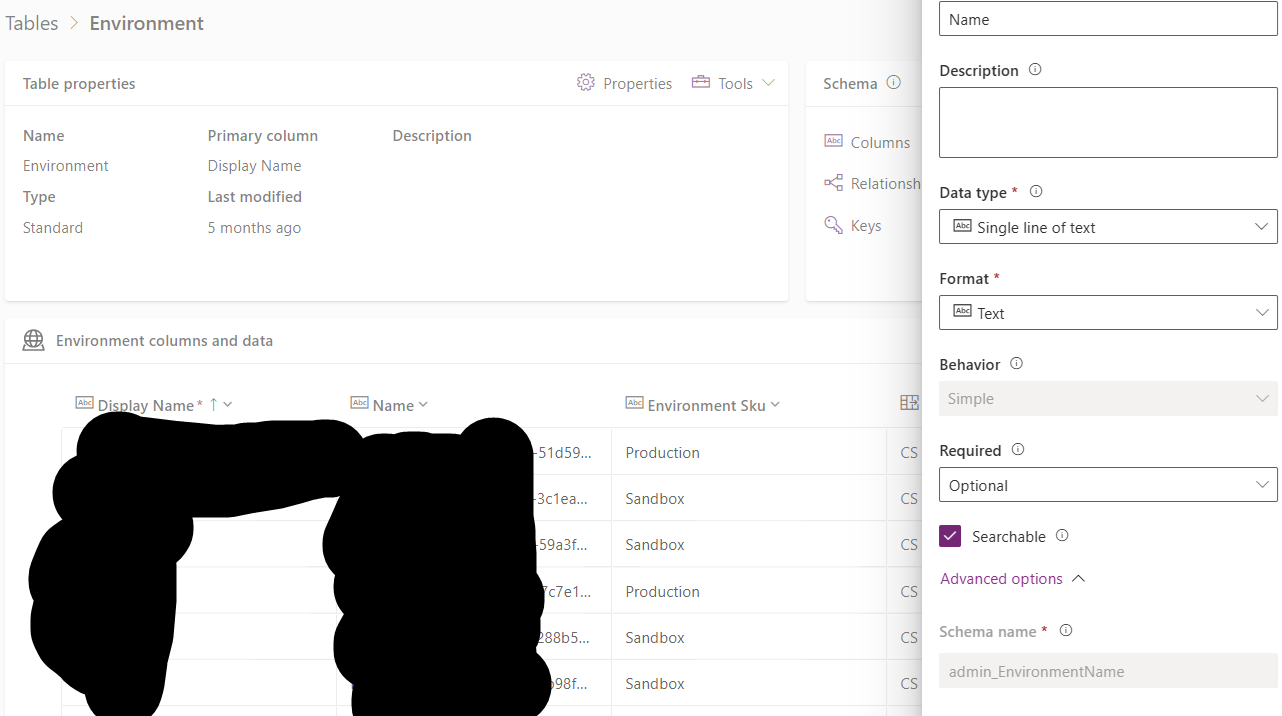
I have the Centre of Excellence installed in its own Environment, inside it contains a table named 'Environment_Capacity' which lists log file, database, and file storage amounts. Additionally, it contains a lookup column named Environment (Logical admin_environment). This uses the Admin_Environment table, which has the admin_Environmentname (this is the GUID for the Environment) and admin_Displayname (the actual display name for the environment.
 
I have a list rows from Environment action as below:
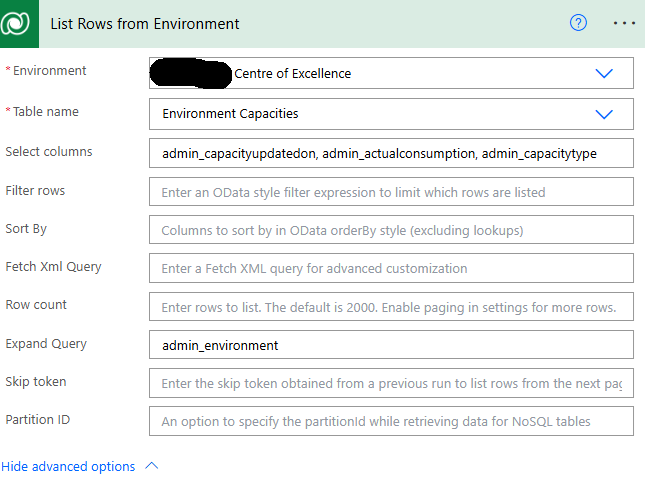
 
I get the below error based on the above 'Expand Query'
 
Action 'List_Rows_from_Environment' failed: Could not find a property named 'admin_environment' on type 'Microsoft.Dynamics.CRM.admin_environmentcapacity'.

Removing the expand query all together, and adding 'admin_environment' into the select column results in
Could not find a property named 'admin_environment' on type 'Microsoft.Dynamics.CRM.admin_environmentcapacity'.


I've tried all sorts of formatting in the Expand Query: (while not having the 'admin_environment' in the Select column.
Tried, pasting directly into the expand query field
Tried using expression, I get teh expression is incorrect. But CoPilot is now pushing me around in circles.

admin_environment($select=admin_displayname),admin_environmentname (Could not find a property named 'admin_environment' on type 'Microsoft.Dynamics.CRM.admin_environmentcapacity'.)
admin_environment(admin_displayname,admin_environmentname)

What formatting should I be using? Everything I tried fails.

Tables below to confirm names


Thank you
RD
Categories:
I have the same question (0)
  • Verified answer
    Nived_Nambiar Profile Picture
    18,129 Super User 2025 Season 2 on at
    Hi,
     
    Did you confirm whether there is a property named admin_environment (i meant related tables property) ?
     
    Just make the expand query blank and other optional fields and get a full default output, see whether there is a property admin_environment.
     

    Thanks & Regards,
    Nived N

    Stay connected:
    LinkedIn | YouTube | Blogs

    Was this answer helpful?
    If yes, please mark it as the solution by selecting the checkbox in the discussion thread.
    Your feedback motivates me to keep contributing. Thank you!

  • RandomDept Profile Picture
    696 on at
    Thank you @Nived_Nambiar
     
    Should have realised that from the start. Apparrently, admin_Environment is actually called _admin_environment_value, so that goes in the Select field.
     

    Then I got the below working in the Expand
    admin_Environment($select=admin_displayname)
     
    Naming seems a bit inconsistent in the COE app :)

Under review

Thank you for your reply! To ensure a great experience for everyone, your content is awaiting approval by our Community Managers. Please check back later.

Helpful resources

Quick Links

Forum hierarchy changes are complete!

In our never-ending quest to improve we are simplifying the forum hierarchy…

Ajay Kumar Gannamaneni – Community Spotlight

We are honored to recognize Ajay Kumar Gannamaneni as our Community Spotlight for December…

Leaderboard > Power Automate

#1
Michael E. Gernaey Profile Picture

Michael E. Gernaey 522 Super User 2025 Season 2

#2
Tomac Profile Picture

Tomac 364 Moderator

#3
abm abm Profile Picture

abm abm 243 Most Valuable Professional

Last 30 days Overall leaderboard