web
You’re offline. This is a read only version of the page.
close
Skip to main content

Announcements

News and Announcements icon
Community site session details

Community site session details

Session Id :
Power Platform Community / Forums / Power Automate / Populate List A with C...
Power Automate
Suggested Answer

Populate List A with Content from List B

(0) ShareShare
ReportReport
Posted on by 8
Hello, 
 
I have a SharePoint List A with a 4-character property code "Park" and another column with a lookup value, also single line of text for "Full Park Name".
I have a SharePoint List B with an "Abbrv" (which is 'field_1') column--containing the 4-character property codes--AND a Full Park Name Column.
I'd like to populate the List A Full Park Name column with the corresponding value from the lookup table based on the content of List A Park Column and List B's correlating Park Column. 
 
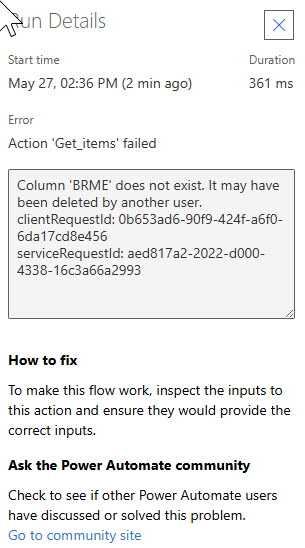
My flow keeps failing and I think it's because of the OData query. See attached screen captures of the flow. The failure message indicates that a "Column" does not exist. But really, the column is just a single 4-character code out of a few hundred in the list (see attached Failure Message) Does anyone see the issue here? 
 
Many thanks,
 
-rbd
 
 
Screencap2.jpg
Screencap1.jpg
FailureMessage.jpg

Your file is currently under scan for potential threats. Please wait while we review it for any viruses or malicious content.

Categories:
I have the same question (0)
  • Suggested answer
    Vish WR Profile Picture
    3,441 on at
     
    We can't see the screenshot as it's still scanning. You can upload the image using image upload instead of attachment 

    Regarding your issue 

    The "Column does not exist" error in your OData filter is almost always caused by using the display name of the column instead of its internal name — SharePoint uses different names for these behind the scenes.

    Quick fix — find the correct internal name: Go to List B → List Settings → click the column → check the URL and look for the value after Field=  , That's the name you need to use in your OData filter, not what you see on screen.

    Also, watch out for spaces — if your column name has spaces, replace them with _x0020_ in the OData filter. For example Full Park Name becomes Full_x0020_Park_x0020_Name.

    Once you have the correct internal name, your filter should look like:

    field_1 eq '@{items('Apply_to_each')?['Park']}'


    Vishnu WR
     
    Please âœ… Does this answer your question if my post helped you solve your issue. This will help others find it more readily. It also closes the item. If the content was useful in other ways, please consider answering Yes to Was this reply helpful? or give it a Like â™¥


  • RB-27052122-0 Profile Picture
    8 on at
    Thanks for taking a look, @Vish WR. I edited to embed the screencaptures directly. I checked the internal names for the columns. The Column A 4 Character park abbreviation is 'Park' and the List B corresponding column is 'field_1'. The List B column with the full park name that I want to insert is 'field_15'.
     
    The OData syntax you provided throws an error because there is no "for each" loop let. I think you can see this in me screencaps. If you have any additional pointers as to how this is set up incorrectly, I'd appreciate it. Thanks,
     
    -rbd
  • David_MA Profile Picture
    14,695 Super User 2026 Season 1 on at
    If field_1 is the correct internal name of the field, then you need to wrap the dynamic value of Park in single quotes as @Vish WR shows in his post. Without the single quotes, the filter query treats it as a numeric value.
     
    I assume the image you attached to your post with the error message BRME does not exist was a mistake, or you figured out that you needed to use the internal name and updated the filter query with field_1? If not, please explain the relevance of the error with BRME as I don't see how it is relevant to the problem.
  • RB-27052122-0 Profile Picture
    8 on at
    So, my two lists are as follows:
     
    List A has 'Park' column populated with character codes. I want to populate the "FullParkName" (internal column name = "FullParkName") from List B according to the 4-character code for each item in List A. I'm not including a screencap of this because I have used JSon formatting to hide the 4-character code in the 'Park' column and display a shortened park name. FullParkName column is currently blank. 
     
    List B has "Abbrv" column with 4-character codes (internal name = 'field_1') and the LABEL_LOCAL (internal name ' 'field_15') column with the full park names that I want to autopopulate List A with.
     
  • RB-27052122-0 Profile Picture
    8 on at
     
    BRME is one of the 4 character codes contained in both lists. It is the 4-character code in the 'Park' column of the most recent List A item, so I think the flow read that value, as it should have, but then didn't find the corresponding list or value? I'm not sure how it relates either. 
  • Vish WR Profile Picture
    3,441 on at
     
    Wanted to check if you are able to resolve your problem? Let me know if you need any clarification 
     
     
    When replying, please don't forget to mention my userid so that it will be notified 
     
    Vishnu WR
     
    Please âœ… Does this answer your question if my post helped you solve your issue. This will help others find it more readily. It also closes the item. If the content was useful in other ways, please consider answering Yes to Was this reply helpful? or give it a Like â™¥
  • RB-27052122-0 Profile Picture
    8 on at
    Hi @Vish WR I have not been able to resolve the issue. I verified that 'field_1' and 'Parks' are the correct internal names of the fields. However, the flow is not within a "for each" loop at that point in the flow so the OData filter you provided does not work. I will be spending more time on this today to try to troubleshoot further. 

Under review

Thank you for your reply! To ensure a great experience for everyone, your content is awaiting approval by our Community Managers. Please check back later.

Helpful resources

Quick Links

Introducing the 2026 Season 1 community Super Users

Congratulations to our 2026 Super Users!

Kudos to our 2025 Community Spotlight Honorees

Congratulations to our 2025 community superstars!

Congratulations to the April Top 10 Community Leaders!

These are the community rock stars!

Leaderboard > Power Automate

#1
Vish WR Profile Picture

Vish WR 464

#2
Haque Profile Picture

Haque 431

#3
David_MA Profile Picture

David_MA 323 Super User 2026 Season 1

Last 30 days Overall leaderboard



