Hi all,
Am relatively new to Power Automate and request for assistance.
I created a flow triggered from my PowerApps button to generate a excel file based on the filtered options. As the Flow admin/creator, the flow works great.
However, all other users accessing the PowerApp get an error when they try generating an excel file.
When I check, the source of the error is at the "Create table for Excel Online" action.
this is error response from Copilot:
"The error indicates that the 'Create table' action failed with a 404 status, meaning the resource could not be found. This is likely caused by an incorrect reference to the file ID in the 'Create table' action, as the file may not have been created successfully, or the ID is not being retrieved correctly".
The "Create file" action creates a blank excel file in the user's OneDrive location but the "Create table " fails to locate the created file.
I have added a delay between the Create file and Create Table actions, but the same error shows up for the other users. I have also shared the flow with the users and set the Connections to "provided by run-only user" but still the flow gets an error at the same stage.
I request help to figure out why it works for only me the admin and possible solutions for other users to run the flow successfully.
Thank you in advance.
This is the flow run.
Parameters for the Create file to OneDrive action and Create table for Excel Online

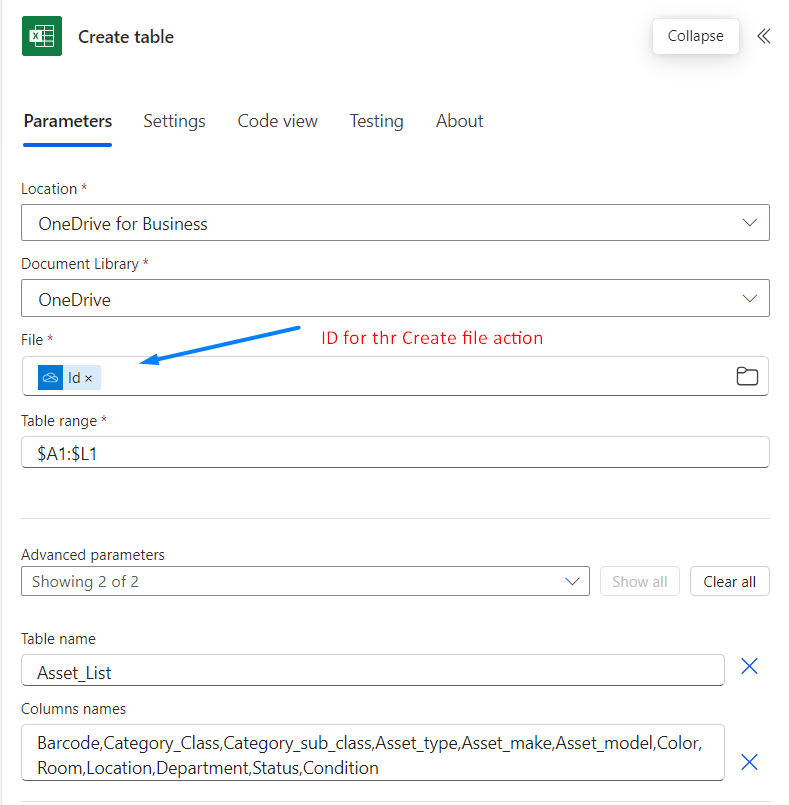
Below are the errors other users running the flow get.
Body Output for the Create file action that was successful.
body": {
"Id": "b!7Wkj7j1TtUKN8yMub2t4w5eSJiV8ZGRPsViZrR1MsI4YVhzOkvhMSrcB4TUUpOB_.01RONDQU2XBFVSUBEEGREJV4LNBMYJ2PJW",
"Name": "AssetList_2025-01-08T06_28_41.1433642Z.xlsx",
"NameNoExt": "AssetList_2025-01-08T06_28_41.1433642Z",
"DisplayName": "AssetList_2025-01-08T06_28_41.1433642Z.xlsx",
"Path": "/ExcelExport/AssetList_2025-01-08T06_28_41.1433642Z.xlsx",
"LastModified": "2025-01-08T06:28:42Z",
"Size": 1,
"MediaType": "application/vnd.openxmlformats-officedocument.spreadsheetml.sheet",
"IsFolder": false,
"ETag": "\"{2A6B0957-8404-4834-9AF1-6D0B309D3D36},1\"",
"FileLocator": "b!7Wkj7j1TtUKN8yMub2t4w5eSJiV8ZGRPsViZrR1MsI4YVhzOkvhMSrcB4TUUpOB_.01RONDQU2XBFVSUBEEGREJV4LNBMYJ2PJW",
"LastModifiedBy": ""
}
this is the Error output for the "Create file " action
the Raw Inputs
{
"host": {
"connectionReferenceName": "shared_excelonlinebusiness",
"operationId": "CreateTable"
},
"parameters": {
"source": "me",
"drive": "b!entFK8dru0OomBeYEWzVeZ0eJOsdPhVNigSMFtEZbpSTTiX_c14uRZ0OQMIT4rf-",
"file": "b!7Wkj7j1TtUKN8yMub2t4w5eSJiV8ZGRPsViZrR1MsI4YVhzOkvhMSrcB4TUUpOB_.01RONDQU2XBFVSUBEEGREJV4LNBMYJ2PJW",
"table/Range": "$A1:$L1",
"table/TableName": "Asset_List",
"table/ColumnsNames": "Barcode,Category_Class,Category_sub_class,Asset_type,Asset_make,Asset_model,Color,Room,Location,Department,Status,Condition"
}
}
the Raw Output (Body)for the Create table
"body": {
"status": 404,
"message": "The resource could not be found.\r\nclientRequestId: 7cd33dcb-464b-42bb-bdf7-d47f2395988d\r\nserviceRequestId: 2895d459-4dcc-4a99-803a-5524371e2637",
"error": {
"message": "The resource could not be found."
},
"source": "excelonline-we.azconn-we-002.p.azurewebsites.net"
}
}







