

web
You’re offline. This is a read only version of the page.
close
Skip to main content

Announcements

News and Announcements icon
Community site session details

Community site session details

Session Id :
Power Platform Community / Forums / Power Automate / Auto Transfer from one...
Power Automate
Suggested Answer

Auto Transfer from one List to another - Duplications

(0) ShareShare
ReportReport
Posted on by
Hello!
 
I'm in need of desperate help!
 
I have a Power Automate flow that transfers a whole row from one list (the parent list) to another (the child list) - this is done by a manual trigger by entering an acronym into a column. However, whenever this flow is tiggered, instead of transferring the row just once, it duplicates the rows so there are multiple rows of the exact same item by separating the people tagged within the child list - screenshot below:


I need the row from the parent list, once triggered, to transfer over exactly without any duplications or separations. Please help!
 
 
This is the PowerAuto flow:
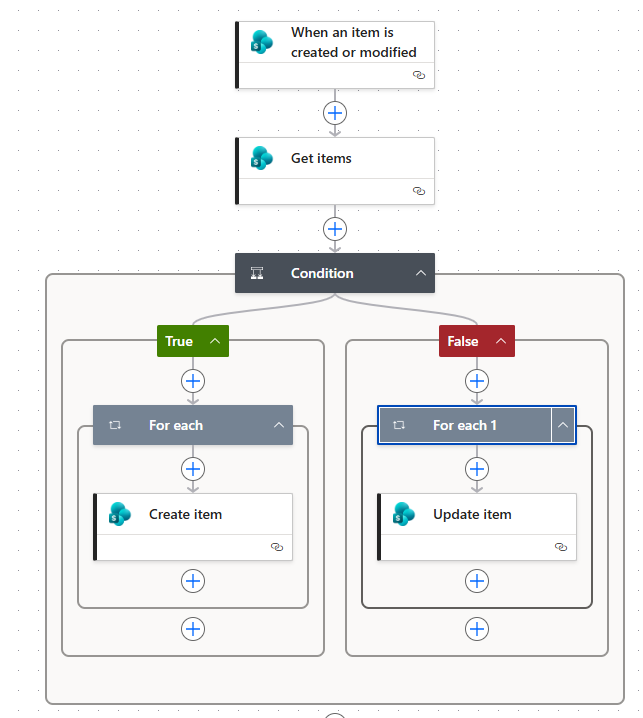
 
The parent list:
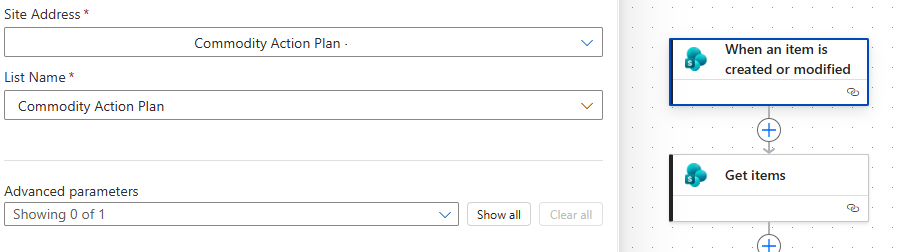
**********************************************************************************
Getting items from parent list with trigger "CI" in column "SGP_Plan"
 
**********************************************************************************
Condition (after many attempts this was the condition that worked)
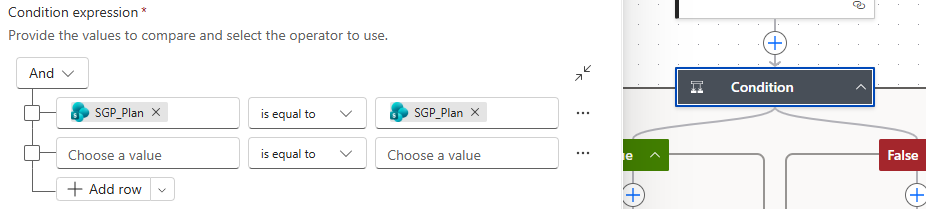
**********************************************************************************
 
For Each (the only selection allowed that worked):

Child List - with 'advanced parameters' matching up with columns from both lists:


Thank you so much!
 
 
Screenshot 2026-0...

Your file is currently under scan for potential threats. Please wait while we review it for any viruses or malicious content.

Categories:
I have the same question (0)
  • Suggested answer
    Vish WR Profile Picture
    2,534 on at


    The duplication will occur if the Person column is multi-select. The column is being treated as a list. Power Automate automatically creates a loop and inserts one row per person, rather than keeping them in a single item.

    You need to stop the implicit loop:

    1. In your flow, find the Person/Action Owner field
    2. Before “Create item”, add a Join action
      • Input: your multi-person field
      • Separator: ; (or ,)
    3. Use the output of Join in the SharePoint/child list column instead of the original field

    Result

    • No “Apply to each” loop
    • One record created
    • All people stored in a single field as text
    Vishnu WR
     
    Please  Does this answer your question if my post helped you solve your issue. This will help others find it more readily. It also closes the item. If the content was useful in other ways, please consider answering Yes to Was this reply helpful? or give it a Like 


Under review

Thank you for your reply! To ensure a great experience for everyone, your content is awaiting approval by our Community Managers. Please check back later.

Helpful resources

Quick Links

Introducing the 2026 Season 1 community Super Users

Congratulations to our 2026 Super Users!

Kudos to our 2025 Community Spotlight Honorees

Congratulations to our 2025 community superstars!

Congratulations to the April Top 10 Community Leaders!

These are the community rock stars!

Leaderboard > Power Automate

#1
Vish WR Profile Picture

Vish WR 922

#2
Valantis Profile Picture

Valantis 837

#3
Haque Profile Picture

Haque 534

Last 30 days Overall leaderboard


