Hey all,
I'm having a bit of trouble I'm hoping I can get help with. I designed a form that has multiple questions that require a file upload, but the form is split into different sections depending on the response so there will only ever be 1 attachment at the end of the form, which will be added to an email. The form is split with a Switch control based on if its a billing or policy submission.
I created an array of the questions and their responses with an identifier of "Error" for question Type [ErrorQuestions]. I then filtered that array to only return an output for a question that has a response that is not empty [errorAnswer].
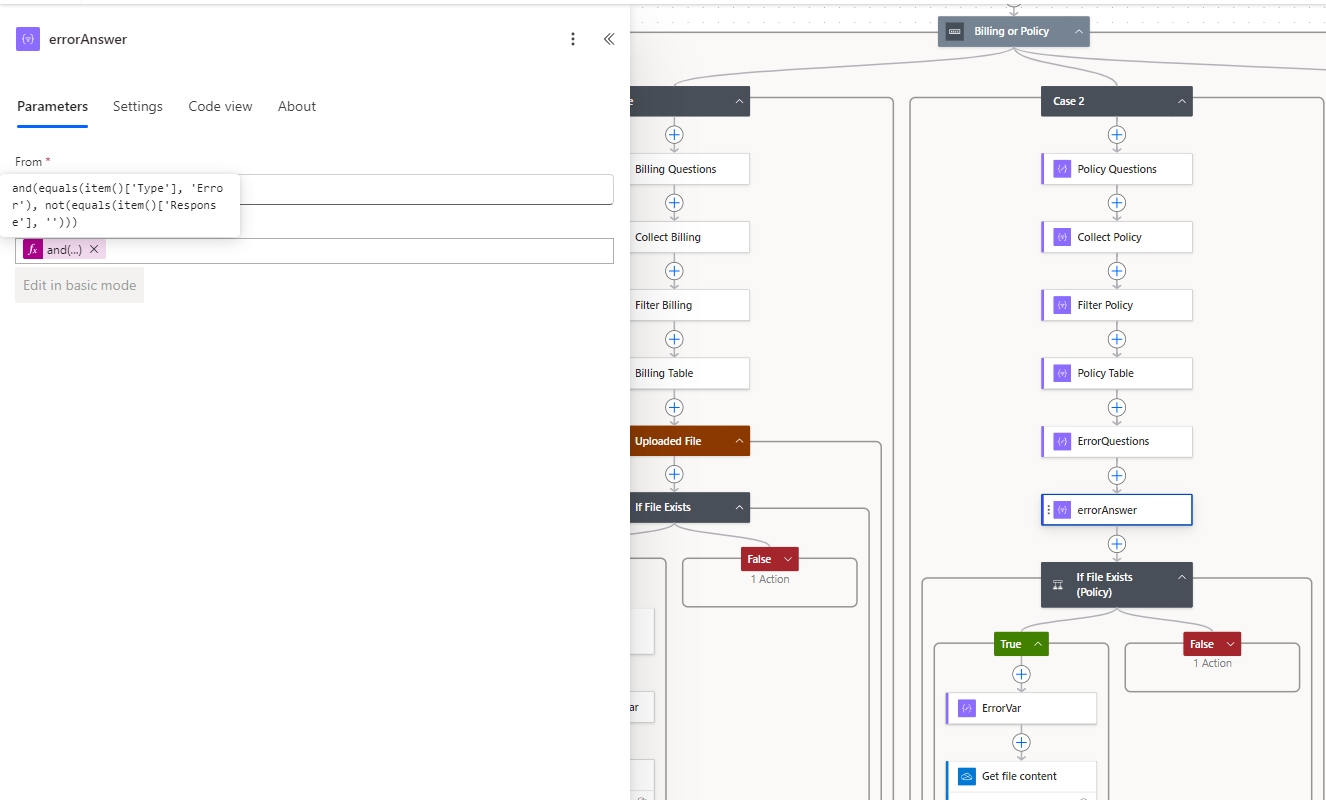
'
The result is this string (link is modified):
[{"name":"test_image.png","link":"PLACEHOLDER LINK","id":"01JGAH2FHXN25QPIYUBFEZQOJSAPDV7YPI","type":null,"size":9919,"referenceId":"01JGAH2FGTHNAIDTYW65BKDEJPK2EJYQ3L","driveId":"b!eYctZotxzUqc0IdvkhG8NJpC5q8pw2tGkIoxi8TUn9B42aNG2ACkRJ0t_3XDmfJl","status":1,"uploadSessionUrl":null}]
"If File Exists" checks ErrorQuestions is not blank. If true, then it will move down a path to collect the content data and add an attachment to the email. If False, the email is sent with questions that have no attachment.
The problem I'm having is getting the Compose action ErrorVal to parse errorAnswer's output to get the id or the name. I've tried so many different ways, but I always encounter an error where either the output is empty or there is some syntax error where there's an invalid parameter or an unexpected value given. It's like that output is not recognized as an array where I can use a command like outputs('ErrorAnswer')?[id] or some variation of that to go to the property position.
When I tried using a Parse JSON on ErrorQuestions, I always get a validation error when running the workflow. This is the schema I used:
{
"type": "array",
"items": {
"type": "object",
"properties": {
"name": {
"type":
"string"
},
"link": {
"type":
"string"
},
"id": {
"type":
"string"
},
"type": {},
"size": {
"type":
"integer"
},
"referenceId": {
"type":
"string"
},
"driveId": {
"type":
"string"
},
"status": {
"type":
"integer"
},
"uploadSessionUrl": {}
},
"required": [
"name",
"link",
"id",
"type",
"size",
"referenceid",
"driveId",
"status",
"uploadSessionUrl"
]
}
}
Is there some operation that will work to properly parse the output to get the name or ID, or a suggested better workflow? Thanks for any help you can provide!
P.S. I've tried using some "apply to each" loops to go through this and they somewhat worked, but it would then send emails for each iteration and not just the one that contained the attachment. couldn't figure out the conditions to limit that... but the attachments still didn't get picked up.










 Share
Share Report
 All responses (
 Answers (
 12,059







