web
You’re offline. This is a read only version of the page.
close
Skip to main content

Announcements

News and Announcements icon
Community site session details

Community site session details

Session Id :
Power Platform Community / Forums / Power Automate / "Invalid property" whe...
Power Automate
Answered

"Invalid property" when trying to add customSecurityAttribute

(0) ShareShare
ReportReport
Posted on by 4
Hi there,
I'm hoping I'm not the only one with this issue, or at least someone would help me with solving it.
I'm trying to build flow where we would push data from Atlassian to Entra ID with Power Automation. Specifically we're trying to create user with values given from Atlassian's forms. So far everything's working as expected, but we've hit the wall when we're trying to add customSecurityAttributes to user's profile. I always get error "Invalid property 'IsManager'." I'm adding screenshot how everything's currently looking. I've checked all permissions for app, Custom security attribute setup (naming, type of attributes, etc.). Basically I've looked and tried everything in my power, with ant without Copilot's help. Hoping there's someone that knows how to fix this.
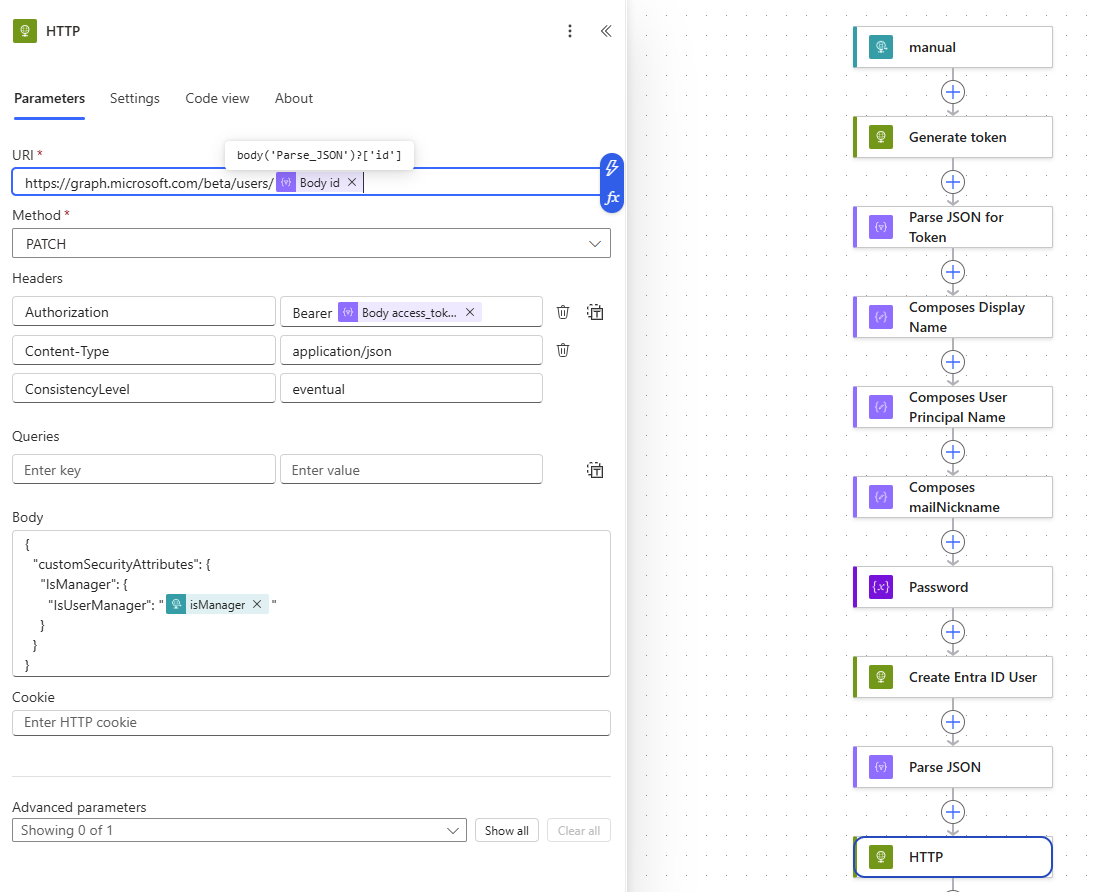
Screenshot 2026-08-03 155916.png
Categories:
I have the same question (0)
  • Verified answer
    Ellis Karim Profile Picture
    12,232 Super User 2026 Season 1 on at
     
    The following extract is from an old flow I have, when Custom security attributes were still in preview:


    {
      "customSecurityAttributes": {
        "ServicePrincipal":
         { "@odata.type": "#Microsoft.DirectoryServices.CustomSecurityAttributeValue",
          "AccountType": "Contractor"
        }
      }
    }


    Ellis Karim
    Ellis Karim
    elliskarim.com  |  LinkedIn  |  Bluesky
    If this solved your issue, please mark it as ✅ Accepted Answer. If it helped, feel free to give it a 🩷 Like!
  • ET-03081251-0 Profile Picture
    4 on at
    Wow, this worked like a charm! Thanks Ellis!

Under review

Thank you for your reply! To ensure a great experience for everyone, your content is awaiting approval by our Community Managers. Please check back later.

Helpful resources

Quick Links

Season of Sharing Community Challenge Winners!

Congratulations to our community stars!

Kudos to our 2025 Community Spotlight Honorees

Expanding mentorship, skilling, and AI innovation

Congratulations to the June Top 10 Community Leaders!

These are the community rock stars!

Leaderboard > Power Automate

#1
David_MA Profile Picture

David_MA 276 Super User 2026 Season 1

#2
11manish Profile Picture

11manish 152

#3
Haque Profile Picture

Haque 123

Last 30 days Overall leaderboard
