NOTE: This is a lot. Go slow, its an educational process as well. Just do it exactly how it says following each picture :-) as your flow is actually VERY small but the steps are a lot.
We are always happy to help, but please do us a solid, and when you say you tried stuff, share it. We don't have time to write everyone's entire flows for them (as we are not consultants) but we are super happy to help educate and help :-).
Yours is simple because you only have 2 actions NOT including the Trigger.
Things to do
Create an Automated flow
1.
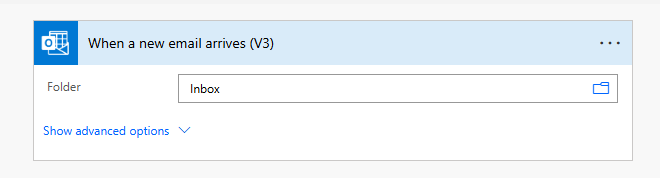
Select the When a new email arrives V3 as your Trigger
2.
Scenario 1: You create a Trigger Condition, so that this flow ONLY runs, when an email comes in when you are Closed.
Scenario 2: You trigger all the time, but you have a Condition Action that checks if you are open or not and you email a custom message
So which one do you do? for now, I would suggest doing #2 just in this instance as you are new and I'd like you to learn from this also and you can study up on "Trigger Conditions" just by searching for that.
Ok Step 3.
Add a Condition Action.
Condition actions allow you to build up complex... Boolean checks. In your case, you want to know if the Email came within your Closed Hours. which means we need to write a Condition set, that will either go to Yes (we were closed) or No (we were open)
If Yes, then send custom message
If No, do nothing, let the engineers handle the responses.
You Said
Work Week After Hours for Standby Personal
From Monday 5:30PM to Tuesday 7:00AM
From Tuesday 5:30PM to Wednesday 7:00AM
From Wednesday 5:30PM to Thursday 7:00AM
3 Day Weekend for Standby Personal
From Thursday 5:30PM to Monday 7:00AM
This adds a little bit of a rub, because essentially you do not have a gauranteed time, because it could be a holiday and maybe it's not a 3-day weekend for 4, or you are shut down for 5 days, who knows really.
But unfortunately, I cannot write all of that for you so I am going to help you get through your standard time
So we have 2 questions we need to answer
1) is it Monday, Tuesday or Wednesday
2) is it between 530-7AM
Luckily, Conditions allow us to "group" things together. Think of it like an "and" situation
if its (M/t/w) AND (asdy) then Yes.
Steps to do
1. Click Add and click Add Group - this is so we can decide what day it is
When you first add a Group, it only has 1 row, so you will need to click the + Add INSIDE the group to add 2 more lines
I want all 3 lines to have the expression dayOfWeek(utcNow())
leave the middle to be is equal too
It returns back an integer value to tell you want day, so my final one looks like this
So let me just explain one thing. You see the And with the chevron at the top its outside the Group. that is because its the Outer "And" in case you want to do multiple groups or a group and a single line.
Which we do!!!
We have the Day of week group and we need the Time check Group.
So I want you to click the + Add at the bottom (not inside the group) and add another group
So it looks like this
Now here is where I want you to try to so some yourself.
in the bottom section you only care about checking the Time. But utcNow() shows the entire Date/Time
to convert its value to ONLY the time
And on the Right side, you have your greater than or equal to 5:30 PM
And on the right side, you have your less than or equal to 7:00 AM
I want you to just read how to customize the values to give you the Hour/Minutes only
Then in the YES side of your Condition you send your customized email letting them know you are closed.
Its truly that simple but I just want to see f you can try to complete the rest.
If you get stuck please come back
If this helps resolve your issue please Mark as such as I appreciate it.







