web
You’re offline. This is a read only version of the page.
close
Skip to main content

Notifications

Announcements

Community site session details

Community site session details

Session Id :
Power Platform Community / Forums / Power Automate / Dynamically Embedding ...
Power Automate
Unanswered

Dynamically Embedding Images into Html PDF File

(1) ShareShare
ReportReport
Posted on by 5,325 Super User 2025 Season 2
I have been charged with deconstructing and adapting another's flow on a project for-which they are no longer assigned.

The flow gets data from SharePoint Lists and Libraries, and through the use of appropriate html and pdf actions, creates
and emails a PDF file to predetermined individuals.

I've gotten most of it to work, but I'm having issue understanding how to incorporate the images files into the html prior
to the html be converted into PDF.


Here is the top of the PDF (there was a header image that I wiped for this exercise).


The report has six sections - Administrative, Maintenance, Landscaping, etc. Each section may have up to three images, or no
images at all.

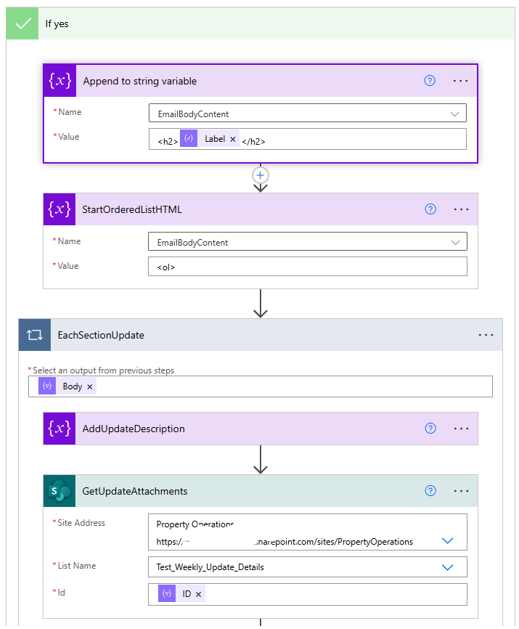
Here are the pieces of the flow where I believe I need to complete my work.
Categories:
I have the same question (0)
  • Michael E. Gernaey Profile Picture
    53,452 Super User 2025 Season 2 on at
     
    Can you share what your dataUri is?
     
    Also, have you tried this and had a specific issue?
     
    have you instead tried using base64? Just trying to level set what is the issue you are having.
     
    also can you share whatever action you are using to create the PDF please.
  • Phineas Profile Picture
    5,325 Super User 2025 Season 2 on at

    Can you share what your dataUri is?

    The 'Test_Weekly_Update_Details' is a list where the data is stored.

    The images are in 'Test_Weekly_Report_Images' library, in the Get file properties action above it.
     
    dataUri(outputs('GetUpdateAttachments')?['body'])

     
    Also, have you tried this and had a specific issue?

    Yes, it fails here...


    Have you instead tried using base64? Just trying to level set what is the issue you are having.

    I haven't tried anything else as yet. Trying to work with and adapt a flow that was already built by another.
     
    Also, can you share whatever action you are using to create the PDF please.

    The Convert/Create PDF portion is working fine. The flow creates a PDF, emails it to stakeholders and saves a copy to SharePoint. My issue is getting the images to show in said PDF.

Under review

Thank you for your reply! To ensure a great experience for everyone, your content is awaiting approval by our Community Managers. Please check back later.

Helpful resources

Quick Links

Forum hierarchy changes are complete!

In our never-ending quest to improve we are simplifying the forum hierarchy…

Ajay Kumar Gannamaneni – Community Spotlight

We are honored to recognize Ajay Kumar Gannamaneni as our Community Spotlight for December…

Leaderboard > Power Automate

#1
Michael E. Gernaey Profile Picture

Michael E. Gernaey 525 Super User 2025 Season 2

#2
Tomac Profile Picture

Tomac 324 Moderator

#3
abm abm Profile Picture

abm abm 232 Most Valuable Professional

Last 30 days Overall leaderboard



