Let's see what you need, what you did and what could be done:
You have mentioned the list group members is a multiselect person or grouip colum - so logically it should returns a table of user records - not a singgle record.
User().Email in Filter(Groups,Split('Group Name',"-")=ThisItem.Location.Value,'Group Members'.Email)
Our target is to check if the current user is in the multi-selet column, so we need to check if the eamil (current user email) exists in the table of eamils, not on a single record of email.
Did you check what this expression Split('Group Name',"-") returns? I geuss it returns a table, and if it returns a table, we cannot directly compare it to string wiht equal sign (=). [User().Email in Filter(Groups,Split('Group Name',"-")=ThisItem.Location.Value,'Group Members'.Email)]
Oner more thing - based on the requirement, we need to extract the part before the hyphen from 'Group Name' and compare it to ThisItem.Location.Value.
Let's solve last thing first:
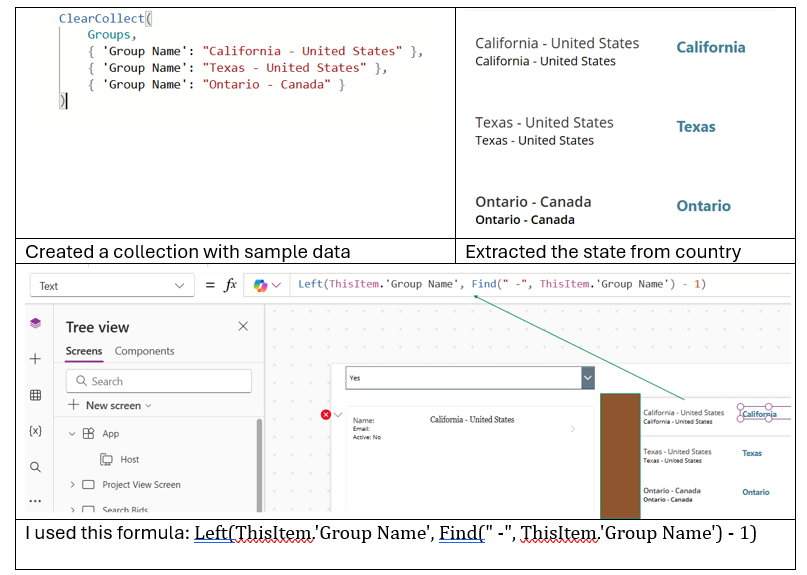
"My location is named as "California - United States" in Groups list whereas i need only California." - your one problem solved.
Let's make sure submit button becomes visible if we find at least one match with the given user. Let's rewrite your expression like below:
CountRows(
    Filter(
        Groups,
        Left('Group Name', Find(" -", 'Group Name') - 1) = ThisItem.Location.Value &&
        User().Email in 'Group Members'.Email
    )
) > 0

//If  CountRows(...) > 0 returns true, means we found at least one match, then show the button.
Filter returns groups by matching the location (ThisItem.Location.Value).
Left and Find extracts state name from the combined group [Left('Group Name', Find(" -", 'Group Name') - 1)], as I explained figuratively.
Then we check if the current user's email is in the 'Group Members' emails [User().Email in 'Group Members'.Email].
Finally, CountRows returns true if user is a member of at least one matched gropu - show the button.
I am sure some clues I tried to give. If these clues help to resolve the issue brought you by here, please don't forget to check the box Does this answer your question? At the same time, I am pretty sure you have liked the response!


