Hello everyone,
I’m using the DeepL API inside a Power Automate flow, and technically everything works as intended:
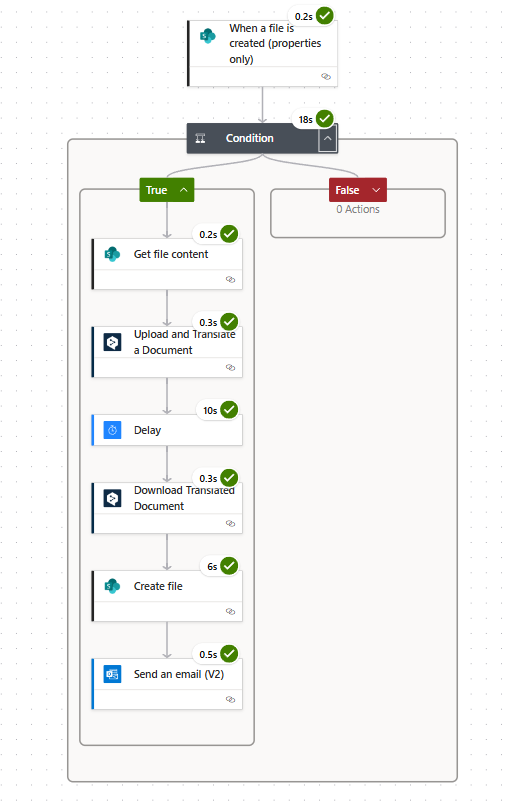
New file in SharePoint → Get file content → DeepL upload + translate → Download result → Save translated file in SharePoint → Send email with link
The automation works perfectly.
The problem: DeepL counts huge character volumes for DOCX/PPTX files
Even though the Word files I tested contain only around 150–200 visible characters, DeepL charges based on the full internal XML structure of the document.
Because a .docx or .pptx file contains a lot of hidden XML data (styles, formatting, metadata, headers, slide layouts, etc.), DeepL ends up counting 20,000–50,000 characters per file, even when the visible text is tiny.
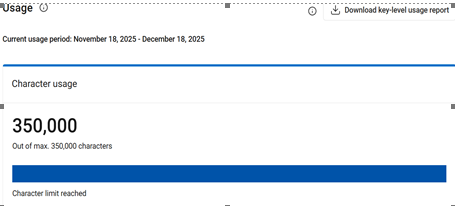
Because of this, my monthly 350,000-character limit was used up after just a few small 5 test files, resulting in extra costs.
My question for the Power Automate community:
- Is there any way—within Power Automate—to reduce or preprocess files so that:
- DeepL only translates the visible text
- or the XML markup is removed before sending to DeepL
- or the structure can be flattened or cleaned
- or another connector/action is better suited before translation?
I want to avoid a situation where someone in my company uploads a large file (e.g., 70 PowerPoint slides) and the translation ends up costing more than a normal DeepL Business plan.
Any suggestions, best practices, or alternative approaches would be greatly appreciated.
Thank you
Regards,
Shreenath


