




 1,297
1,297 Like
Like Share
Share
 Report
While working as a Dynamics 365 and Power Platform Consultant at a technology company, I was responsible for supporting and maintaining our Dataverse environments. Along with configuring tables, business processes, and user requirements, I also looked after environment health, data cleanup, and overall data management.
As more teams started using the system, the amount of data in Dataverse kept growing. We had historical records that needed to be retained, but we also had temporary, integration-related, and older operational data that was no longer useful. We were already using the traditional Bulk Delete functionality, but as the data volume increased, managing deletion jobs became more challenging. When a job failed, investigating the reason could take time, and maintaining similar deletion configurations across development, testing, and production environments meant repeating the setup. I also had to consider the impact of deletion on plug-ins, workflows, integrations, and other custom processes running in the environment.
While looking into ways to improve this process, I came across Microsoft’s newer Bulk Delete capabilities: Run Details, Solution-aware Bulk Delete, Permanent Deletion, and Sandbox mode. The Run Details option gave me better visibility when a deletion job failed, making troubleshooting easier. Solution-aware Bulk Delete helped us manage deletion configurations more consistently across environments. Permanent Deletion provided an option for situations where we were completely certain that data was no longer required, while Sandbox mode was useful when cleaning up non-production environments, especially after production data was copied into a sandbox.
After exploring these improvements, I started looking at Bulk Delete as more than just a tool for removing old records. It gave me a more structured way to manage data cleanup, retention, troubleshooting, ALM, and sandbox maintenance. This helped us handle growing Dataverse data more efficiently while choosing the appropriate deletion approach based on the environment and the type of data we were managing.
Pre-requisite
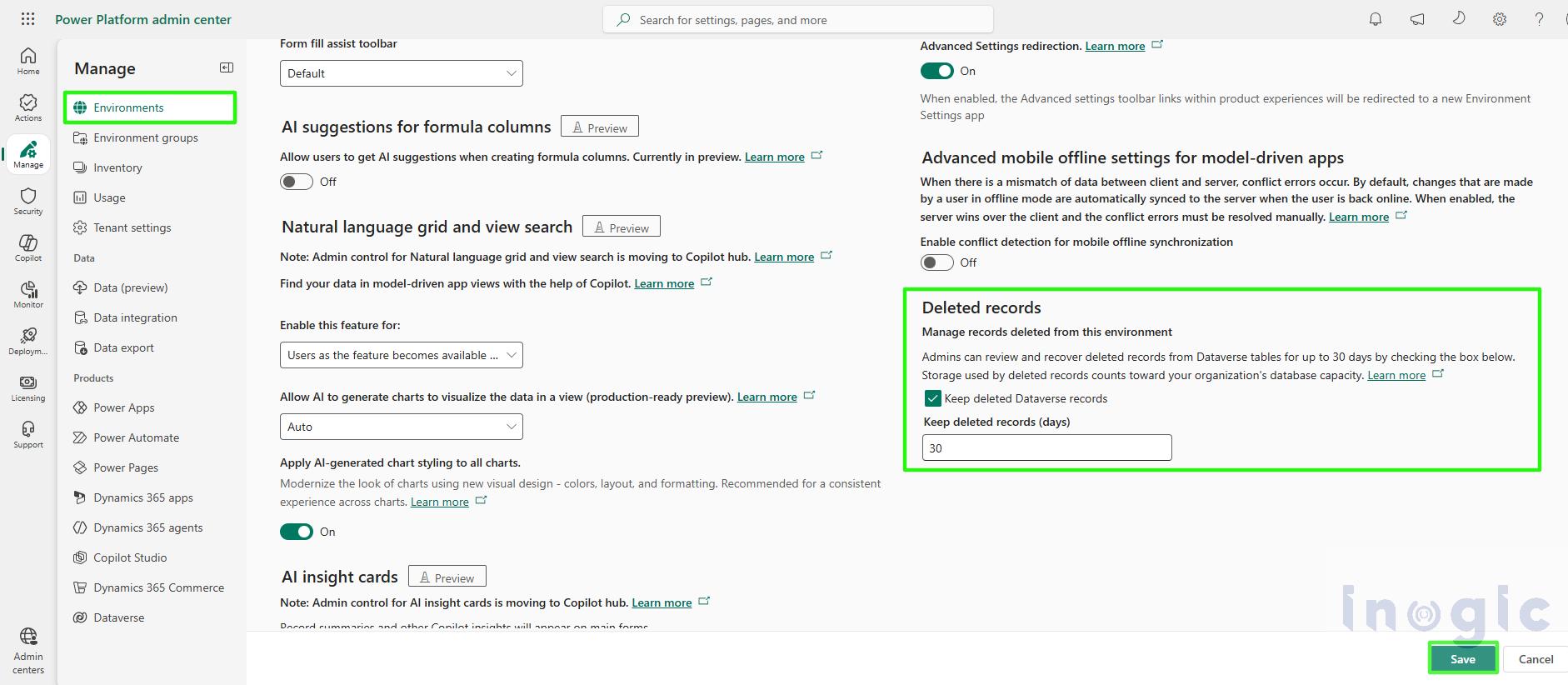
As a prerequisite to use all features related to bulk delete, you need to enable the deleted records feature in your environment. To enable this, follow the steps below.
Environment > Settings > Product > Features > Check the box “Keep deleted records in Dataverse” and then click Save.
Understanding Bulk Delete in Microsoft Dataverse
Bulk Deletion is a built-in Dataverse feature that we can use when we need to clean up a large number of records without manually deleting them one by one. We simply define the conditions for the records we want to remove, and Dataverse takes care of the deletion in the background.
For example, if an environment has completed system jobs that are more than 90 days old, I can create a Bulk Deletion job to identify and remove those records automatically.
Depending on the requirement, the job can be run once for a quick cleanup or scheduled to run regularly, such as daily, weekly, monthly, or yearly. We can also configure email notifications so we know when the job has finished... Read More
*This post is locked for comments