web
You’re offline. This is a read only version of the page.
close
Skip to main content

Announcements

News and Announcements icon
Community site session details

Community site session details

Session Id :

Connect a Copilot Studio Agent with an Agent Flow to Validate Parking Disputes

Haseeb Ahmad Profile Picture Haseeb Ahmad

Introduction

AI agents become significantly more powerful when they can interact with business data and perform actions on behalf of users.

In this scenario, we are building a Parking Dispute Resolution Agent in Microsoft Copilot Studio. The agent is responsible for interacting with the user and collecting the required information to validate a parking dispute.

Once the required information is available, the agent calls an Agent Flow. The Agent Flow retrieves the relevant information from Dataverse, processes the data, and returns a structured response to the calling agent.

The overall process is:

User → Copilot Studio Agent → Agent Flow → Dataverse → Agent Flow → Copilot Studio Agent → User

Agent Flows are designed to extend the capabilities of Copilot Studio agents by allowing an agent to call an automated process at runtime to retrieve data or perform actions.

Scenario

For this example, we have a Parking Dispute Resolution Agent.

The user wants to validate a parking dispute and provides the required customer and vehicle information.

The agent collects the information and then calls an Agent Flow to retrieve the corresponding dispute record from Dataverse.

The Agent Flow performs the following four steps:

  1. When an agent calls the flow

  2. List rows

  3. Agent

  4. Respond to the agent

    Let's look at each step in detail.

1. Create the Parking Dispute Resolution Agent

First, create the agent in Microsoft Copilot Studio.

The agent is responsible for handling the conversation with the user and understanding what the user wants to accomplish.

For this scenario, the agent is named:

Parking Dispute Resolution Agent

The agent starts the conversation by asking the user how it can help.

For example:

Hello! I'm Parking Dispute Resolution Agent. How can I help you today?

The user can then ask:

What information do you need from me to validate the parking dispute?

The agent responds:

Please provide:

1. Customer name

2. Vehicle details, such as the registration/license plate number, make, and model.

Once you provide these details, I can retrieve and validate the dispute record.

This keeps the conversation simple for the user while allowing the agent to collect the information required by the Agent Flow.


2. User Provides the Required Information

The user now provides the information requested by the agent.

For example:

Validate a parking dispute for Customer A. The vehicle details are ABC-101.

At this point, the agent has the information required to perform the validation.

Instead of exposing the Dataverse query or backend processing to the user, the agent calls the configured Agent Flow.

This is where the Agent Flow acts as a bridge between the conversational experience and the business data.

3. Agent Flow

An Agent Flow is an automated process that can be called by an agent to retrieve information or perform actions.

For an Agent Flow to be used as a tool by an agent, it needs the When an agent calls the flow trigger and the Respond to the agent response action.

Our Agent Flow contains four main steps:

When an agent calls the flow
             ↓
         List rows
             ↓
           Agent
             ↓
    Respond to the agent

Now let's look at each step.

4. Agent Flow – When an agent calls the flow

Screenshot 1 – When an agent calls the flow
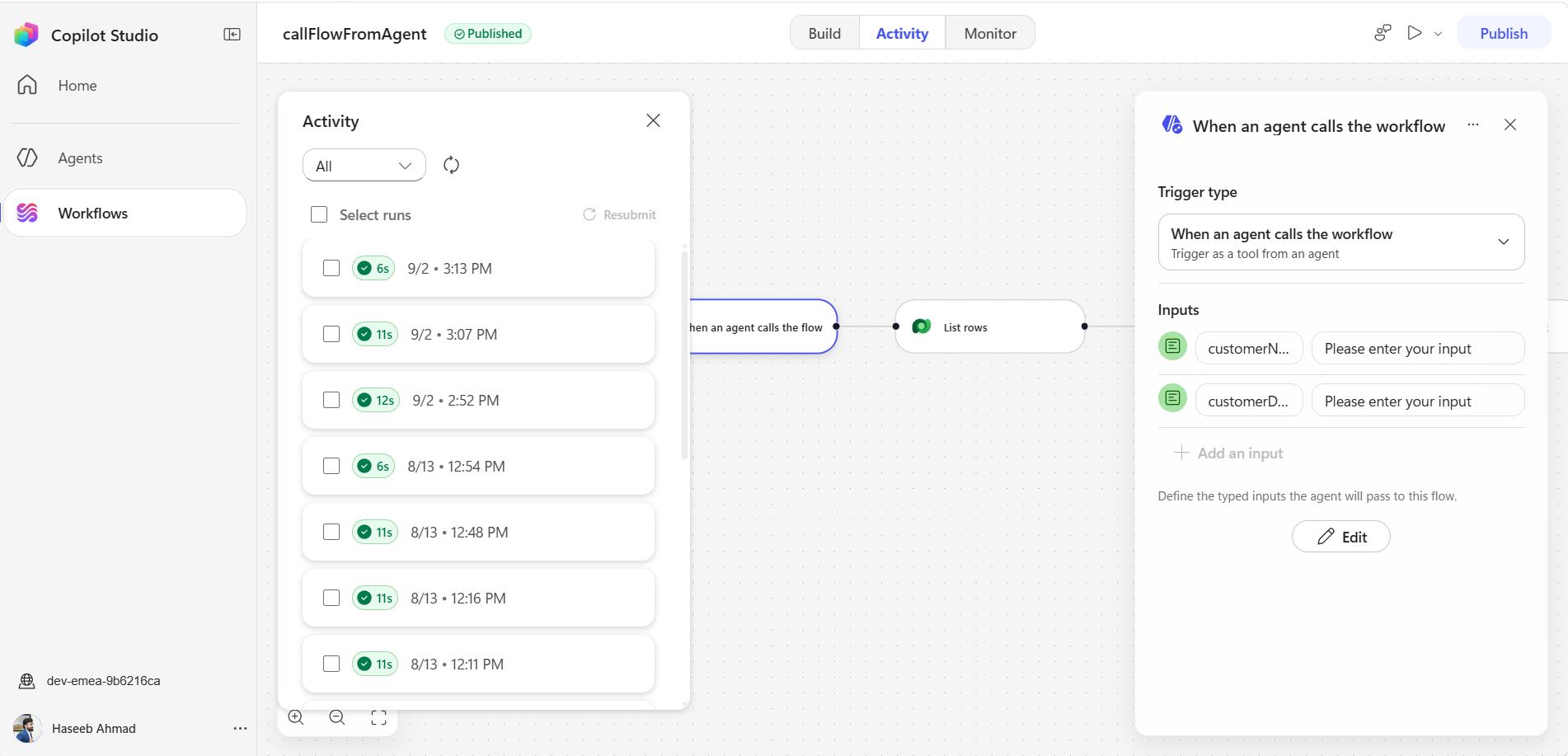

The first step of the Agent Flow is:

When an agent calls the flow

This trigger allows the Copilot Studio agent to invoke the Agent Flow when it needs to perform the parking dispute validation.

The trigger receives the required information from the agent.

For example:

Customer: Customer A
Vehicle: ABC-101

The Agent Flow can then use these values in the subsequent actions.

This trigger is important because it makes the Agent Flow available as a tool that the agent can call at runtime. Microsoft documentation also specifies that Agent Flows using this trigger can be added to agents as tools.

The key advantage here is that the agent does not need to directly perform the Dataverse operation. Instead, it delegates the required backend processing to the Agent Flow.

5. Agent Flow – List rows

Screenshot 2 – List rows
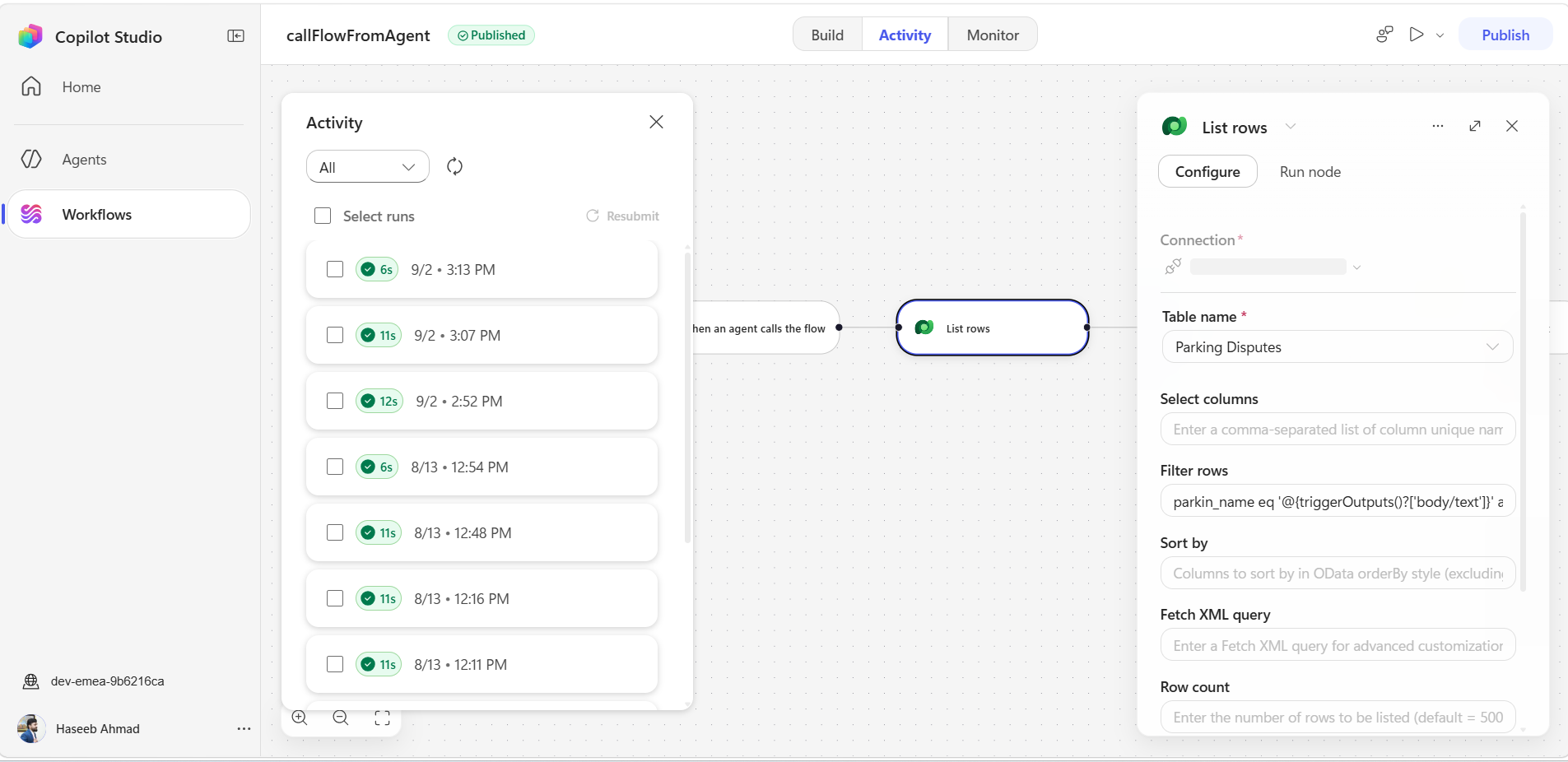

The next step in the Agent Flow is:

List rows

This action is used to retrieve the relevant parking dispute information from Microsoft Dataverse.

The information received from the agent can be used to identify the appropriate record.

For example, the vehicle information provided by the user could be:

ABC-101

The List rows action searches the relevant Dataverse table and retrieves the matching dispute information.

The purpose of this step is to convert the user's conversational request into actual business data.

Instead of the agent simply responding based on the user's message, it can now work with information retrieved directly from Dataverse.

This provides a much more reliable approach for scenarios where the agent needs to validate information against enterprise data.


6. Agent Flow – Agent

Screenshot 3 – Agent
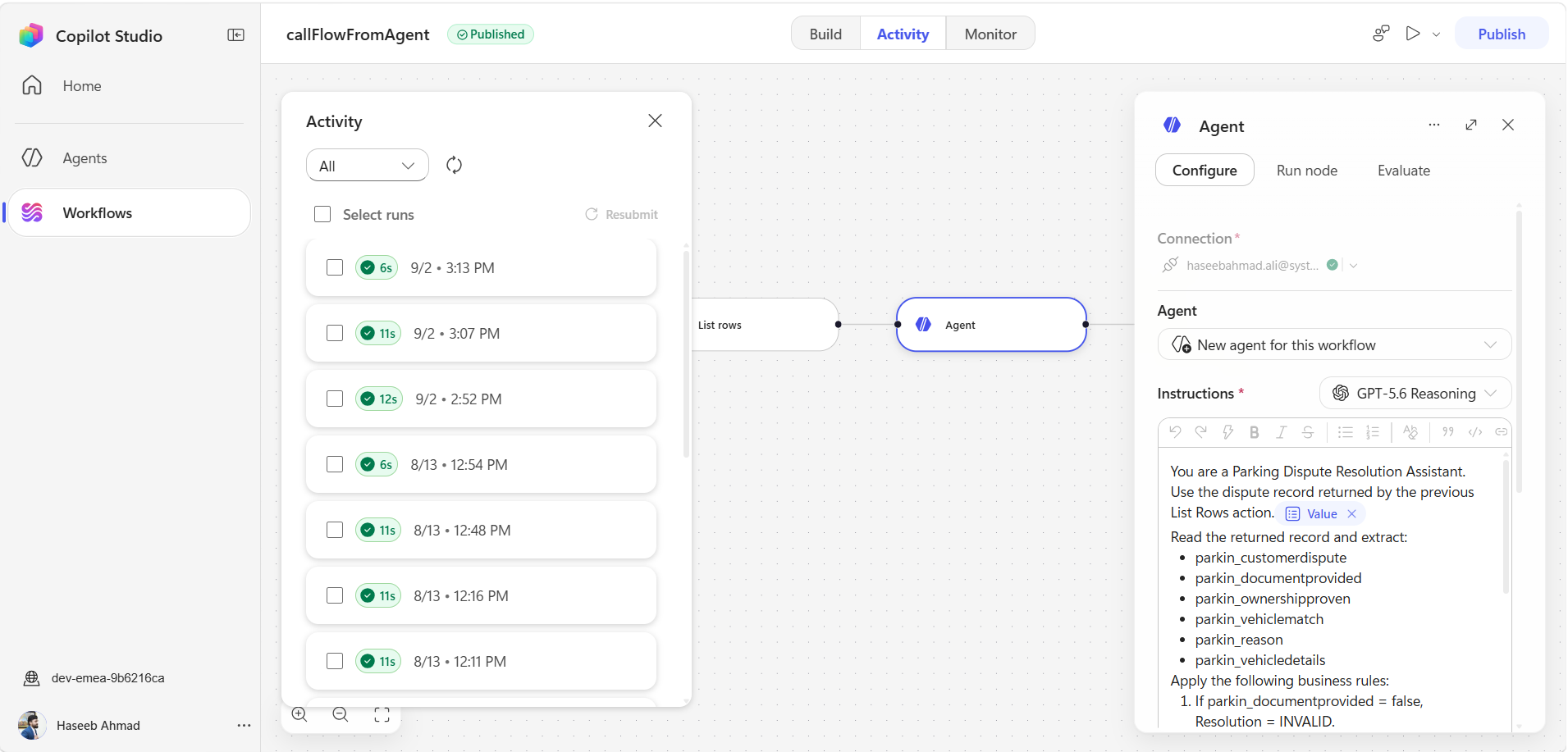


After retrieving the required information from Dataverse, the next step is the:

Agent

This step is responsible for processing and interpreting the information retrieved from Dataverse.

The Agent receives the relevant dispute information and determines the appropriate resolution based on the available data.

For example, the retrieved information can indicate that:


  • The vehicle was recently purchased from the previous owner.

  • The required ownership document was provided.

  • Ownership was successfully verified.

  • The vehicle details match the dispute record.

The Agent can use this information to produce a meaningful business result.

This is particularly useful because we don't want to simply return raw Dataverse fields to the user.

Instead, the information can be interpreted and transformed into a meaningful response such as:

Resolution: VALID

with an appropriate explanation of why the dispute is considered valid.

Agent Flow – Respond to the agent

Screenshot 4 – Respond to the agent
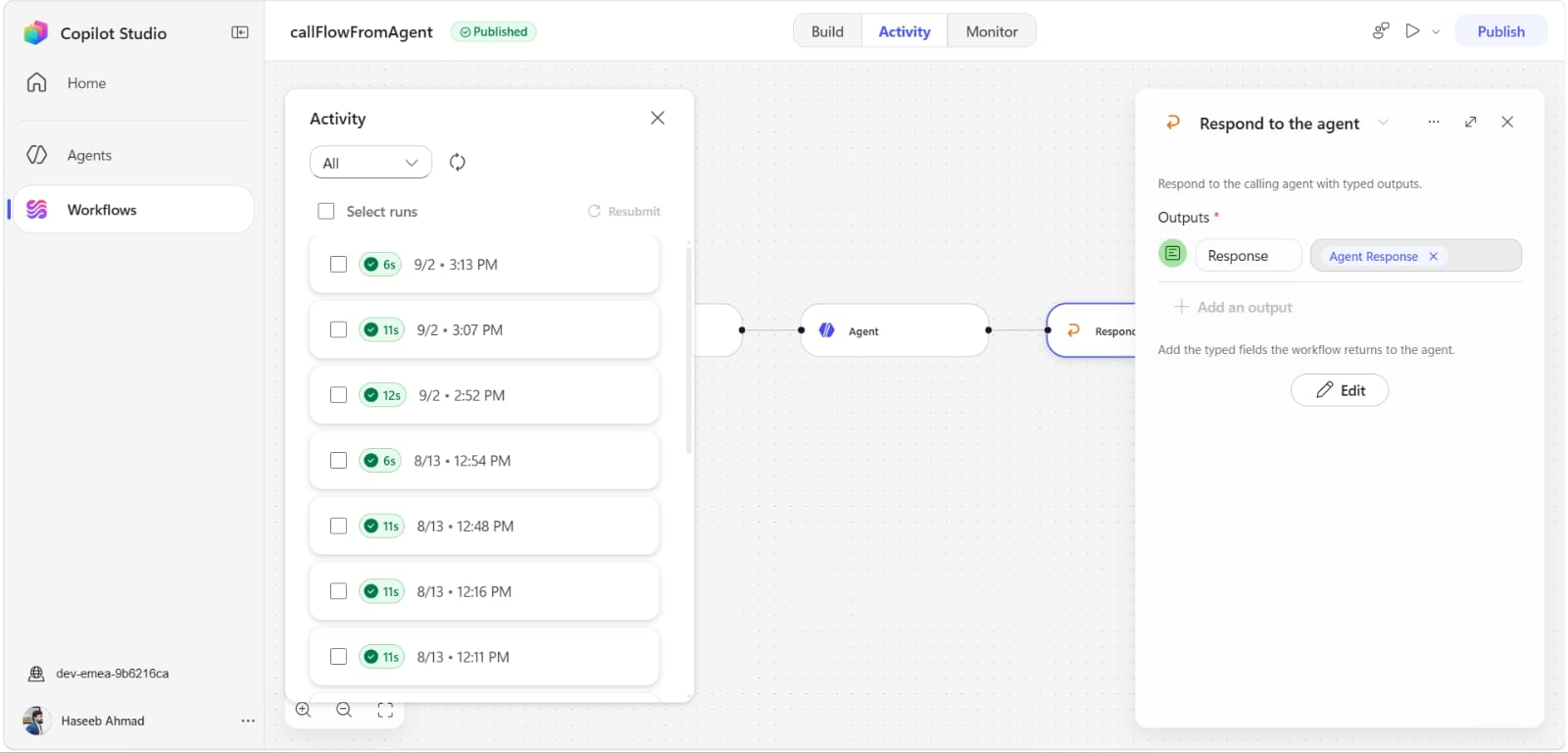
The final step of the Agent Flow is:

Respond to the agent

This action sends the result of the Agent Flow back to the Copilot Studio agent.

The response can contain structured information such as:

Customer Dispute
Resolution
Reason
Summary

For example:

Customer Dispute:
Recently purchased vehicle from previous owner

Resolution:
VALID

Reason:
Ownership transfer verified

The agent can then use this information to generate the final response for the user.

The response action is a required part of an Agent Flow that is intended to be called by an agent.

8. Calling the Agent Flow from the Agent

Once the Agent Flow is configured and published, it can be added to the Copilot Studio agent as a tool.

The agent can then determine when the Agent Flow needs to be called based on the user's request.

In our scenario, the user has provided the customer and vehicle information.

The agent recognizes that it needs to retrieve and validate the parking dispute, so it calls the Agent Flow.

The execution looks like:

User provides details
        ↓
Copilot Studio Agent
        ↓
Calls Agent Flow
        ↓
Agent Flow retrieves Dataverse data
        ↓
Agent processes the information
        ↓
Agent Flow returns structured response
        ↓
Copilot Studio Agent
        ↓
Final response to user

9. Testing the Agent


– Agent calls the Agent Flow

Now we can test the complete solution from the Copilot Studio test panel.

The user provides:

Validate a parking dispute for Customer A. The vehicle details are ABC-101.

The agent identifies that the Agent Flow is required to complete the request.

The test experience shows the agent preparing to use the configured tool and calling the Agent Flow.

For example:

Preparing to use tool

followed by:

callFlowFromAgent

This confirms that the agent is invoking the Agent Flow rather than trying to answer the request without retrieving the required business data.

10. Agent Flow Returns the Structured Data | Final Response from the Agent

Screenshot 6 – Returning exact structured data

After the Agent Flow completes its processing, the response is returned to the Copilot Studio agent.

The returned information can be structured as:

Customer Dispute:

Recently purchased vehicle from previous owner

Resolution:

VALID

Reason:

Ownership transfer verified

The important point is that the Agent Flow doesn't simply return a generic success message.

It returns the relevant business information that the agent can use to formulate the final response.


                         USER
                           │
                           ▼
              ┌──────────────────────┐
              │   Copilot Studio     
              │        Agent         
              │ Parking Dispute      
              │ Resolution Agent     
              └──────────┬───────────┘
                         │
                         │ Calls Agent Flow
                         ▼
              ┌──────────────────────┐
              │     Agent Flow       
              └──────────┬───────────┘
                         │
                         ▼
              ┌──────────────────────┐
              │      List rows       
              │      Dataverse       
              └──────────┬───────────┘
                         │
                         ▼
              ┌──────────────────────┐
              │        Agent         
              │ Process & Validate   
              │      Information     
              └──────────┬───────────┘
                         │
                         ▼
              ┌──────────────────────┐
              │ Respond to the agent 
              └──────────┬───────────┘
                         │
                         ▼
              ┌──────────────────────┐
              │   Copilot Studio     
              │   Final Response     
              └──────────┬───────────┘
                         │
                         ▼
                        USER

11. Why Use an Agent Flow?

Using Agent Flows with Copilot Studio provides a clean way to extend what an agent can do.

Instead of making the agent responsible for every operation, we can delegate specific business processes to an Agent Flow.

Some key benefits are:

Data retrieval

The Agent Flow can retrieve information from Dataverse and other connected services.

Business process automation

Complex or repeatable processing can be handled within the Agent Flow.

Separation of responsibilities

The Copilot Studio agent focuses on the conversation, while the Agent Flow handles the required automated process.

Structured responses

The Agent Flow can return specific outputs that the agent can use in its response.

Reusable pattern

The same architecture can be applied to many business scenarios, including:


  • Customer service

  • Case validation

  • Order verification

  • Claims processing

  • Invoice validation

  • Warranty verification

  • Customer onboarding

  • Vehicle management

Conclusion

In this example, we created a Parking Dispute Resolution Agent and extended its capabilities using an Agent Flow.

The agent collects the required information from the user and calls the Agent Flow when it needs to retrieve and validate business data.

The Agent Flow then:

  1. Receives the request through When an agent calls the flow.

  2. Retrieves the relevant record using List rows.

  3. Processes and interprets the information using the Agent action.

  4. Returns the structured result using Respond to the agent.

  5. The Copilot Studio agent presents the final result to the user.

This demonstrates how Copilot Studio Agents + Agent Flows + Dataverse can be combined to create intelligent business solutions where the agent handles the conversation while the Agent Flow performs the required business processing.

The same pattern can be extended to many real-world Power Platform and Dynamics 365 scenarios where an agent needs to retrieve data, perform an action, and return a meaningful result to the user.

    Haseeb Ahmad
    Junior Microsoft Power Platform Consultant | Systems Limited
    Microsoft Power Platform | Dynamics 365 | CRM | Dataverse | Copilot Studio


    Comments
