web
You’re offline. This is a read only version of the page.
close
Skip to main content

Notifications

Announcements

Community site session details

Community site session details

Session Id :
Power Platform Community / Forums / Power Apps / Attachment Control out...
Power Apps
Unanswered

Attachment Control outside a Form

(1) ShareShare
ReportReport
Posted on by 46

First of all, I know that an attachment control is not designed to be used outside of a form. Nevertheless, the Internet shows several examples of this, and my current solution approach is already quite advanced.

Before I describe my problem, here’s a brief explanation: Using a Dataverse table and a gallery, I created a dynamically adjustable form. The table defines the data fields along with their data types, which are then displayed in a gallery. Depending on the data field type, either a TextInput or an attachment control becomes visible within the gallery item. By pressing a button, the gallery is iterated over and, based on the type, either text is written into a column called “Daten” or, in the case of an attachment, into a column called “Daten Anhang”. The dynamic creation of the form and the data saving work flawlessly up to this point. I was also able to verify this with a model-driven app, where I can download the attachment that was uploaded via the canvas app without any issues.

Now to my problem:

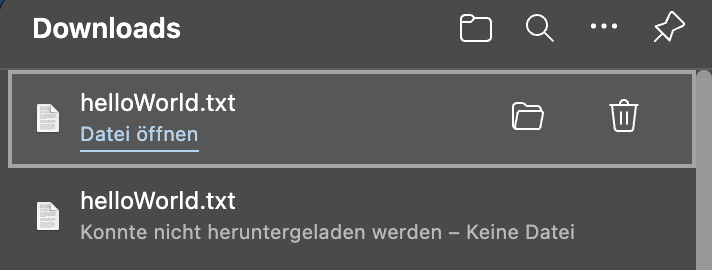
In the canvas app, the uploaded attachment is correctly displayed in the attachment control; however, when I try to download it, my browser (MS Edge) gives me the error message that no file could be downloaded. Below are some images and code snippets for clarification.

// shorted function to patch attachment
Patch(
    '_REF Vorgang Prozess Datenfelder';
    LookUp(
        '_REF Vorgang Prozess Datenfelder';
        'Vorgang Prozess Datenfeld ID' = recVorgangProzessDatenfeld.'Vorgang Prozess Datenfeld ID'
    );
    If(
        IsBlank(First(recVorgangProzessDatenfeld.AnhangVorgangProzessDatenfeld.Attachments).Value);
        {'Daten Anhang': Blank()};
        {
            'Daten Anhang': {
                FileName: First(recVorgangProzessDatenfeld.AnhangVorgangProzessDatenfeld.Attachments).Name;
                Value: First(recVorgangProzessDatenfeld.AnhangVorgangProzessDatenfeld.Attachments).Value
            }
        }
    )
)


// Funtion to display attachment in attachmentcontrol
If(
    IsBlank(ThisItem.'Daten Anhang'.Value);
    Blank();
    First(
        Table(
            {
                FileName: ThisItem.'Daten Anhang'.FileName;
                Value: ThisItem.'Daten Anhang'.Value
            }
        )
    )
)
// Also not work
//ThisItem.'Daten Anhang'

Structure of the Gallery
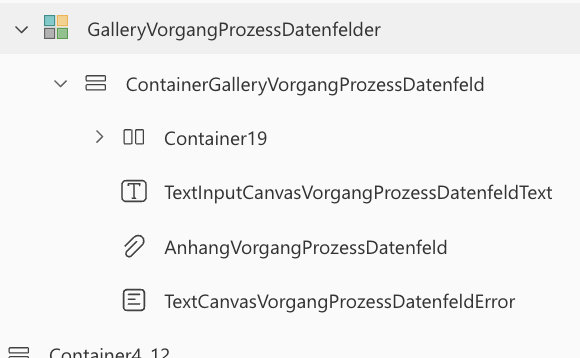
 
 
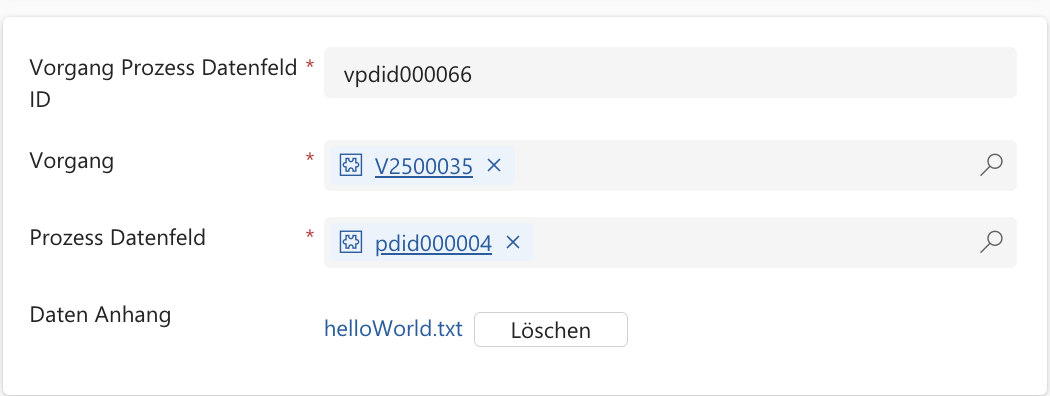
Successfull uploaded attachment in canvas app
 

File can be found in model-driven app
 

Download from the Canvas app (bottom) failed, download from the model-driven app (top) succeeded.
Categories:
I have the same question (0)
  • WarrenBelz Profile Picture
    153,049 Most Valuable Professional on at
    I have seen this issue posted before and you are correct that attachment controls are designed to be in Forms (and they do have quite useful purposes outside this - I use them to upload files), however putting one in a Gallery (and yours is inside a container as well) seems a "bridge too far" for the full expected functionality.
    What is disappointing is that that actually insert correctly and display the files, however do not download - I just did a test here to confirm and received the (expected) message File wasn't available on site.
     
    However there may be a workaround if all that you want to do is display the file names and open the file. Put a Gallery (nested) instead of the attachment control with the Items 
    ThisItem.Attachments
    with a Text Label
    ThisItem.DisplayName
    and then OnSelect
    Launch(ThisItem.AbsoluteUri)
     
    Please click Does this answer your question if my post helped you solve your issue. This will help others find it more readily. It also closes the item. If the content was useful in other ways, please consider giving it a Like.
    MVP (Business Applications)    Visit my blog Practical Power Apps    LinkedIn   
  • LukasW Profile Picture
    46 on at

    First of all, thank you very much for your answer. Unfortunately, I cannot get your workaround to work. When I insert the gallery into my gallery, the content of the nested gallery is not displayed, and on the other hand, the property “AbsoluteUri” is not available to me. Have I misunderstood the workaround?

  • WarrenBelz Profile Picture
    153,049 Most Valuable Professional on at
    Hi @LukasW,
    I should have read back to your post properly. My structure is using SharePoint and works as described. Unfortunately, it does not work with Dataverse, though the comment on the attachment control I believe may be relevant.
  • Verified answer
    LukasW Profile Picture
    46 on at

    Yes, it doesn’t seem to work with a Dataverse table. Since I had hoped that my mechanism would work better outside of the gallery, I placed a button inside the gallery item that makes a dialog visible outside of the gallery, and I implemented my mechanism there. Unfortunately, I got the same result. The upload works, but the download does not. Now, I’ll simply include a form with a field for the attachment in the dialog. Then it should work… Hopefully… 😭

    Thanks for your help @WarrenBelz

Under review

Thank you for your reply! To ensure a great experience for everyone, your content is awaiting approval by our Community Managers. Please check back later.

Helpful resources

Quick Links

Forum hierarchy changes are complete!

In our never-ending quest to improve we are simplifying the forum hierarchy…

Ajay Kumar Gannamaneni – Community Spotlight

We are honored to recognize Ajay Kumar Gannamaneni as our Community Spotlight for December…

Leaderboard > Power Apps

#1
WarrenBelz Profile Picture

WarrenBelz 717 Most Valuable Professional

#2
Michael E. Gernaey Profile Picture

Michael E. Gernaey 329 Super User 2025 Season 2

#3
Power Platform 1919 Profile Picture

Power Platform 1919 268

Last 30 days Overall leaderboard
