web
You’re offline. This is a read only version of the page.
close
Skip to main content

Notifications

Announcements

Community site session details

Community site session details

Session Id :
Power Platform Community / Forums / Power Apps / Collecting multiple Sh...
Power Apps
Unanswered

Collecting multiple SharePoint Document Libraries

(1) ShareShare
ReportReport
Posted on by 23

I am working on a canvas app which is intended to combine the view for multiple SharePoint Document Libraries, a total of 5 different libraries in all. As far as I can tell, each library has the same set of Columns with consistent types between each library. I am facing a problem when trying to Collect all 5 libraries. I can get 3 of them to work, while 2 of them produce an error that I'm getting Invalid argument types.

Here is my App's OnStart Property for the ones that work:

Here is what it looks like when I try to add the other 2 libraries:
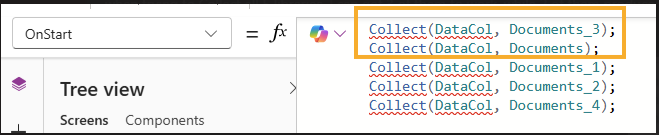
When I add the two libraries marked in orange, the Collect fails.


Any ideas on what I should be looking out for when trying to troubleshoot this?

Categories:
I have the same question (0)
  • Verified answer
    Pstork1 Profile Picture
    68,697 Most Valuable Professional on at
    Try adding the other two to a different collection temporarily. That will let you verify that the columns are the same.  If they aren't you may have to do some work with AddColumns, DropColumns, RenameColumns, or ShowColumns to adjust which columns are in the Collection.

    ----------------------------------------------------------------------------------
    If this Post helped you, please click "Does this answer your question" and give it a like to help others in the community find the answer too!

    Paul Papanek Stork, MVP
    Blog: https://www.dontpapanic.com/blog
     
  • Lyondenn Profile Picture
    23 on at
    I was able to resolve by creating a collection per library and using ShowColumns to utilize the correct columns needed. I did RenameColumns for some of the items to make them all uniform, then created a separate collection that includes all those collections.
     
    Thanks for the insight Pstork1

Under review

Thank you for your reply! To ensure a great experience for everyone, your content is awaiting approval by our Community Managers. Please check back later.

Helpful resources

Quick Links

Forum hierarchy changes are complete!

In our never-ending quest to improve we are simplifying the forum hierarchy…

Ajay Kumar Gannamaneni – Community Spotlight

We are honored to recognize Ajay Kumar Gannamaneni as our Community Spotlight for December…

Leaderboard > Power Apps

#1
WarrenBelz Profile Picture

WarrenBelz 717 Most Valuable Professional

#2
Michael E. Gernaey Profile Picture

Michael E. Gernaey 329 Super User 2025 Season 2

#3
Power Platform 1919 Profile Picture

Power Platform 1919 268

Last 30 days Overall leaderboard



