Absolut! Hier ist ein Entwurf für eine Forum-Anfrage auf Englisch. Du kannst ihn direkt kopieren und einfügen oder nach Belieben anpassen. Ich habe alle wichtigen Punkte aufgenommen, die wir besprochen haben, um das Problem so klar wie möglich darzustellen.
Subject: Critical: DateAdd Function Not Working in Power Apps - Even in New App! (Locale Issues?)
Dear Power Apps Community,
I'm facing a very frustrating and persistent issue with the DateAdd function in Power Apps, and I'm hoping someone here might have encountered something similar or can offer a solution. My official Microsoft support request is currently unresponsive, which is why I'm turning to the community.
Problem:
The DateAdd function does not work at all in my Power Apps environment. It consistently shows red squiggly lines (syntax errors), even for the simplest possible use cases.
Context & Specific Example:
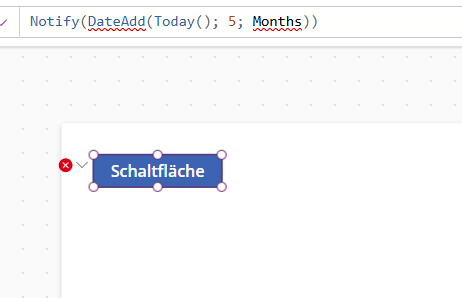
I'm trying to use DateAdd (for example, on the OnSelect property of a button) to calculate a future date. My region/locale is set to German (Germany), so I expect semicolon (;) as a separator.
The formula I'm testing is:
Notify(DateAdd(Today(); 5; Months))
Symptoms:
-
Red squiggly lines appear under DateAdd and Months, or even the entire Notify statement.
-
The app cannot be saved/published with this error.
-
No specific, helpful error message appears other than generic syntax errors.
Troubleshooting Steps Already Taken (and failed):
-
Separator Check:
-
Tried with semicolons (;) as argument separators, as expected for my German locale.
-
Also tried with commas (,) as argument separators (just in case).
-
Neither worked; the error persists.
-
TimeUnit Variation:
-
Input Validation:
-
Confirmed Today() returns a valid date.
-
Confirmed the number 5 is correctly interpreted as a number (this is a hardcoded number, not from a control).
-
Locale Settings in Power Apps Studio:
-
Checked and explicitly set the App settings (File > App settings > Language and region) to "German (Germany)". Saved, closed Studio, reopened.
-
Also tried setting it to "English (United States)" (and using commas). No change.
-
Cache Clearing: Cleared browser cache and cookies completely. No effect.
-
Test in Brand New, Empty App:
-
Created a completely new, blank canvas app.
-
Immediately set its language to "German (Germany)" and saved it.
-
Added a single button.
-
Entered the formula Notify(DateAdd(Today(); 5; Months)) in its OnSelect property.
-
Result: The exact same error (red squiggly lines) appeared, even in a fresh, clean environment.
-
Support Contact: Opened a support request with Microsoft, but currently receiving no response.
Question:
Has anyone else encountered this critical issue where DateAdd (or other core functions) simply doesn't work, even in a new app and after extensive troubleshooting of regional settings? Is this a known bug in a specific Power Apps Studio version, a tenant-specific configuration problem, or am I missing some obscure setting?
Any help or insights would be greatly appreciated as this is completely blocking development.
Thank you in advance!