web
You’re offline. This is a read only version of the page.
close
Skip to main content

Notifications

Announcements

Community site session details

Community site session details

Session Id :
Power Platform Community / Forums / Power Apps / Filter Column B when C...
Power Apps
Answered

Filter Column B when Column A is from excel table

(0) ShareShare
ReportReport
Posted on by 35
I have 2 data sources: one is sharepoint list ,in which, there're 3 columns: 
[Company] -single choice column
[Responsible Section] - multiply choice column
[Cost Center] - multiply choice column
And I have a excel with TABLE1_1 in sharepoint library.
 
I choose the both as data sources in power apps.
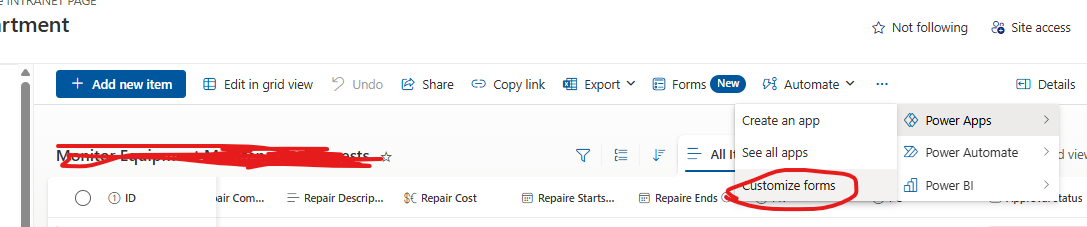
(What I want to let you know is that I not create a blank power apps ,I just want to customize forms from sharepoint list
)
Okay ,above is basis information, Let me talk my issue.
I choose the sharepoint list and excel as my datasources.
I want to let the list column 'Company' choose values from excel column'SAP PLANT', so I edit the function as below, and it works.
 
Then after the column company is chosen, I hope the list column 'Responsible Section' choose values from excel column'section' , and these values should be filter. For example, when company = 6321, there should only 6 sections to select. Because when SAP PLANT =6321,there're only 6 sections in table.
so I edit the function as below, but it doesn't filter, it shows all sections in excel .
So I write a gallery to test, the function is same as the above one. you can the function is working in Gallery.It  confused me a lot.
Categories:
I have the same question (0)
  • CS-07030638-0 Profile Picture
    35 on at
  • Verified answer
    WarrenBelz Profile Picture
    153,117 Most Valuable Professional on at
    That is a Delegation error as the number to text conversion is not supported by Delegation in Excel. Firstly you need to format 'SAP PLANT' in Excel as Text (not a number) and then drop the Text() conversion from both sides of the equation. I also suggest you take the space out of the field name (SAP_PLANT or SAPPLANT) as this is often the cause of failed queries in Excel.
    Lastly, why are you using Excel at all when you have access to SharePoint - Excel is really the "data source of last resort" and should be avoided if possible.
     
    Please click Does this answer your question if my post helped you solve your issue. This will help others find it more readily. It also closes the item. If the content was useful in other ways, please consider giving it a Like.
    MVP (Business Applications)    Visit my blog Practical Power Apps    LinkedIn   
     
     
  • CS-07030638-0 Profile Picture
    35 on at
    Thanks !It working now. But why "Excel is really the "data source of last resort"  "?and should be avoided if possible.
    I once tried to create a sharepoint list to restore these information in excel, but I think excel is more easy to update information than list,so I chosed it as one datasource.
  • WarrenBelz Profile Picture
    153,117 Most Valuable Professional on at
    SharePoint is far superior to Excel on every level as a data source for Power Apps. If you want to pay the licencing cost for Dataverse, it is even better, but most of the time SharePoint will do the job you need and do so reliably and consistently. To name a few issues with Excel
    • Multiple concurrent users often have conflicts
    • Inconsistent results from queries that "should work but do not"
    • Slow performance and poor Delegation support, particularly on larger data sets
    • It does not handle dates well
    • You cannot have the Excel file open when it is used by Power Apps, nor can you add record to it outside Power Apps (see your note on this)
    • No relational structure- it is all simply "flat files" in Tables
    I strongly suggest you recreate this list in SharePoint and most of your issues will go away. If you have 13 minutes, this video from Shane Young may be of interest to you.
  • CS-07030638-0 Profile Picture
    35 on at
    Thanks a lot! @WarrenBelz

Under review

Thank you for your reply! To ensure a great experience for everyone, your content is awaiting approval by our Community Managers. Please check back later.

Helpful resources

Quick Links

Forum hierarchy changes are complete!

In our never-ending quest to improve we are simplifying the forum hierarchy…

Ajay Kumar Gannamaneni – Community Spotlight

We are honored to recognize Ajay Kumar Gannamaneni as our Community Spotlight for December…

Leaderboard > Power Apps

#1
WarrenBelz Profile Picture

WarrenBelz 765 Most Valuable Professional

#2
Michael E. Gernaey Profile Picture

Michael E. Gernaey 343 Super User 2025 Season 2

#3
Power Platform 1919 Profile Picture

Power Platform 1919 272

Last 30 days Overall leaderboard



