web
You’re offline. This is a read only version of the page.
close
Skip to main content

Notifications

Announcements

Community site session details

Community site session details

Session Id :
Power Platform Community / Forums / Power Apps / How to attach a file t...
Power Apps
Answered

How to attach a file to an email using a Power App

(3) ShareShare
ReportReport
Posted on by 16
I have a power app.  In the power app users fill out fields with information.  
This information is then sent to Power Automate through the Power Apps V2 connector and then the flow compilates an email using the Send an email through a shared mailbox V2 action which contains a template and then the email is sent.  
I would like the user to be able to attach a file from a shared network drive call it (\\mycompany.co.uk\Folder\Anotherfolder), from within the power app.  
I want the user to be able to click a button named attach file and then have a box pop up to navigate to the file location so they can pick the file.  I also want a button that allows the user to open the file once chosen so they can check the contents of the attached documents.  I also want the ability to remove the file if it is not correct.  
I then want that file to be attached to the email that is created in Power Automate.   I have exhausted the internet and instruction guides as well as co-pilot.
 
One of the best options was using the media picker with an attach file, an open file and a remove file buttons.  When I use the open file button I am running into blob storage errors when it opens in Edge.  CoPilot suggested things like PickFile but I get errors that the app doesn't recognise Pickfile.  It has also given me directions on how to do it if it was just one file, but it is not, the folder is populated daily with files and each of them will need to be attached to a different email by each user that uses the power app.  The only constant is a folder.
 
This feels like it should be relatively simple but all roads lead to some sort of error.
 
How do I go about this?
Categories:
I have the same question (0)
  • Suggested answer
    JasonD Profile Picture
    31 on at
    I would suggest you watch this (and his related videos).
     
    It is not a direct solution to what you are doing, but you should be able to take from it and then mutate it to what you need.
  • Verified answer
    WarrenBelz Profile Picture
    153,051 Most Valuable Professional on at
    You can do most of that (apart from the user previewing the file before attaching) by utilising an Attachment control (just copy one from a Form and paste it on the screen and clean up the few errors) with run code something like this
     
     
    and a Flow like this - you will need to add the shared mailbox in the From (Send as)
     
     
    Please click Does this answer your question if my post helped you solve your issue. This will help others find it more readily. It also closes the item. If the content was useful in other ways, please consider giving it a Like.
    MVP (Business Applications)    Visit my blog Practical Power Apps    LinkedIn   
  • CU07022222-0 Profile Picture
    16 on at
    @WarrenBelz thanks so much for your answer - I had to tweak it a bit to get where I wanted to but it worked for the most part.  I am just trying to complete the loop so I don't know if you could help me with one more question? 
     
    There are 2 different types of emails that are being sent from the power app - lets call them Basic Email and Special Emal.  Both have the same configuration but Special Email has an HTML table that gets added to the email that goes from the shared mailbox.  Both sets of emails worked perfectly with their configurations as is prior to trying to add the attachment.  However, currently I can only get the Basic Email to work.  The other one fails in Power Automate with this error: 
    Unable to process template language expressions in action 'Send_an_email_from_a_shared_mailbox_(V2)_2' inputs at line '0' and column '0': 'The template language expression 'triggerBody()['file']['name']' cannot be evaluated because property 'file' doesn't exist, available properties are 'email, text, text_1, text_2, boolean, text_3'. Please see https://aka.ms/logicexpressions for usage details.'.
    This is the code in Power Apps - and as mentioned for the Basic Email this all works perfectly with the attachment, so what is causing the error for the Special email?
    If(
        EmailTypeDropdown.Selected.Value = "Special Email",
        ForAll(
            AttachmentControl.Attachments,
            ‘Special-EmailResponseForm-Mymailbox'.Run(
                CustomerEmailInput.Text,
                CustomerGreetingInput.Text,
                IDInput.Text,
                HtmlText2.HtmlText,
                Checkbox.Value,
                Dropdown.Selected.Value,
                {
                    contentBytes: Value,
                    name: Name
                }
            )
        ),
        ForAll(
            AttachmentControl.Attachments,
           â€˜PersonalDetails-EmailResponseForm-MyMailbox'.Run(
                CustomerEmailInput.Text,
                DateReqRcvd.SelectedDate,
                CustomerGreetingInput.Text,
                IDInput.Text,
                Checkbox.Value,
                Dropdown.Selected.Value,
                {
                    contentBytes: Value,
                    name: Name
                }
            )
        );
        Clear(Collection1);
        Reset(CustomerEmailInput);
        Reset(CustomerGreetingInput);
        Reset(IDInput);
        Reset(Date);
        Reset(EmailTypeDropdown);
        Reset(DateReqRcvd);
        Reset(Checkbox);
        Reset(AttachmentControl);
        Set(isNotConfirmed, false);
        Set(isSubmitted, true);
        Reset(Dropdown);
        Navigate(DataEntryScreen);
        Set(CustomerEmail, "");
        Set(CustomerGreeting, "");
        Set(ID, "");
        Set(RequestReceived, Blank())
    )

    And this is in my flow for both of the emails but the Special one has the HTML table input below.
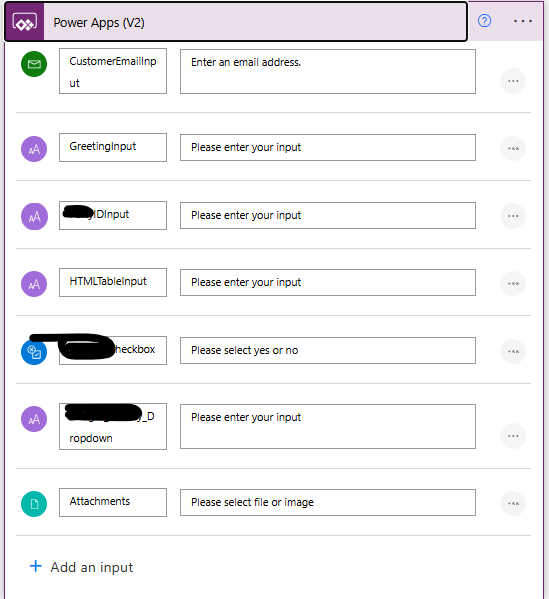
  • WarrenBelz Profile Picture
    153,051 Most Valuable Professional on at
    You have a date in the "Normal" email that is missing in the the "special" one. The error sounds a bit like your parameters are not "lining up" with the field types required in the the email.
  • CU07022222-0 Profile Picture
    16 on at
    Apologies @WarrenBelz you are correct - that is the other thing that is different between the 2.  That being said though, prior to me adding the attachment stuff they worked fine and everything matched up - it is just that Special Email doesn't have the date but does have the HTML table.  The only things I have changed is the code as per below to push the attachment across to the flow, adding the File property called Attachments in the Power Apps V2 and the bits as you had suggested in the flow under attachments.  Any other things come to mind?
  • WarrenBelz Profile Picture
    153,051 Most Valuable Professional on at
    So that we can focus solely on the problem, please confirm this is your run code
    ForAll(
       AttachmentControl.Attachments,
       'Special-EmailResponseForm-Mymailbox'.Run(
          CustomerEmailInput.Text,
          CustomerGreetingInput.Text,
          IDInput.Text,
          HtmlText2.HtmlText,
          Checkbox.Value,
          Dropdown.Selected.Value,
          {
             contentBytes: Value,
             name: Name
          }
       )
    )
    then post a fully expanded view of the Flow including the email parameters and any other values used (you have three other values in there other than the email requirements).
  • CU07022222-0 Profile Picture
    16 on at
    @WarrenBelz - I have had to change/redact a few bits for the t'internet but hopefully this captures it - as mentioned , there is a drop down which denotes which flow it goes to and without the email attachment alterations both flows work, but only the Basic Email seems to work correctly with the Attachments (pdfs).
    If(
        EmailTypeDropdown.Selected.Value = "SpecialEmail",
        ForAll(
            AttachmentControl.Attachments,
            ‘Special-EmailResponseForm-Mymailbox'Run (
                CustomerEmailInput.Text,
                CustomerGreetingInput.Text,
                IDInput.Text,
                HtmlText2.HtmlText,
                Tick_Checkbox.Value,,
                Tick_Dropdown.Selected.Value,
                {
                    contentBytes: Value,
                    name: Name
                }
            )
        ),
        ForAll(
            AttachmentControl.Attachments,
            ‘Basic-EmailResponseForm-MyMailbox'.Run(
                CustomerEmailInput.Text,
                DateReqRcvd.SelectedDate,
                CustomerGreetingInput.Text,
                IDInput.Text,
     Tick_Checkbox.Value,,
                Tick_Dropdown.Selected.Value,
                {
                    contentBytes: Value,
                    name: Name
                }
            )
        );
        Clear(Collection1);
        Reset(CustomerEmailInput);
        Reset(CustomerGreetingInput);
        Reset(IDInput);
        Reset(CancellationDate);
        Reset(EmailTypeDropdown);
        Reset(DateReqRcvd);
        Reset(Tick_Checkbox);
        Reset(AttachmentControl);
        Set(isNotConfirmed, false);
        Set(isSubmitted, true);
        Reset(Tick_Dropdown);
        Navigate(DataEntryScreen);
        Set(CustomerEmail, "");
        Set(CustomerGreeting, "");
        Set(ID, "");
        Set(RequestReceived, Blank())
    )
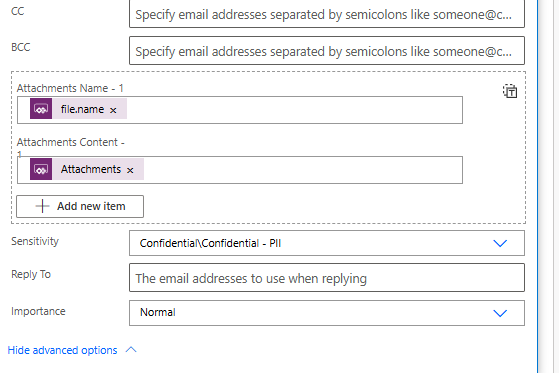
    The below is the 'Special' Email flow that is not working:
     
    And this is the one that is (the 'Basic' email)
     
  • WarrenBelz Profile Picture
    153,051 Most Valuable Professional on at
    Those images are too small to read effectively, particularly with all that black redacting. Can you please attach them as files and see if you can only redact what you need - field names are generally not that sensitive - we cannot see any of your data.
  • CU07022222-0 Profile Picture
    16 on at
    @WarrenBelz Sorry for the inconvenience.  I have added a Word doc and hopefully it has everything you need in  the right format.
    Community Query a...

    Your file is currently under scan for potential threats. Please wait while we review it for any viruses or malicious content.

  • WarrenBelz Profile Picture
    153,051 Most Valuable Professional on at
    Your file cannot be downloaded - try a PDF. The bottom line here is that either the values being presented to the Flow are not "lining up" with what it expects (in order) or you are not sending the expected value in your output.

Under review

Thank you for your reply! To ensure a great experience for everyone, your content is awaiting approval by our Community Managers. Please check back later.

Helpful resources

Quick Links

Forum hierarchy changes are complete!

In our never-ending quest to improve we are simplifying the forum hierarchy…

Ajay Kumar Gannamaneni – Community Spotlight

We are honored to recognize Ajay Kumar Gannamaneni as our Community Spotlight for December…

Leaderboard > Power Apps

#1
WarrenBelz Profile Picture

WarrenBelz 711 Most Valuable Professional

#2
Michael E. Gernaey Profile Picture

Michael E. Gernaey 319 Super User 2025 Season 2

#3
Power Platform 1919 Profile Picture

Power Platform 1919 268

Last 30 days Overall leaderboard