web
You’re offline. This is a read only version of the page.
close
Skip to main content

Notifications

Announcements

Community site session details

Community site session details

Session Id :
Power Platform Community / Forums / Power Apps / Sort-Distinct-Filter F...
Power Apps
Suggested Answer

Sort-Distinct-Filter Formula for Gallery

(0) ShareShare
ReportReport
Posted on by 5,325 Super User 2025 Season 2
I have three Dropdown controls.

I have Gallery_1.

Gallery_1 is displaying data from a Collection.

The data displayed in Gallery_1 is based on the choices made in the three Dropdowns.

I am having an issue getting the Distinct function to work in the Dropdowns and Gallery_1.
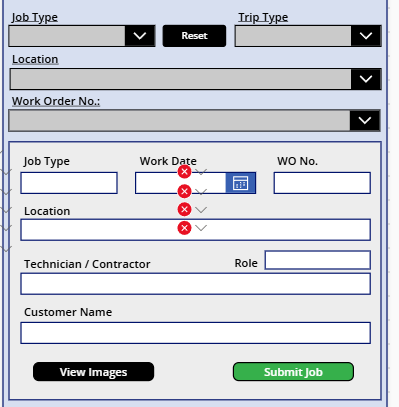

.
The Location Dropdown Items formula is the following. However, where the Location name appears more than once in the dataset it shows more than once in the Dropdown list;
it should be distinct and only appear once.
 
   If(
   JPU_Job_Type_Dropdown.Selected.Value = "Drop",
   Sort(Distinct(Filter(colPendingDropData,colPending_Invoice_Type = "Drop"),colPending_Location),SortOrder.Ascending),
   
 
   JPU_Job_Type_Dropdown.Selected.Value =  "Install",
   Sort(Distinct(Filter(colPendingInstallData,colPending_Invoice_Type = "Install"),colPending_Location),SortOrder.Ascending),
   
   JPU_Job_Type_Dropdown.Selected.Value =  "Storm Work",
   Sort(Distinct(Filter(colPendingStormWorkData,colPending_Invoice_Type = "Storm Work"),colPending_Location),SortOrder.Ascending),
 
   JPU_Job_Type_Dropdown.Selected.Value = "Trip",
   Sort(Distinct(Filter(colPendingTripProjectData,colPending_Invoice_Type = "Trip"),colPending_Location),SortOrder.Ascending))
 

The Gallery_1 Items formula is the following. Same issue as the Location. Where the Work Order No. (colPending_Title) appears more than once in the dataset, it also appears
more than once in Gallery_1; It should be distinct and only appear once.
 
    JPU_Job_Type_Dropdown.Selected.Value = "Trip" && !IsBlank(JPU_Location_Dropdown.Selected.Value) &&
    !IsBlank(JPU_Work_Order_Number_Dropdown.Selected.Value),Sort(Filter(colPendingTripProjectData,colPending_Title = JPU_Work_Order_Number_Dropdown.Selected.Value &&
    colPending_Invoice_Type = "Trip" && colPending_Trip_Activity = "Trip"),SortOrder.Ascending),
   
    JPU_Job_Type_Dropdown.Selected.Value = "Trip" && !IsBlank(JPU_Location_Dropdown.Selected.Value),Sort(Filter(colPendingTripProjectData,colPending_Location =
    JPU_Location_Dropdown.Selected.Value && colPending_Invoice_Type = "Trip" && colPending_Trip_Activity = "Trip"),SortOrder.Ascending),
   
    JPU_Job_Type_Dropdown.Selected.Value = "Trip",
    Sort(Filter(colPendingTripProjectData,colPending_Invoice_Type = "Trip" && colPending_Trip_Activity = "Trip"),colPending_Title,SortOrder.Ascending))
Categories:
I have the same question (0)
  • Suggested answer
    CU07111156-1 Profile Picture
    6 on at
    Hi,

    Could I suggest a simplified approach, something along the lines of:

    Sort(
     
    Distinct(
      
    Filter(colPendingDropData,colPending_Invoice_Type = JPU_Job_Type_Dropdown.Selected.Value),
     [
    distinct column name]),
    [sort column name]
    SortOrder.Ascending)

    You could then use And / OR second filter
    Alternatively nest the filter queries but only have a single
       
    Filter and/or would be something like:
      Sort( Distinct( Filter( xxxxxxx && xxxxxxx ), [
    distinct column name), [sort column name]SortOrder.Ascending )

    Nesting would be along the lines of:
    Sort by             Sort(
    distinct             Distinct(

    outer                 Filter(
    inner                  Filter( xxxxxxx && xxxxxxx ),
    out criteria            activity = abcd),
    distinct value       [column name] 
    ),
    sort order          [column name] )
    SortOrder.Ascending)
     
  • Phineas Profile Picture
    5,325 Super User 2025 Season 2 on at
    It is unclear to me where each of the formula you show should be placed.

    Can you please clarify.

    Also, what the the 'x's in the inner filter represent?

Under review

Thank you for your reply! To ensure a great experience for everyone, your content is awaiting approval by our Community Managers. Please check back later.

Helpful resources

Quick Links

Forum hierarchy changes are complete!

In our never-ending quest to improve we are simplifying the forum hierarchy…

Ajay Kumar Gannamaneni – Community Spotlight

We are honored to recognize Ajay Kumar Gannamaneni as our Community Spotlight for December…

Leaderboard > Power Apps

#1
WarrenBelz Profile Picture

WarrenBelz 721 Most Valuable Professional

#2
Michael E. Gernaey Profile Picture

Michael E. Gernaey 320 Super User 2025 Season 2

#3
Power Platform 1919 Profile Picture

Power Platform 1919 268

Last 30 days Overall leaderboard


