web
You’re offline. This is a read only version of the page.
close
Skip to main content
Community site session details

Community site session details

Session Id :
Power Apps - Building Power Apps
Unanswered

Deep Linking in Power Apps: zero config using flow headers

(1) ShareShare
ReportReport
Posted on by 1,773
Please note: This is not a question. just a neat thing i tripped over while messing with power apps and power automate. i’d share it as a blog, but silly me doesn’t have the blog button.
 
Recently, I had to implement deep linking in a Canvas app. The plan felt straightforward: use Param() to read query strings and jump to the right screen or record
 
However, to build links that work across Dev, Test, and Prod environments, I needed the App ID, Environment ID, and Tenant ID at runtime.
 
 
The extra twist is the base of the link. If you want links that survive Dev, Test, and Prod, you need the correct App ID, Environment ID, and Tenant ID. Keeping those in sync across environments can be tedious.
 
I searched the web for a dead-simple approach… nope. lots of workarounds, nothing truly easy. and I was also curious about something: when the same Power Automate flow is connected to multiple apps, how does the flow know which app is calling it?
 

While checking the Power Automate trigger headers, I found something interesting (a few useful properties).
 
Whenever a Power Apps call a flow, it includes the caller details in the request headers (App ID, Environment ID, and Tenant ID). Based on these headers, the Power Automate flow tailors the response to the exact app that invoked it.
 

The trick is:

1. Create an Instant cloud flow with the trigger When Power Apps calls a flow (V2).

 
2. Add three Compose actions named Compose - App ID, Compose - Environment ID, and Compose - Tenant ID.
 
 
3.In each Compose, paste these expressions:
  
App ID
 
last(split(trigger()?['Outputs/headers/x-ms-client-app-id'], '/'))
 
 
Environment ID
  
last(split(trigger()?['Outputs/headers/x-ms-client-environment-id'], '/'))
  
  
Tenant ID
 
trigger()?['Outputs/headers/x-ms-client-tenant-id']
   
 
4. Add Respond to a Power App or flow that returns { App_ID, Environment_ID, Tenant_ID } mapped from the three Compose outputs.
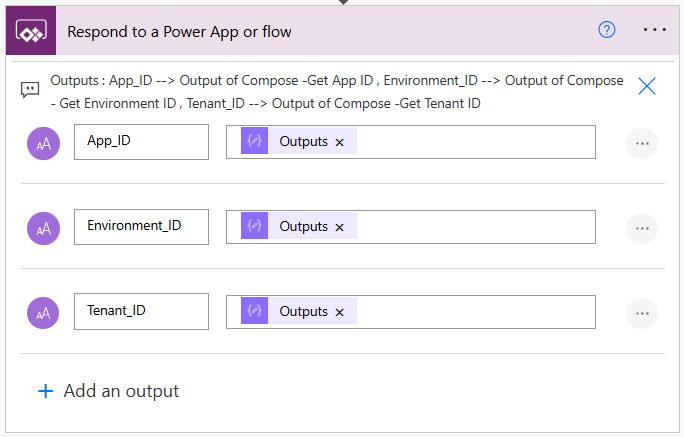
5. Consume it in Power Apps.

// Call the flow and capture IDs
Set(App_Details, GetAppdetails.Run()); // Sample flow name

// Build a deep link
Set(
    _deepLink,
    $"https://apps.powerapps.com/play/e/{App_Details.environment_id}/a/{App_Details.app_id}?tenantId={App_Details.tenant_id}"
);

// Optional: add screen/record params
Set(
    DeepLinkWithParams,
    _deepLink & "&screen=Details&recordId=" & Text(SomeRecord.Id)
);

Display _deepLink in a Label or wire it to a Copy button.
   
Optionally, append custom query parameters like screen=Details or recordId=123 to jump to the right screen or record.
  
Advantages using this method:  
  • No maintenance for IDs found at run time.
  • Reusable across apps. One flow can serve many apps.
  • Easy to deploy. Move from Dev to Test to Prod without touching variables or constants.
 
Happy deep linking.
I have the same question (0)
  • SebS Profile Picture
    4,569 Moderator on at
    Deep Linking in Power Apps: zero config using flow headers
    I would use Environment variables for that less complicated and took  APP ID from 


    And rest from :


    and use them in the app
  • Power Platform 1919 Profile Picture
    1,773 on at
    Deep Linking in Power Apps: zero config using flow headers
    Hi @SebS ,
    i completely agree with you. but as mentioned in the post this approach completely removes dependency on environment variables and no external maintainer of these values.
     
    On a side note(this is case to case basis) ,
    when working with multiple versions of same app (duplicate apps). deep links becomes nightmare as these environment variables still point to same app (as we hard coded the values indirectly)
     
     
    i am happy to be corrected and the way you proposed to get these values is correct and my approach is also gives the same values in different style (just like : to get value 2 , we can do 1+1 or 3-1 )
     
     
  • SebS Profile Picture
    4,569 Moderator on at
    Deep Linking in Power Apps: zero config using flow headers
    HI,
     
    I do like it but most of Deep linking is created from App.OnStart and placing there a flow maybe unreliable and it's hard to create error handling for user in enterprice scale apps, but for specific scenarios it's a cool method. Thank You for sharing it with the community. 
     

Under review

Thank you for your reply! To ensure a great experience for everyone, your content is awaiting approval by our Community Managers. Please check back later.

Helpful resources

Quick Links

Coming soon: forum hierarchy changes

In our never-ending quest to improve we are simplifying the forum hierarchy…

Ajay Kumar Gannamaneni – Community Spotlight

We are honored to recognize Ajay Kumar Gannamaneni as our Community Spotlight for December…

Leaderboard > Power Apps

#1
WarrenBelz Profile Picture

WarrenBelz 803 Most Valuable Professional

#2
Michael E. Gernaey Profile Picture

Michael E. Gernaey 314 Super User 2025 Season 2

#3
MS.Ragavendar Profile Picture

MS.Ragavendar 253 Super User 2025 Season 2

Last 30 days Overall leaderboard
