web
You’re offline. This is a read only version of the page.
close
Skip to main content

Notifications

Announcements

Community site session details

Community site session details

Session Id :
Power Platform Community / Forums / Power Apps / Can't change settings ...
Power Apps
Unanswered

Can't change settings for default environment.

(0) ShareShare
ReportReport
Posted on by 30
Howdy.
I'm trying to change settings for default environment in power platform admin center. Beforehand it did allow me to add Dataverse to the default environment.
Now I tried enabling auditing, but get the following error (sorry for censoring of GUIDs, mum told me to be skeptical of strangers on the internet).


The account I'm using has Power Platform and Sharepoint admin priviledges on Entra ID and also Power Automate premium license.
I also get similar errors when I try to add system admin role to myself in the environment's security roles or try to toggle things in the "Features" tab of the environment.

I did not run into such issues when configuring other environments (sandbox, production, development).

 
I have the same question (0)
  • Verified answer
    stampcoin Profile Picture
    5,058 Super User 2025 Season 2 on at
    You don't have enough privilege to change that. ( it's better to avoid using the default environment).
    1. Sign in to the Power Platform admin center.
    2. In the left side panel, select Environments.
    3. Select the checkmark next to your environment.
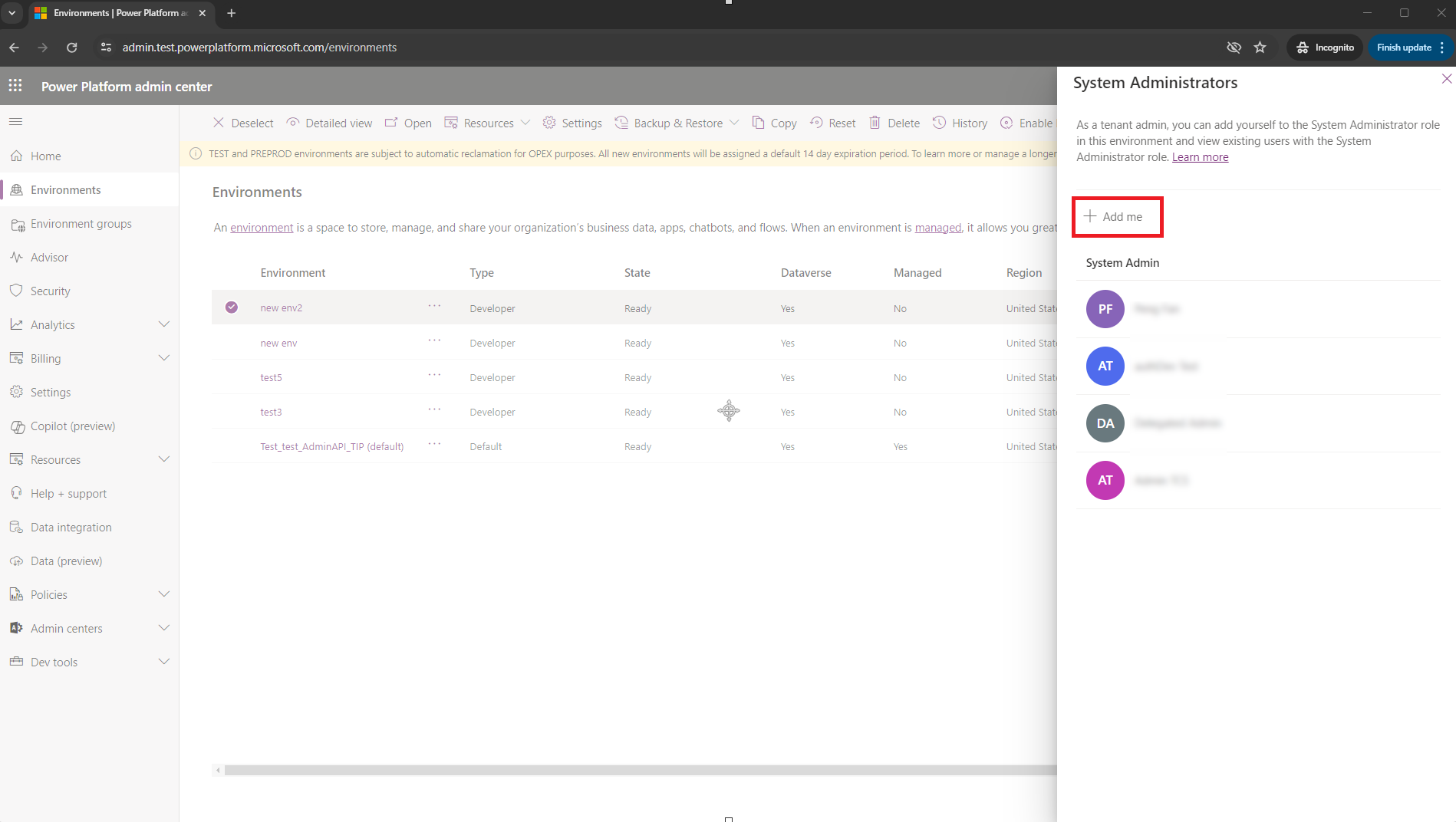
    4. Select Membership in the command bar (on the top, check... if you it doesn't show) to request self-elevation.
    5. The System Administrators pane is displayed. Add yourself to the system administrator role by selecting Add me.
    Use the Membership menu option to request self-elevation.

Under review

Thank you for your reply! To ensure a great experience for everyone, your content is awaiting approval by our Community Managers. Please check back later.

Helpful resources

Quick Links

Forum hierarchy changes are complete!

In our never-ending quest to improve we are simplifying the forum hierarchy…

Ajay Kumar Gannamaneni – Community Spotlight

We are honored to recognize Ajay Kumar Gannamaneni as our Community Spotlight for December…

Leaderboard > Power Apps

#1
WarrenBelz Profile Picture

WarrenBelz 717 Most Valuable Professional

#2
Michael E. Gernaey Profile Picture

Michael E. Gernaey 329 Super User 2025 Season 2

#3
Power Platform 1919 Profile Picture

Power Platform 1919 268

Last 30 days Overall leaderboard