web
You’re offline. This is a read only version of the page.
close
Skip to main content

Notifications

Announcements

Community site session details

Community site session details

Session Id :
Power Platform Community / Forums / Power Apps / How to filter a galler...
Power Apps
Suggested Answer

How to filter a gallery based on a managed metadata (term store) column in SharePoint

(2) ShareShare
ReportReport
Posted on by
Hello,
 
I have a column with managed metadata from the term store in SharePoint list, and I have a gallery connected to that list, and simply put, I want to filter my gallery based on one of the values in that column:
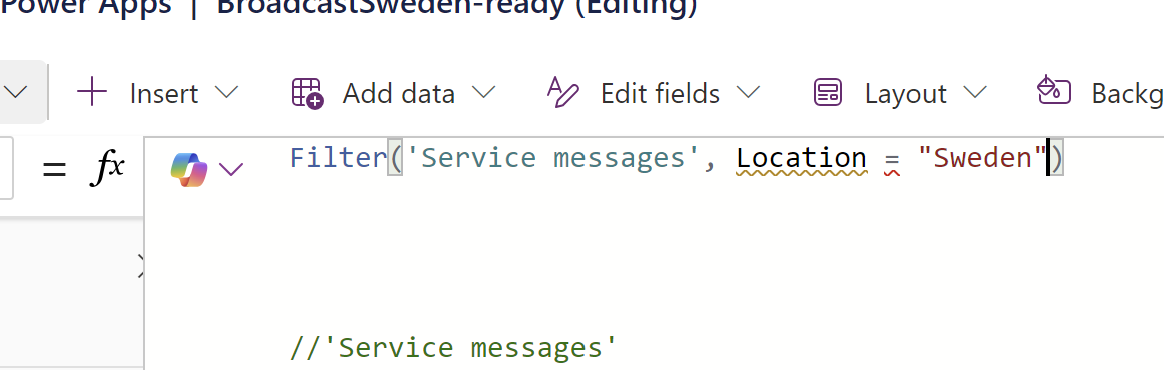

But the problem here is that it says "Cannot compare Table, Text", how do I do it?
 
When I put the Location in a dropdown using a collection, I get the options like "Sweden | U123-28851-addasikkl-asdasdd" , I get the name and a guid, but I just want the name.
I tried things like Text(Location), Location.Value etc but it doesnt work, it keeps giving me the error that either Location is not a text or cannot compare Table and Text.
 
Anyone knows how to achieve this?

Thank you in advance!
Categories:
I have the same question (0)
  • RN-10011829-0 Profile Picture
    on at
    Hi, 
     
    Did you find a solution for this? I am in a similar situation. I just cant seem to filter a metadata column in a gallery. I managed to display the metadata text in the column like this - > 
    Concat(Location, Label , "; ") but filter doesnt work. 
  • vipuljain03 Profile Picture
    657 Super User 2025 Season 2 on at
    I replicated the scenario and was able to filter the gallery for a Metadata Column present in a SharePoint List. Please find below the explanation:
    1. Created a column "Location" in SharePoint Online List, as shown below:


    2. Added a drop-down in Canvas App and a Gallery control.


    3. Used the below formula on Items property of the Gallery
      Filter('Issue tracker',Location.Label = "Sweden")
      This formula will work, however with Delegation warning.
      Note: Below formulas also will give you Delegation warning:
      Filter('Issue tracker',Dropdown1.Selected.Label in Location.Label)
      Filter('Issue tracker',Location.Label = Dropdown1.Selected.Label)
       
      So, its better to create a local collection on App.OnStart property, and then
      use the collection with Filter, as shown below:
      App.OnStart: 
      ClearCollect(colIssueTracker, 'Issue tracker');
      Gallery Items: Filter('Issue tracker',Location.Label = Dropdown1.Selected.Label)

    Explanation:
    A managed metadata column in SharePoint returns a record with the following structure:
    • Value: The display name of the term.
    • ID: The GUID of the term.
    • Label: represents the display name of the term. This can interchangeably used with Value in some contexts. The Label property is directly accessible and treated as a text field, making it compatible with filtering conditions.
    My Recommendation:
    If feasible, convert the managed metadata column to a Choice column in SharePoint. Choice columns are fully delegable and work seamlessly with Power Apps filtering. However, this requires altering your SharePoint list structure, which might not be suitable in all cases.
    -----------------------------------------------------------------------------------------
    If this reply helped you, please mark this reply as suggested answer and give it a like to help others in the community find the answer too!
     
    Thanks,
    Vipul
  • Suggested answer
    vipuljain03 Profile Picture
    657 Super User 2025 Season 2 on at
    Please click Accept as solution if my post helped you solve your issue. ✔️ This will help others find the solution to this problem. It also closes the item.

    If the content was useful in other ways, please consider giving it Thumbs Up. 👍

Under review

Thank you for your reply! To ensure a great experience for everyone, your content is awaiting approval by our Community Managers. Please check back later.

Helpful resources

Quick Links

Forum hierarchy changes are complete!

In our never-ending quest to improve we are simplifying the forum hierarchy…

Ajay Kumar Gannamaneni – Community Spotlight

We are honored to recognize Ajay Kumar Gannamaneni as our Community Spotlight for December…

Leaderboard > Power Apps

#1
WarrenBelz Profile Picture

WarrenBelz 739 Most Valuable Professional

#2
Michael E. Gernaey Profile Picture

Michael E. Gernaey 343 Super User 2025 Season 2

#3
Power Platform 1919 Profile Picture

Power Platform 1919 268

Last 30 days Overall leaderboard



