Hello,
I have problem with parsing XML from our national index of companies and entrepreneurs. Below is example of that XML which I GET from HTTP request. For example I need to get only <dtt:Nazev_obce> which is name of a city. I tried to use this formula in compose:
xpath(xml(body('HTTP')), './/*[local-name()="properties"]/*[local-name()="Nazev_Obce"]/text()')
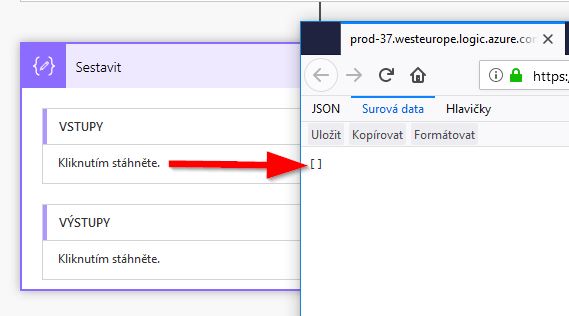
My flow run without error but in the end I see [ ] on input of the compose and [ ] on the output which is weird.
Source XML:
http://wwwinfo.mfcr.cz/cgi-bin/ares/darv_std.cgi?ico=27074358
<are:Ares_odpovedi odpoved_datum_cas="2018-07-24T13:42:57" odpoved_pocet="1" odpoved_typ="Standard" vystup_format="XML" xslt="klient" validation_XSLT="/ares/xml_doc/schemas/ares/ares_answer/v_1.0.0/ares_answer.xsl" xsi:schemaLocation="http://wwwinfo.mfcr.cz/ares/xml_doc/schemas/ares/ares_answer/v_1.0.1 http://wwwinfo.mfcr.cz/ares/xml_doc/schemas/ares/ares_answer/v_1.0.1/ares_answer_v_1.0.1.xsd" Id="ares">
 <are:Odpoved>
 <are:Pocet_zaznamu>1</are:Pocet_zaznamu>
 <are:Typ_vyhledani>FREE</are:Typ_vyhledani>
 <are:Zaznam>
 <are:Shoda_ICO>
 <dtt:Kod>9</dtt:Kod>
 </are:Shoda_ICO>
 <are:Vyhledano_dle>ICO</are:Vyhledano_dle>
 <are:Typ_registru>
 <dtt:Kod>2</dtt:Kod>
 <dtt:Text>OR</dtt:Text>
 </are:Typ_registru>
 <are:Datum_vzniku>2003-08-06</are:Datum_vzniku>
 <are:Datum_platnosti>2018-07-24</are:Datum_platnosti>
 <are:Pravni_forma>
 <dtt:Kod_PF>121</dtt:Kod_PF>
 </are:Pravni_forma>
 <are:Obchodni_firma>Asseco Central Europe, a.s.</are:Obchodni_firma>
 <are:ICO>27074358</are:ICO>
 <are:Identifikace>
 <are:Adresa_ARES>
 <dtt:ID_adresy>206538183</dtt:ID_adresy>
 <dtt:Kod_statu>203</dtt:Kod_statu>
 <dtt:Nazev_okresu>Hlavní město Praha</dtt:Nazev_okresu>
 <dtt:Nazev_obce>Praha</dtt:Nazev_obce>
 <dtt:Nazev_casti_obce>Michle</dtt:Nazev_casti_obce>
 <dtt:Nazev_mestske_casti>Praha 4</dtt:Nazev_mestske_casti>
 <dtt:Nazev_ulice>Budějovická</dtt:Nazev_ulice>
 <dtt:Cislo_domovni>778</dtt:Cislo_domovni>
 <dtt:Typ_cislo_domovni>1</dtt:Typ_cislo_domovni>
 <dtt:Cislo_orientacni>3a</dtt:Cislo_orientacni>
 <dtt:PSC>14000</dtt:PSC>
 <dtt:Adresa_UIR>
 <udt:Kod_oblasti>19</udt:Kod_oblasti>
 <udt:Kod_kraje>19</udt:Kod_kraje>
 <udt:Kod_okresu>3100</udt:Kod_okresu>
 <udt:Kod_obce>554782</udt:Kod_obce>
 <udt:Kod_pobvod>43</udt:Kod_pobvod>
 <udt:Kod_nobvod>43</udt:Kod_nobvod>
 <udt:Kod_casti_obce>490130</udt:Kod_casti_obce>
 <udt:Kod_mestske_casti>500119</udt:Kod_mestske_casti>
 <udt:PSC>14000</udt:PSC>
 <udt:Kod_ulice>444375</udt:Kod_ulice>
 <udt:Cislo_domovni>778</udt:Cislo_domovni>
 <udt:Typ_cislo_domovni>1</udt:Typ_cislo_domovni>
 <udt:Cislo_orientacni>3</udt:Cislo_orientacni>
 <udt:Pism_cislo_orientacni>a</udt:Pism_cislo_orientacni>
 <udt:Kod_adresy>41405609</udt:Kod_adresy>
 <udt:Kod_objektu>21770794</udt:Kod_objektu>
 </dtt:Adresa_UIR>
 </are:Adresa_ARES>
 </are:Identifikace>
 <are:Kod_FU>9</are:Kod_FU>
 <are:Priznaky_subjektu>NAAANANNNNNNNNNNNNNNNNNNANNNNN</are:Priznaky_subjektu>
 </are:Zaznam>
 </are:Odpoved>
</are:Ares_odpovedi>


