web
You’re offline. This is a read only version of the page.
close
Skip to main content

Notifications

Announcements

Community site session details

Community site session details

Session Id :
Power Platform Community / Forums / Power Apps / Issues Filtering Users...
Power Apps
Answered

Issues Filtering Users from a Microsoft Entra ID Group in Power Apps

(1) ShareShare
ReportReport
Posted on by 143
Hi everyone,
 
I’m working on a SharePointIntegration form in Power Apps and I have a ComboBox named “ComboBox5”. In its Items property, I have the following expression:
Choices([@'Backup Projects 26-06-2024'].'TS Contact')
 
 
The SharePoint list is called ‘Backup Projects 26-06-2024’ and the ‘TS Contact’ column is of type “Person or Group”. The ComboBox works fine and allows me to search and select any user in the company.
However, I need to limit the ComboBox to only search within a specific group of users in Microsoft Entra ID, called example.group, which has about 20 people.
 
I tried using the Office 365 Groups connector with the following code in the OnVisible event of the screen:
 
 
ClearCollect(GroupMembers, Office365Groups.ListGroupMembers("12345678-1234-1234-1234-123456789012").value);
ClearCollect(GroupEmails, GroupMembers.mail);
(Note: The code “12345678-1234-1234-1234-123456789012” corresponds to the Object ID of the group in question.)
 
 
And in the Items property of the ComboBox:
Filter(
    Choices([@'Backup Projects 26-06-2024'].'TS Contact'),
    ThisItem.Email in GroupEmails
)

Despite this, the GroupMembers collection appears empty. I have tried with other groups of which I am the owner and get the same result.
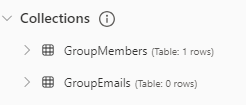

Can anyone help me resolve this issue or suggest a better way to limit the ComboBox to users from a specific Microsoft Entra ID group?
Thanks in advance!
Categories:
I have the same question (0)
  • WarrenBelz Profile Picture
    153,117 Most Valuable Professional on at
    Try 
    Filter(
        Choices([@'Backup Projects 26-06-2024'].'TS Contact'),
        Email in GroupMembers.mail
    )
     
    Please click Does this answer your question if my post helped you solve your issue. This will help others find it more readily. It also closes the item. If the content was useful in other ways, please consider giving it a Like.
    MVP (Business Applications)     Visit my blog Practical Power Apps    Buy me a coffee
  • Verified answer
    FlowFalcon Profile Picture
    143 on at
    Hi @WarrenBelz,
     

    After some investigation and testing, I finally found a solution to limit a ComboBox in Power Apps so that it only shows members of two specific groups in Microsoft Entra ID. Here’s what I did:

    - In the OnVisible event of the screen, I added the following code:

    // Get the members of 'example.group1'
    ClearCollect(GroupMembersGroup1, Office365Groups.ListGroupMembers("11111111-1111-1111-1111-111111111111").value);
    
    // Get the members of 'example.group2'
    ClearCollect(GroupMembersGroup2, Office365Groups.ListGroupMembers("22222222-2222-2222-2222-222222222222").value);
    
    // Combine both collections into one
    ClearCollect(AllGroupMembers, GroupMembersGroup1); // first, add members from the first group
    Collect(AllGroupMembers, GroupMembersGroup2); // then, add members from the second group
    
     
    - Then, in the Items property of the ComboBox, I used the following expression to filter the results based on the text entered in the search box:
    Filter(
        AllGroupMembers,
        StartsWith(displayName, ComboBox5.SearchText) || StartsWith(mail, ComboBox5.SearchText)
    )


    This way, I can search and select users who belong only to the two specified groups.

    I hope this helps someone else. Thanks to @WarrenBelz who contributed with their suggestions!

Under review

Thank you for your reply! To ensure a great experience for everyone, your content is awaiting approval by our Community Managers. Please check back later.

Helpful resources

Quick Links

Forum hierarchy changes are complete!

In our never-ending quest to improve we are simplifying the forum hierarchy…

Ajay Kumar Gannamaneni – Community Spotlight

We are honored to recognize Ajay Kumar Gannamaneni as our Community Spotlight for December…

Leaderboard > Power Apps

#1
WarrenBelz Profile Picture

WarrenBelz 765 Most Valuable Professional

#2
Michael E. Gernaey Profile Picture

Michael E. Gernaey 343 Super User 2025 Season 2

#3
Power Platform 1919 Profile Picture

Power Platform 1919 272

Last 30 days Overall leaderboard
