web
You’re offline. This is a read only version of the page.
close
Skip to main content

Announcements

News and Announcements icon
Community site session details

Community site session details

Session Id :
Power Platform Community / Forums / Power Apps / Modern Control Table n...
Power Apps
Suggested Answer

Modern Control Table not showing data

(0) ShareShare
ReportReport
Posted on by 146

Hello PAC,


I'm using a modern control table where I want to display items from the Invoice Master SharePoint list. Specifically, I'm trying to filter the list so that it only shows records where the 'Request ID' (a single line of text field in Invoice Master) matches the ID (a number) from a different SharePoint list.

Here's the formula I'm currently using:

Filter(

'Invoice Master',

'Request ID' = DataCardValue70.Value

)

This formula works perfectly in a Gallery—it shows only the records linked to the selected ID. However, when I use the same formula in a modern control table, no data appears.
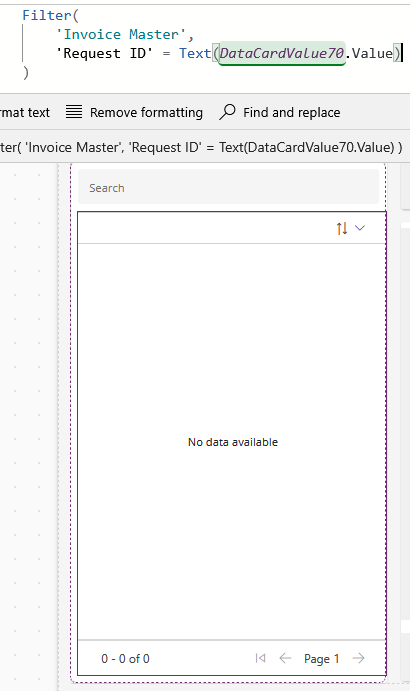
I want the modern table to only display items from Invoice Master that are linked to the currently selected request ID from the other SharePoint list. Could you help me understand why it's not working in the modern control?

 
Categories:
I have the same question (0)
  • stampcoin Profile Picture
    5,153 Super User 2026 Season 1 on at
    @Seth18 Hi,
    You said Request ID' (a single line of text field in Invoice Master) matches the ID (a number).
    Then please try this first.
    Filter(
      'Invoice Master',
      Value('Request ID') = DataCardValue70.Value
    )
    
     
  • Suggested answer
    MS.Ragavendar Profile Picture
    6,961 Super User 2026 Season 1 on at
     
    I replicated the same logic by adding text input control and gallery and table control.
     
    Gallery : 
     
    If(IsBlank(TextInput1.Text),Test, Filter(Test,Title=TextInput1.Text))
     
     
    Table 
     
    // Same formula
    If(IsBlank(TextInput1.Text),Test, Filter(Test,Title=TextInput1.Text))
     
     
    I created one label and checking whether it returning any rows or not to ensure my query is right.


    I didn't experience issue like you stating, may i know why you used datacard and all are u using the form ?
     
    🏷️ Please tag me @MS.Ragavendar if you still have any queries related to the solution or issue persists.
    ✅ Please click Accept as solution if my post helped you solve your issue and help others who will face the similar issue in future.
    ❤️ Please consider giving it a Like, If the approach was useful in other ways.
  • Seth18 Profile Picture
    146 on at
     
    I tried your method but it still not working. 
  • Seth18 Profile Picture
    146 on at
     
    what i meant is this as below this is the old used way where this sharepoint contain only the basic info.
     
     
    and when moving to the invoice screen as below once the user create the invoices and save the invoice (which is submitting the form) then i used the code on item as below 
     

    Filter(

    'Invoice Master',

    'Request ID' = DataCardValue10.Text

    ) (Datacardvalue10 here is the ID from the first screen)


    Then i wanted to change to the modern control table as i mentioned above in which it not showing the data. 
  • Suggested answer
    MS.Ragavendar Profile Picture
    6,961 Super User 2026 Season 1 on at
     
    Based on understanding, I am sharing this suggestion revert me it doesnt work for you.
     
    Inside the form, i am getting the last item Id of submitted records and setting to the global variable.
     
     
    In the Items property
     
     
    🏷️ Please tag me @MS.Ragavendar if you still have any queries related to the solution or issue persists.
    ✅ Please click Accept as solution if my post helped you solve your issue and help others who will face the similar issue in future.
    ❤️ Please consider giving it a Like, If the approach was useful in other ways.
  • MS.Ragavendar Profile Picture
    6,961 Super User 2026 Season 1 on at
     
    Did u sort it out or still looking for any challenge in the implementation?
     
     
  • Seth18 Profile Picture
    146 on at
     
    I tried your proposed but it not working as well
  • MS.Ragavendar Profile Picture
    6,961 Super User 2026 Season 1 on at
     
    Can you please help us with the schema and detailed approach which you tried, so that we can able to replicate it from our end and proposed solution accordingly.

Under review

Thank you for your reply! To ensure a great experience for everyone, your content is awaiting approval by our Community Managers. Please check back later.

Helpful resources

Quick Links

Introducing the 2026 Season 1 community Super Users

Congratulations to our 2026 Super Users!

Kudos to our 2025 Community Spotlight Honorees

Congratulations to our 2025 community superstars!

Congratulations to the April Top 10 Community Leaders!

These are the community rock stars!

Leaderboard > Power Apps

#1
Vish WR Profile Picture

Vish WR 1,055

#2
Valantis Profile Picture

Valantis 666

#2
11manish Profile Picture

11manish 666

Last 30 days Overall leaderboard
