Hi,
To provide a list of available environments in your Power App, you can use the Power Platform for Admins connector. This allows you to pull the environment data into a simple list that your users can interact with.
Here is exactly how to set it up:
Step 1: Add the Connector
In your Power App editor, go to the Data tab on the left:
-
Click Add data.
-
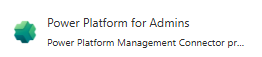
Search for "Power Platform for Admins" and select it.
-
Ensure you are using an account with Power Platform Admin or Global Admin privileges.
Step 2: Create the Collection
To make the data easy to use in your UI, you need to extract the names from the connector's results. Paste this formula into the OnVisible property of your screen (or the OnStart of the App):
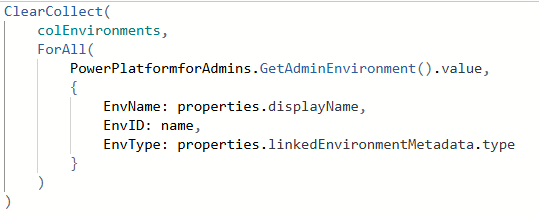
Note: We use ForAll here to move the displayName out of the properties section so it is easy to select in your dropdown.
Step 3: Configure the Dropdown
Now that your data is ready, set up your control:
-
Insert a Dropdown or Combo Box.
-
Set the Items property to:
colEnvironments
-
In the right-hand Properties pane, set the Value (or DisplayField) to:
EnvName
✅If this helped, please Accept as Solution to help others ❤️ A Like is appreciated


