web
You’re offline. This is a read only version of the page.
close
Skip to main content

Announcements

Community site session details

Community site session details

Session Id :
Power Platform Community / Forums / Power Apps / PDF function with Expa...
Power Apps
Answered

PDF function with ExpandContainers does not correctly display large expanded content correctly

(0) ShareShare
ReportReport
Posted on by 14
Hello everyone,
 
I have created an app that allows users to enter material needs into a form like interface in power apps.
After they decide they have entered everything they need a pdf document should be generated.
 
I am using a separate screen for this it contains the header data as some text fields and two containers containing (1) the different positions of their request and (2) their attachments:
The generated PDF looks like this if it has only a few positions in the first container:
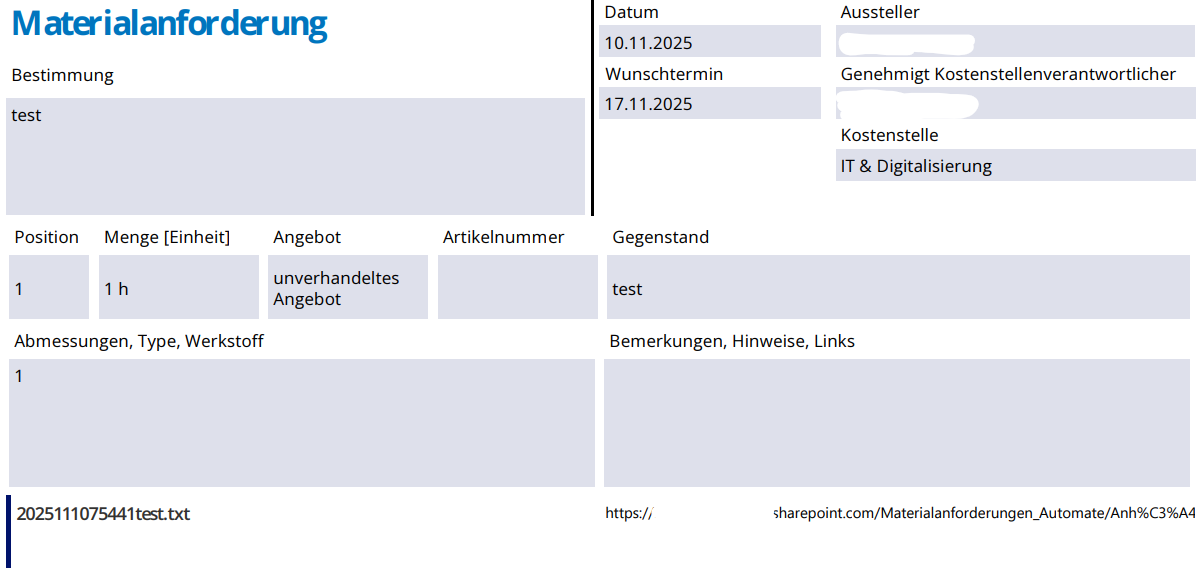
However, if there are a lot of positions for example 11 it looks like this:
The content of the first container expands as it should but the content of the second container is technically there but not rendered correctly.
 
I appreciate any help on this matter.
 
If you need any additional information please tell me.
Categories:
I have the same question (0)
  • Suggested answer
    Daniel Bocklandt Profile Picture
    5,117 Super User 2026 Season 1 on at
     
    Take a look at this documentation: PDF function (experimental) - Power Platform | Microsoft Learn

    Could you tell us how you've bult this other screen? the PDF function, does it take the whole screen or a container?
     
    Did you make sure, that all child components are extended completly? 
    for the gallery.height : CountRows(gallery.AllItems)*Self.Templateheight
     
    Since the PDF function is still in preview, the expandContainers property is sometimes a bit bugy. 

    That's why I always make sure to manually expand all child controls when creating a PDF.
     

    If this solved your problem, please mark it as Solved to help others find the solution faster.
    If you found it helpful, consider giving it a Like to support each other in this community!

    Thanks, and happy building!

  • TE-10110741-0 Profile Picture
    14 on at
     
    I have looked at that documentation before posting my question and I am certain not to have nested containers or something along these lines in my pdf screen.
     
    By 'other screen' you are probably refering to my screen that I use to generate the PDF file.
    I use the whole screen to generate my PDF using a timer's OnTimerStart attribute like this:
    Set(createdPDF; PDF(Screen1; {ExpandContainers: true}));;
     
    And OnTimerEnd is used to send the generated PDF to a PowerFlow.
     
    I did not make sure that all child components are extended by formula, I will try that next then.
    Do I have to adjust the position of my containers accordingly when I expand them myself or will the PDF function make sure all elements are positioned correctly then?
  • TE-10110741-0 Profile Picture
    14 on at
     
    I have now tried expanding the galleries manually. It did not change the outcome of the PDF. I even controlled the position of the second gallery like this:
     
    Anhangsliste.Y:
    Anforderungsliste.Y + Anforderungsliste.Height
     
    But as soon as the first gallery exceeds the first page on the PDF file, the attachment gallery isn't rendered correctly in the PDF file anymore.
    During generation the attachments on screen look fine though:
  • Suggested answer
    Daniel Bocklandt Profile Picture
    5,117 Super User 2026 Season 1 on at
     
    sorry for my late reply... didn't get any notification about your answers. 
     
    The way you use the PDF function all the screen is actually a container. So all other containers and galleries are nested components.
     
    That you've controlled the position of the second gallery is perfect. exactly what you need to do. 
    Here's an example how I used the PDF function, 
    PDF(
            ContainerACC,
            {ExpandContainers:true, Size: "A4", Margin: "0,0,0,0", Orientation: "Portrait"}
        )
     Something that could be the issue is the following. Use the PDF function as soon as you get on the screen it is sometimes quite buggy.
    This function is still experimental. That's why I added a timer that wait's 2 seconds after the 2 seconds (the components had time to render completly) I start the PDF function and generate a report over multiple pages
     

    If this solved your problem, please mark it as Solved to help others find the solution faster.
    If you found it helpful, consider giving it a Like to support each other in this community!

    Thanks, and happy building!

  • TE-10110741-0 Profile Picture
    14 on at
    thank you for your reply.
     
    I tried your suggested answer now but unfortunately it did not work for me.
     
    I also tried
    • expanding the Screen1.Height depending on the content in advance
    • waiting 5 seconds before generating the PDF
    without success.
     
    As you mentioned, if the galleries on the screen are counted as nested containers that is probably my problem. 
    Is there any way to have 2 views for separate lists in one PDF then?
  • Daniel Bocklandt Profile Picture
    5,117 Super User 2026 Season 1 on at
    Could you do me a Favor and just test somethig? 

    Could you duplicate your screen, and put everything into a container instead of directly into the screen. then use the Container in the PDF function instead of the Screen? 
     
    Since it's still an experimental featture I wouldn't be surprised if that would make it work (eben though the documentation doesn't mention anything about it).
     

    If this solved your problem, please mark it as Solved to help others find the solution faster.
    If you found it helpful, consider giving it a Like to support each other in this community!

    Thanks, and happy building!

  • TE-10110741-0 Profile Picture
    14 on at
    Unfortunately putting everything from the screen into a container did not change the outcome either.
     
    At this point I think we just have to wait for further development of the function. That's the pain of working with experimental features...
  • Verified answer
    Daniel Bocklandt Profile Picture
    5,117 Super User 2026 Season 1 on at
    Sadly yes, 
     
    But if you know a how to use HTML to create a table you can use Power automate to create your PDF. 
    You can work with a variable to create one line after the other with HTML in an apply to each loop. (Append to variable).
     
    With onedrive you can convert th ehtml to a pdf and either download it to the device directly or save i in a cloud folder. 

    If this solved your problem, please mark it as Solved to help others find the solution faster.
    If you found it helpful, consider giving it a Like to support each other in this community!

    Thanks, and happy building!

Under review

Thank you for your reply! To ensure a great experience for everyone, your content is awaiting approval by our Community Managers. Please check back later.

Helpful resources

Quick Links

Forum hierarchy changes are complete!

In our never-ending quest to improve we are simplifying the forum hierarchy…

Kudos to our 2025 Community Spotlight Honorees

Congratulations to our 2025 community superstars!

Leaderboard > Power Apps

#1
WarrenBelz Profile Picture

WarrenBelz 279 Most Valuable Professional

#2
Kalathiya Profile Picture

Kalathiya 229 Super User 2026 Season 1

#3
VASANTH KUMAR BALMADI Profile Picture

VASANTH KUMAR BALMADI 195

Last 30 days Overall leaderboard



