web
You’re offline. This is a read only version of the page.
close
Skip to main content

Notifications

Announcements

Community site session details

Community site session details

Session Id :
Power Platform Community / Forums / Power Apps / Control Button Display...
Power Apps
Answered

Control Button DisplayMode with Multiple If Statements

(1) ShareShare
ReportReport
Posted on by 5,325 Super User 2025 Season 2
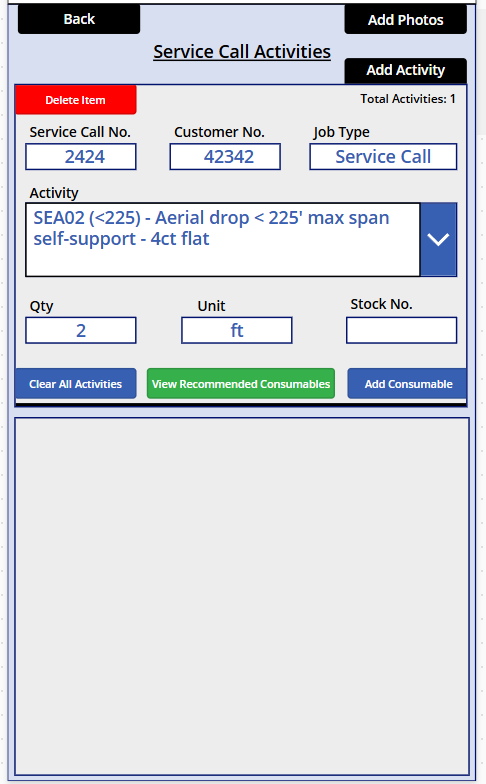
I have Button1 (Add Photos), the display mode of which I'd like to control with the following multiple 'If' statement.

If job type is 'Install' or 'Trip' gallery1 (and its Qty) must have content; or if 'Install' or 'Trip' and gallery1 is complete and gallery2
(Add Consumable) is created (though it is not required for 'Install' or 'Trip'), gallery2 - including its Qty must have content in order
for Button1 to be enabled.

For the others, gallery1 And gallery2 are both required and their fields, including, Qty must have content in order for Button1 to be
enabled.

What am I missing?
 
If(
       "Install" in Activity_Invoice_Type_Fld.Text And
                 (CountRows(Activity_Gallery.AllItems) > 0 &&
           CountRows(Filter(Activity_Gallery.AllItems, IsBlank(Activity_Quantity_Fld.Text))) = 0 ||
       
          (CountRows(Activity_Gallery.AllItems) > 0 &&
           CountRows(Filter(Activity_Gallery.AllItems, IsBlank(Activity_Quantity_Fld.Text))) = 0)),
           (CountRows(Consumables_Gallery.AllItems) > 0 &&
           CountRows(Filter(Consumables_Gallery.AllItems, IsBlank(Activity_Consumed_Qty_Fld.Text))) = 0)
,
    DisplayMode.Edit,
 
    "Trip" in Activity_Invoice_Type_Fld.Text And
                 (CountRows(Activity_Gallery.AllItems) > 0 &&
           CountRows(Filter(Activity_Gallery.AllItems, IsBlank(Activity_Quantity_Fld.Text))) = 0 ||
       
          (CountRows(Activity_Gallery.AllItems) > 0 &&
           CountRows(Filter(Activity_Gallery.AllItems, IsBlank(Activity_Quantity_Fld.Text))) = 0)),
           (CountRows(Consumables_Gallery.AllItems) > 0 &&
           CountRows(Filter(Consumables_Gallery.AllItems, IsBlank(Activity_Consumed_Qty_Fld.Text))) = 0)
,
    DisplayMode.Edit,
 
       "Service Call" in Activity_Invoice_Type_Fld.Text And
                 (CountRows(Activity_Gallery.AllItems) > 0 &&
           CountRows(Filter(Activity_Gallery.AllItems, IsBlank(Activity_Quantity_Fld.Text))) = 0) &&
           (CountRows(Consumables_Gallery.AllItems) > 0 &&
           CountRows(Filter(Consumables_Gallery.AllItems, IsBlank(Activity_Consumed_Qty_Fld.Text))) = 0)
,
    DisplayMode.Edit,
 
   
       "Strom Work" in Activity_Invoice_Type_Fld.Text And
                 (CountRows(Activity_Gallery.AllItems) > 0 &&
           CountRows(Filter(Activity_Gallery.AllItems, IsBlank(Activity_Quantity_Fld.Text))) = 0) &&
           (CountRows(Consumables_Gallery.AllItems) > 0 &&
           CountRows(Filter(Consumables_Gallery.AllItems, IsBlank(Activity_Consumed_Qty_Fld.Text))) = 0)
,
    DisplayMode.Edit,
 
   
       "Drop" in Activity_Invoice_Type_Fld.Text And
                 (CountRows(Activity_Gallery.AllItems) > 0 &&
           CountRows(Filter(Activity_Gallery.AllItems, IsBlank(Activity_Quantity_Fld.Text))) = 0) &&
           (CountRows(Consumables_Gallery.AllItems) > 0 &&
           CountRows(Filter(Consumables_Gallery.AllItems, IsBlank(Activity_Consumed_Qty_Fld.Text))) = 0)
,
    DisplayMode.Edit,
    DisplayMode.Disabled
)
Categories:
I have the same question (0)
  • Verified answer
    stampcoin Profile Picture
    5,058 Super User 2025 Season 2 on at
     
    The first two part ( see below from your code), basically you try to use :
    If condition is true, evaluate something, other wise , DiplayMode.Edit.
     
     
    1.Here Power Apps sees your two parenthesized clauses as
    • Condition: "Install" in … And (activity-check OR activity-check)
    • Then Result: (consumables-check)
    • Else Result: DisplayMode.Edit
    In other words, the consumables-check is never part of the condition, it’s the thing you return when "Install" passes. That isn’t what you intended—you meant “only edit if all three sub-conditions are true.”


    2. Same problem on the second  as well.
    • Condition: "Trip" in … And (activity-check OR activity-check)
    • Then Result: (consumables-check)
    • Else Result: DisplayMode.Edit


    fix those two first.
     
  • Verified answer
    WarrenBelz Profile Picture
    153,117 Most Valuable Professional on at
    Coming in here with a suggestion as I have been responding to your posts for quite some years now - I know the below is probably not completely logically correct with your posted rather complex requirements, however you have repeated code everywhere including what appears to be a total duplicaiton in the || Or statement. Try defining all of those CountRows and Filters (there are only four of them) once only and you will find the logic statement that follows after will be far easier to manage and get correct.
    With(
       {
          _ActivityA: CountRows(Activity_Gallery.AllItems),
          _ActivityQ: 
          CountRows(
             Filter(
                Activity_Gallery.AllItems, 
                IsBlank(Activity_Quantity_Fld.Text)
             )
          ),
          _ConsumablesA: CountRows(Consumables_Gallery.AllItems),
          _ConsumablesQ:
          CountRows(
             Filter(
                Consumables_Gallery.AllItems, 
                IsBlank(Activity_Consumed_Qty_Fld.Text)
             )
          )
       },
       If(
          Activity_Invoice_Type_Fld.Text in ["Install", "Trip", "Service Call", "Strom Work", "Drop"] &&
          _ActivityA > 0 && _ActivityQ = 0,
          _ConsumablesA > 0 && _ConsumablesQ = 0
       ),
       DisplayMode.Edit,
       DisplayMode.Disabled
    )
     

Under review

Thank you for your reply! To ensure a great experience for everyone, your content is awaiting approval by our Community Managers. Please check back later.

Helpful resources

Quick Links

Forum hierarchy changes are complete!

In our never-ending quest to improve we are simplifying the forum hierarchy…

Ajay Kumar Gannamaneni – Community Spotlight

We are honored to recognize Ajay Kumar Gannamaneni as our Community Spotlight for December…

Leaderboard > Power Apps

#1
WarrenBelz Profile Picture

WarrenBelz 765 Most Valuable Professional

#2
Michael E. Gernaey Profile Picture

Michael E. Gernaey 343 Super User 2025 Season 2

#3
Power Platform 1919 Profile Picture

Power Platform 1919 272

Last 30 days Overall leaderboard



