web
You’re offline. This is a read only version of the page.
close
Skip to main content

Notifications

Announcements

Community site session details

Community site session details

Session Id :
Power Platform Community / Forums / Power Apps / Search option in a Gal...
Power Apps
Answered

Search option in a Gallery Power App

(0) ShareShare
ReportReport
Posted on by 295

Hi,

I need your help to underatnd how should I proceed in order to get Search boxes working proprely in a Gallery.

I have a Gallery with a ShP List data base and I want to add multiple search boxes.

The formula I am inserting on Items in the Gallery is not working.

I am mentioning that the columns I am sharing in Gallery (Stream, Zone, KPI Name etc) , thourgh of which I want to create searches are Choice Columns in ShP List.

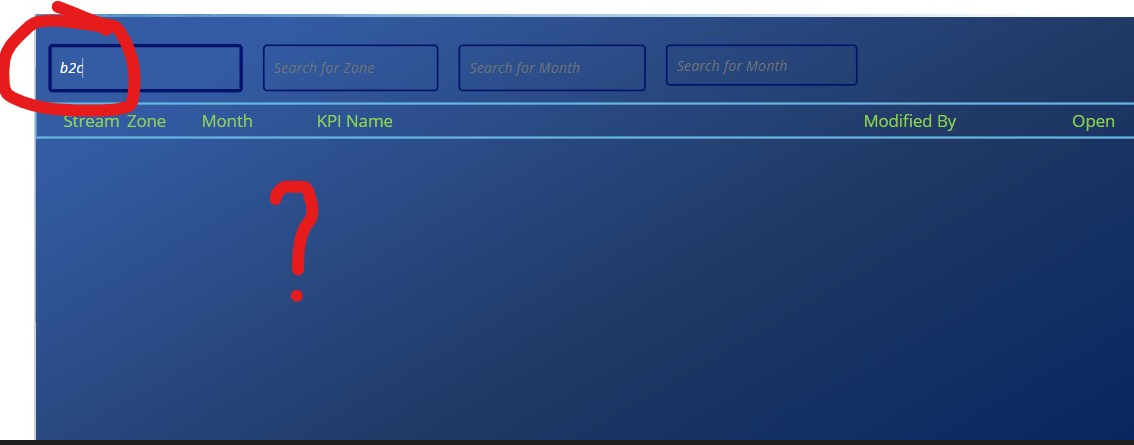
I've tried : Filter('KPI comment collection list', StartsWith(Name, SearchStream.Text)) - No error displayed but when I am trying to search something by writting a Stream name the Gallery is not filtering anything, it is showing that nothing was found. ( below print screen 1 and print screen 2)

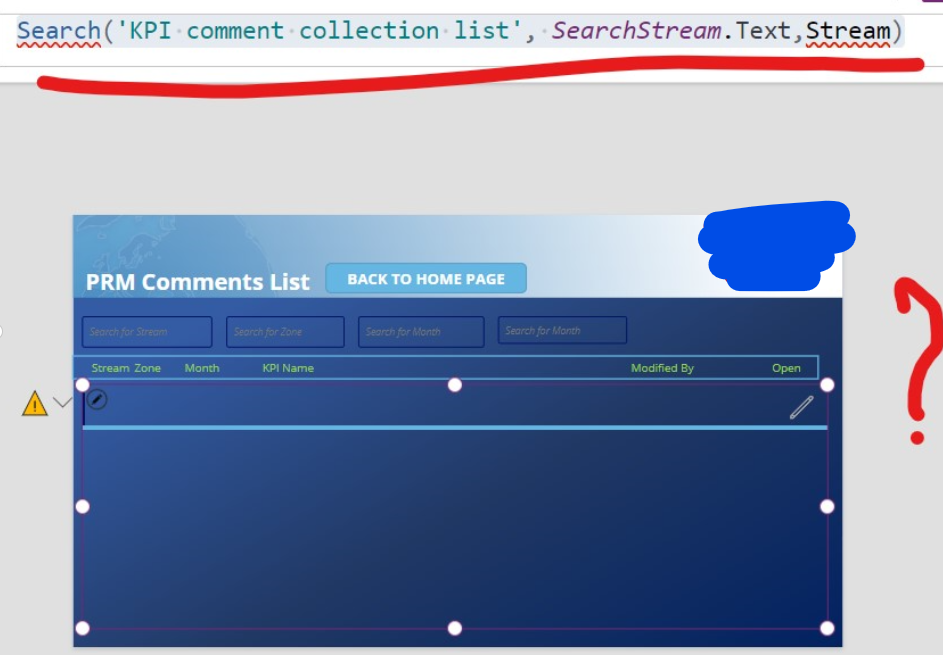
I've tried : Search('KPI comment collection list', SearchStream.Text,Stream) - No error displayed but the Gallery is not displaying the columns details anymore; so I am seeing a Gallery without informations. ( below print screen 3)

What is the right formula to apply in order to make search option to work?

Thank you!
 

Categories:
I have the same question (0)
  • Daniel Bocklandt Profile Picture
    5,099 Super User 2025 Season 2 on at
    Hey Carmen, 
     
    From your screenshots I can see that there is an error in your formula (Screenshot 3 red underlinde Search and Stream)
    Could you share the error message with us? 
     
    In the two formulas I saw that you used two different columns once "Name" and once "Stream". is this on purpose? 
  • Carmen15 Profile Picture
    295 on at
    @DBO_DV    Thank you for your reply! 
     
    For the Filter formula, when I am trying to insert the right ShP column I cannot find it. It finds Datacard but the column itself it is not finding. (Stream column is a choice column in ShP List)


    For the previous message third print screen warning message is : 
  • Suggested answer
    Daniel Bocklandt Profile Picture
    5,099 Super User 2025 Season 2 on at
    Okay thats probably because you need to add a '.Value' behind the Stream.
     
    Would it maybe be better to Change the TextInput with a Dropdown? since it is a choice column this would be more intuitive. 

    In the Dropdown you could use this formula in the Items property: 
    Choices('KPI comment collection list'.Stream)
    And then you could simply use this as filter: 
    Filter('KPI comment collection list', Stream = Dropdown.Selected)
    But the Stream.Value should do the trick as well. 
     
    If this solved your problem please accept it as Solution so others can find it as well. 
    If it helped in any other way consider liking it so we can keep supporting eachother. 
  • Carmen15 Profile Picture
    295 on at
    I think I have just found the correct formula to apply:
     
    Gallery Items :
     
    Search(AddColumns('KPI comment collection list','StreamChoice', Stream.Value),
    SearchStream.Text, StreamChoice)
     
    I tested and it works perfectley.
     
     
    My question now is:
    How should I proceed to extend this formula in order to have multiple search boxes? 
    I would like to have the option to filter the gallery
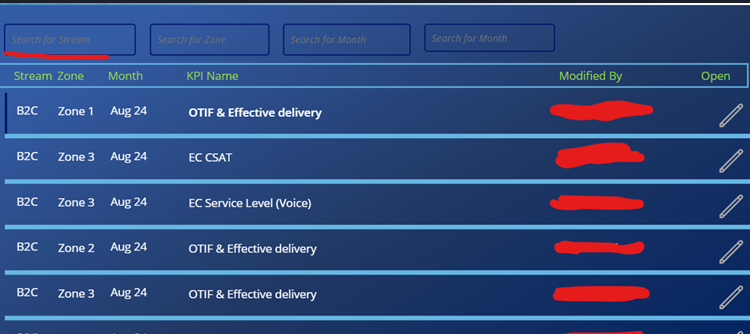
    by using different columns in ShP list ( see below in the print screen)
    and all these columns are Choice Columns in ShP List. 
    How should the formula looks like ? :)
     
     
  • Suggested answer
    Daniel Bocklandt Profile Picture
    5,099 Super User 2025 Season 2 on at
    To get this done you could do this: 
    Search(
     Filter(
      'KPI comment collection list',
      IsBlank(TextInput1.Text) || StartsWith(TextInput1.Text,ColumnName1),
      IsBlank(TextInput2.Text) || StartsWith(TextInput2.Text,ColumnName2),
      ....
     ),
     SearchStream.Text, 
     Stream.Value
    )
    The AddColumns Function can be Added outside of the filter function but isn't necessary since the column is already there. 
    It will be better to use the StartsWith to not get Delegation problems. 
     
    If this solved your problem please accept it as Solution so others can find it as well. 
    If it helped in any other way consider liking it so we can keep supporting eachother. 
  • WarrenBelz Profile Picture
    153,084 Most Valuable Professional on at
    Hi Carmen15 
    If you want to Search with the Text Input (this is not Delegable)
    Search(
       'KPI comment collection list', 
       SearchStream.Text,
       Stream.Value
    )
    If you need it to be Delegable, then DBO_DV's response using StartsWith() is your only option.
  • Carmen15 Profile Picture
    295 on at
    I tried with dropdown as you suggested but the Filter formula is not working. It is giving me an error. 
     
    If I am trying the formula like this : 
    Filter('KPI comment collection list', SearchStream.Text in Stream.Value
      - It works perfectly
     
    But when I am adding the other search options ( Formula : 
     
    Filter('KPI comment collection list', SearchKPIName.Text in 'KPI  Name'.Value ||
    SearchStream.Text in Stream.Value ||
    SearchMonth.Text in Month.Value ||
    SearchZone.Text in Zone.Value)
     
    It is not working anymore even if there is no error or warning!
     
    Can you please explain me better the formula with StartWith ?
    I would like to do a try with this one as well. :) 


  • Suggested answer
    Daniel Bocklandt Profile Picture
    5,099 Super User 2025 Season 2 on at
    Hey to explain it a bit better the sign || means Or thats why you have to use the comma that will serve in this Formula as and.
     
    So this:
    Filter(Collection, Condition1 || Condition2, Condition3, Condition4 || Condition5)
    Means:
    Filter(Collection, (Condition1 Or Condition2) And Condition3 And (Condition4 Or Condition5))
     
    So you would need to do it as follows: 
    Filter('KPI comment collection list', SearchKPIName.Text in 'KPI  Name'.Value,
    SearchStream.Text in Stream.Value || IsBlank(SearchStream.Text),
    SearchMonth.Text in Month.Value || IsBlank(SearchMonth.Text),
    SearchZone.Text in Zone.Value || IsBlank(SearchZone.Text))
    This works only if all the columns are choice columns and if you will always stay under 500 records.  
     
    Otherwise if you have more then 500 I'll suggest this version
     
     Filter(
      'KPI comment collection list',
      IsBlank(SearchStream.Text) || StartsWith(SearchStream.Text,Stream.Value),
      IsBlank(SearchMonth.Text) || StartsWith(SearchMonth.Text,Month.Value ),
      IsBlank(SearchZone.Text) || StartsWith(SearchZone.Text,Zone.Value),
      IsBlank(SearchKPIName.Text) || StartsWith(SearchKPIName.Text,'KPI  Name'.Value )
     )
     
    If this solved your problem please accept it as Solution so others can find it as well. 
    If it helped in any other way consider liking it so we can keep supporting eachother. 
  • Carmen15 Profile Picture
    295 on at
    @DBO_DV  you are my hero! 
    Thank you very much for your help and also for making me understand the formula! 
    It solved my issue perfectly! 

Under review

Thank you for your reply! To ensure a great experience for everyone, your content is awaiting approval by our Community Managers. Please check back later.

Helpful resources

Quick Links

Forum hierarchy changes are complete!

In our never-ending quest to improve we are simplifying the forum hierarchy…

Ajay Kumar Gannamaneni – Community Spotlight

We are honored to recognize Ajay Kumar Gannamaneni as our Community Spotlight for December…

Leaderboard > Power Apps

#1
WarrenBelz Profile Picture

WarrenBelz 739 Most Valuable Professional

#2
Michael E. Gernaey Profile Picture

Michael E. Gernaey 343 Super User 2025 Season 2

#3
Power Platform 1919 Profile Picture

Power Platform 1919 268

Last 30 days Overall leaderboard