web
You’re offline. This is a read only version of the page.
close
Skip to main content

Announcements

News and Announcements icon
Community site session details

Community site session details

Session Id :
Power Platform Community / Forums / Power Apps / PowerApps gets booelan...
Power Apps
Unanswered

PowerApps gets booelan variable instead of string output of Flow

(0) ShareShare
ReportReport
Posted on by 4

I have a Flow which processes a HTTP request and saves one of the properties value of the JSON response into a String variable. It runs succesfully:

ss.png


I'd like to assign this variable to a label at my Power Apps application as I click on an Icon which triggers the Flow. I use the Set([variablename][myFlow.RUN(...)]) in order to get the results into a new variable. However, the variable I get is type of Boolean, not the String value of the Initialize variable step.  

I've also tried to use Compose function in the Flow, and store the result in a collection. I got a Boolean too.

(And I've tried many times to re-assign the Flow and the collection/variable in my app.)


How could I get that URL as a text of a label in my app? 

Categories:
I have the same question (0)
  • v-litu-msft Profile Picture
    Microsoft Employee on at

    Hi @kbene91,


    Could you please share screenshots of your Flow configuration?

    I am not sure you can get a variable in the Flow to PowerApps request. The result from Flow is boolean.

    As a workaround, you can create a column in the list named ImageURL, one it got in Flow, store in the list, you can hide it, then you can get the column value in the PowerApps text label.


    Best Regards,
    Community Support Team _ Lin Tu
    If this post helps, then please consider Accept it as the solution to help the other members find it more quickly.

  • kbene91 Profile Picture
    4 on at

    Thank you for your answer.


    Basically, I just want to upload the pictures I take with my app. So the Flow processes the file, uploads it via the API I call and in the response message we get the data of the uploaded image. Here is a screenshot:screen2.png
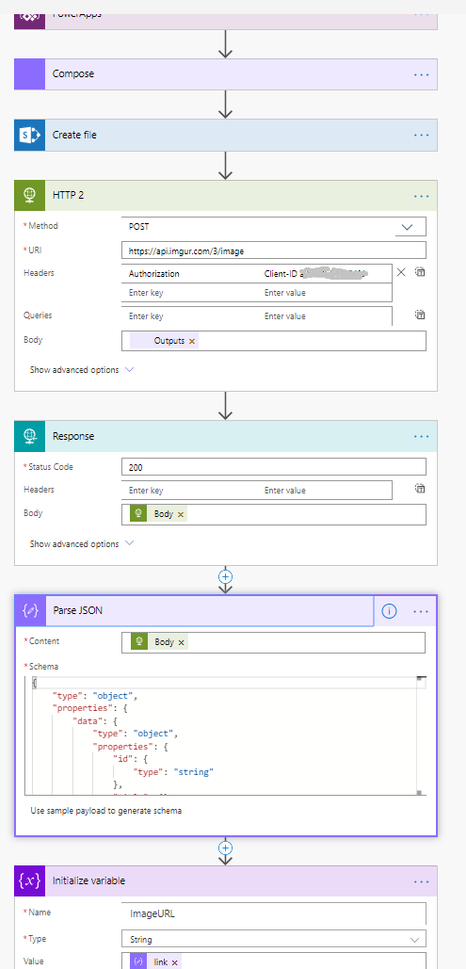
     

    It works fine, I just can't get the response data back into my App. I have also to tried to set the Schema of the JSON body to type of array (instead of object) and Collect the response into a Collection, so it looks like this:

    {
     "type": "array",
     "items": {
     "type": "object",
     "properties": {
     "id": {
     "type": "string"
     },
     "title": {},
     "description": {},
     "datetime": {
     "type": "integer"
     },
     "type": {
     "type": "string"
     },
     "animated": {
     "type": "boolean"
     },
     "width": {
     "type": "integer"
     },
     "height": {
     "type": "integer"
     },
     "size": {
     "type": "integer"
     },
     "views": {
     "type": "integer"
     },
     "bandwidth": {
     "type": "integer"
     },
     "vote": {},
     "favorite": {
     "type": "boolean"
     },
     "nsfw": {},
     "section": {},
     "account_url": {},
     "account_id": {
     "type": "integer"
     },
     "is_ad": {
     "type": "boolean"
     },
     "in_most_viral": {
     "type": "boolean"
     },
     "has_sound": {
     "type": "boolean"
     },
     "tags": {
     "type": "array"
     },
     "ad_type": {
     "type": "integer"
     },
     "ad_url": {
     "type": "string"
     },
     "edited": {
     "type": "string"
     },
     "in_gallery": {
     "type": "boolean"
     },
     "deletehash": {
     "type": "string"
     },
     "name": {
     "type": "string"
     },
     "link": {
     "type": "string"
     }
     }
     },
     "success": {
     "type": "boolean"
     },
     "status": {
     "type": "integer"
     }
    }

    So my Flow ends with the response data like this:

    {
     "data": {
     "id": "dfgdfh",
     "title": null,
     "description": null,
     "datetime": 1341455,
     "type": "image/png",
     "animated": false,
     "width": 640,
     "height": 480,
     "size": 389202,
     "views": 0,
     "bandwidth": 0,
     "vote": null,
     "favorite": false,
     "nsfw": null,
     "section": null,
     "account_url": null,
     "account_id": 0,
     "is_ad": false,
     "in_most_viral": false,
     "has_sound": false,
     "tags": [],
     "ad_type": 0,
     "ad_url": "",
     "edited": "0",
     "in_gallery": false,
     "deletehash": "4wz",
     "name": "",
     "link": "https://i.imgur.com/xxxxx.png"
     },
     "success": true,
     "status": 200
    }

    And I got the properties in my new Power Apps colelction, but it seems like an empty array:ss4.PNG


  • jcregg Profile Picture
    19 on at

    @kbene91 Not sure if you are still having trouble with this but I just had the same issue. My Flow had a response to to canvas app with a string but my variable was set to Boolean so I could only set the output to true or false.


    I have got round it by adding a dummy button and creating a new connection to my flow. This created a new connection and I renamed my original trigger to use that connection name. The variable now shows as a Records and it works fine. Hope that helps.  

Under review

Thank you for your reply! To ensure a great experience for everyone, your content is awaiting approval by our Community Managers. Please check back later.

Helpful resources

Quick Links

Introducing the 2026 Season 1 community Super Users

Congratulations to our 2026 Super Users!

Kudos to our 2025 Community Spotlight Honorees

Congratulations to our 2025 community superstars!

Congratulations to the April Top 10 Community Leaders!

These are the community rock stars!

Leaderboard > Power Apps

#1
Vish WR Profile Picture

Vish WR 1,055

#2
Valantis Profile Picture

Valantis 666

#2
11manish Profile Picture

11manish 666

Last 30 days Overall leaderboard



