web
You’re offline. This is a read only version of the page.
close
Skip to main content

Notifications

Announcements

Community site session details

Community site session details

Session Id :
Power Platform Community / Forums / Power Apps / Show Count of the Clic...
Power Apps
Unanswered

Show Count of the Clicked button

(2) ShareShare
ReportReport
Posted on by 652
Hello,
 
I have a button where the Text property is set to below:
CountIf('SharePointList', Status = "Pending")
And OnSelect property is set as below:
Set(varButtonID,1);
UpdateContext({locFilterStatus: !locFilterStatus})
I have 2 more buttons i.e. Category 1 and Category 2. Currently the count that I see in the Text property is the total of Category 1 and Category 2
 
OnSelect property for Category 1 button is set to below:
Set(varButtonID,2);
UpdateContext({locFilterCategory1: !locFilterCategory1})
My Requirement is that, when I click Category 1 button, the count in the Text property should only show how many "Pending" count are there for Category 1
 
Say for example - There are Total 9 "Pending" counts. For Category 1, there are 5 and for Category 2 there are 4 counts.
 
Now when clicked on Category 1 show count as 5, when clicked on Category 2, show count as 4.
 
Please advise. Thanks!
Categories:
I have the same question (0)
  • Prem4253 Profile Picture
    652 on at
    Hello Experts,
     
    Could someone please advise me on above logic / requirement?
  • KevinGador Profile Picture
    822 Super User 2025 Season 2 on at
    Hello @
     

    Sample entries below:  ( 9 Pending, 1 In Progress, 3 Completed ) (5 category 1's pending, 4 category 2's pending)
    ShowCountTableSample = Table(
        [
            {Status: "Pending", Category: "Category 1"},
            {Status: "Pending", Category: "Category 1"},
            {Status: "Pending", Category: "Category 1"},
            {Status: "Pending", Category: "Category 1"},
            {Status: "Pending", Category: "Category 1"},
            {Status: "Pending", Category: "Category 2"},
            {Status: "Pending", Category: "Category 2"},
            {Status: "Pending", Category: "Category 2"},
            {Status: "Pending", Category: "Category 2"},
            {Status: "In Progress"},
            {Status: "Completed"},
            {Status: "Completed"},
            {Status: "Completed"},
        ]
    );

    Set a variable that will hold the button's text. Initialize it with 
    //Show count of clicked button problem
    Set(varPendingCategory1, 0);
    Set(varPendingCategory2, 0);


    OnSelect of button 2: 
    Set(varButtonID,2);
    Set(varPendingCategory1, CountIf(ShowCountTableSample, Status = "Pending" && Category = "Category 1"));
    UpdateContext({locFilterCategory1: !locFilterCategory1})
    OnSelect of button 3: 
    Set(varButtonID,3);
    Set(varPendingCategory2, CountIf(ShowCountTableSample, Status = "Pending" && Category = "Category 2"));
    UpdateContext({locFilterCategory2: !locFilterCategory2})


    Result after click:


    Change the text property of the buttons to
    varPendingCategory1 and varPendingCategory2 for button 2 and 3.

    Before click: 
    After click:


    Please mark this as an answer if this is the solution you are looking for. Thank you :)


  • Suggested answer
    Ravi-Prajapati Profile Picture
    416 Super User 2025 Season 2 on at
     

    To achieve your requirement, you need to modify the Text property of the button to dynamically update based on the selected category. You can use conditional logic based on varButtonID to filter the data.

    Solution:

    Set the Text property of the button as follows:


    If(
    varButtonID = 1,
    CountIf('SharePointList', Status = "Pending"),
    varButtonID = 2,
    CountIf('SharePointList', Status = "Pending" && Category = "Category 1"),
    varButtonID = 3,
    CountIf('SharePointList', Status = "Pending" && Category = "Category 2"),
    0
    )

    Explanation:

    • When varButtonID = 1, it shows the total "Pending" count.
    • When varButtonID = 2, it filters the count for "Category 1."
    • When varButtonID = 3, it filters the count for "Category 2."

    OnSelect Properties for Buttons:

    • Pending Button:
       
       
      Set(varButtonID, 1); UpdateContext({locFilterStatus: !locFilterStatus})
    • Category 1 Button:
       
       
      Set(varButtonID, 2); UpdateContext({locFilterCategory1: !locFilterCategory1})
    • Category 2 Button:
       
       
      Set(varButtonID, 3); UpdateContext({locFilterCategory2: !locFilterCategory2})

    This approach will ensure that the count updates dynamically based on the selected category.

  • Prem4253 Profile Picture
    652 on at
    I tried with the logics provided by you, but sadly I'm not able to achieve my requirement. Probably I'm missing to follow your logic correctly.
     
    Good to have a brief explanation provided by you. But I was not able to get on how to add the table that you mentioned in your post
    Probably I'll try to explain about my requirement once again. See below screen shot;
     
     
    Currently we see total 11 counts, where Status says Pending.
     
    Category 1 and Category are the 2 buttons and the OnSelect property are set to below:
     
    For Category 1:
    Set(varButtonID,1);
    UpdateContext({locFilterCategory1:!locFilterCategory1})
    For Category 2:
    Set(varButtonID,2);
    UpdateContext({locFilterCategory2:!locFilterCategory2})
    Category 1 has 9 Pending counts and Category 2 has 2 Pending counts
     
    So, if none of the Category buttons are clicked, show count as 11. If anyone of the category buttons are clicked i.e. 1 or 2, show / filter the counts as stated above
     
    My sincere apologize for any misunderstanding.
  • KevinGador Profile Picture
    822 Super User 2025 Season 2 on at
    Now that you've added more details into your problem. I can help you more. 

    The table that I provided is merely just a sample, think of it as the items in your DataSource. I made this formula inside the formulas property of the app. Just substitute your DataSource name in my ShowCountTableSample. 

    I created a custom table to replicate your scenario.


    I'll match the sample with the one you provided. 11 total pending status, 9 - category 1 and 2 - category 2
    ShowCountTableSample = Table(
        [
            {Status: "Pending", Category: "Category 1"},// 1 - pending category 1
            {Status: "Pending", Category: "Category 1"},// 2 - pending category 1
            {Status: "Pending", Category: "Category 1"},// 3 - pending category 1
            {Status: "Pending", Category: "Category 1"},// 4 - pending category 1
            {Status: "Pending", Category: "Category 1"},// 5 - pending category 1
            {Status: "Pending", Category: "Category 1"},
            {Status: "Pending", Category: "Category 1"},
            {Status: "Pending", Category: "Category 1"},
            {Status: "Pending", Category: "Category 1"},// 9 - pending category 1
            {Status: "Pending", Category: "Category 2"},// 1 - pending category 2
            {Status: "Pending", Category: "Category 2"} // 2 - pending category 2
        ]
    );
    You need to initalize these variable either in the OnVisible property of your screen or the OnStart property of the app. (take not that this will not take into effect unless you right click the app button and click Run OnStart
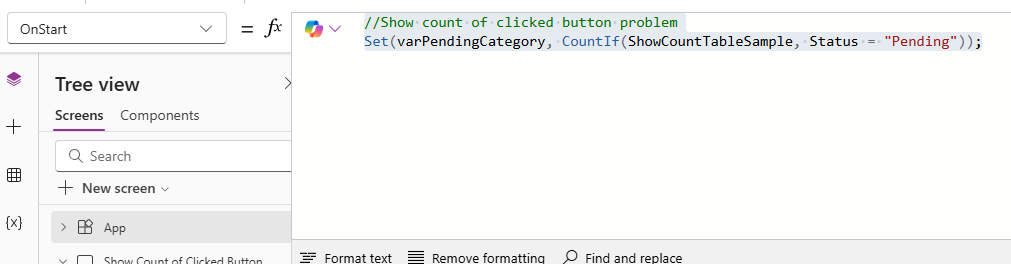


    So, I imitated your problem in power apps in order for me to solve your problem. 
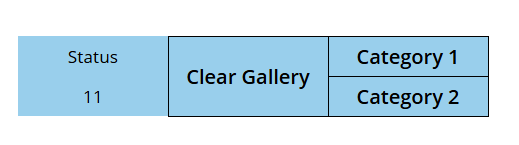
    What you have to do is set the Text property of the button or is that a label where it states "11" to 


    set the OnSelect property of Category 1 to 
    Set(varButtonID,1);
    Set(varPendingCategory, CountIf(ShowCountTableSample, Status = "Pending" && Category = "Category 1"));
    UpdateContext({locFilterCategory1:!locFilterCategory1})
    set the OnSelect property of Category 2 to 
    Set(varButtonID,2);
    Set(varPendingCategory, CountIf(ShowCountTableSample, Status = "Pending" && Category = "Category 2"));
    UpdateContext({locFilterCategory2:!locFilterCategory2})
    and in the Clear button set the OnSelect property back to 
    //Show count of clicked button problem
    Set(varPendingCategory, CountIf(ShowCountTableSample, Status = "Pending"));

    Results: 

    Category 1 clicked
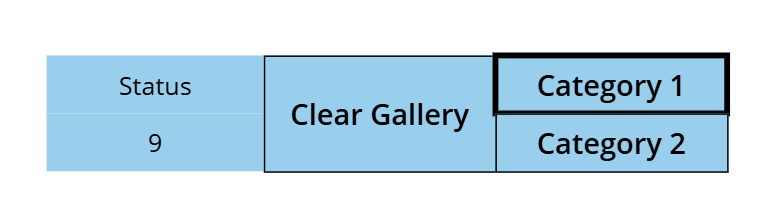
    Category 2 clicked
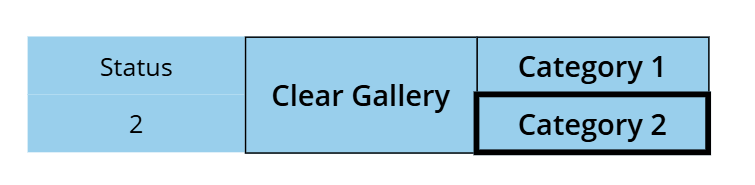
    Clear clicked


    Please let me know if this worked. If it worked please mark this as the answer and don't forget to like the comment too :) 
     
  • Prem4253 Profile Picture
    652 on at
     
    Thanks! for the information.
     
    But I'm concerned about the table. Is there a way we do not add a formula inside the formulas property of the app.
     
    How can be achieve without a Table formula?
     
    My Status column is a calculated field. And using below logic:
    If(Len(DataCardValue4.Text)=0,"Pending","Completed") ; If(IsBlank(DataCardValue15.SelectedDate, "Pending", "Completed"
     
  • KevinGador Profile Picture
    822 Super User 2025 Season 2 on at
    Hello @Prem4253

    The formula that I did is a replicattion of what your data source is. I only did this to match your exact scenario which means in your data source you have 11 pending items with 9 category 1s and 2 category 2s.  Think of it as your datasource.

    Just replace the ShowCountTable in my formulas as your datasource.

    For example. 

    In my formula 
    Set(varButtonID,1);
    Set(varPendingCategory, CountIf(ShowCountTableSample, Status = "Pending" && Category = "Category 1"));
    UpdateContext({locFilterCategory1:!locFilterCategory1})

    In your formula replace ShowCountTableSample as 'SharePointList' or whereever your datasource is coming from.
    Set(varButtonID,1);
    Set(varPendingCategory, CountIf('SharePointList', Status = "Pending" && Category = "Category 1"));
    UpdateContext({locFilterCategory1:!locFilterCategory1})

    If this solves your problem, don't forget to mark it as the answer and give it a like! 😊 Your feedback helps others in the community. Thank you and happy learning power apps! 💻💡
     
  • Prem4253 Profile Picture
    652 on at
     
     
    Thanks! Kevin. Almost there. My datasource is SharePoint.
     
    I'm now able to filter my Status column with accurate counts by clicking Category 1 and Category 2 buttons.
     
    Just wondering if you can advise further.
     
    I've been now asked to also get counts for dates, where we do not have dates for Incoming and Outgoing Date columns (see below)
     
  • KevinGador Profile Picture
    822 Super User 2025 Season 2 on at
    Hello @Prem4253

    you want to also count where there are blank dates but from what action? clicking category 1 would need to do what? count both? I dont understand why the outgoing date is in boolean type.

    you need to provide more details in order for us to help you quicker. What is incoming date? What is outgoing date? Why is the outgoing date in boolean value? 

    Also I would appreciate it more if you atleast like or mark my comments as an answer if it solves or helps you with your question ;) 

    If this solves your problem, don't forget to mark it as the answer and give it a like! 😊 Your feedback helps others in the community. Thank you and happy learning power apps! 💻💡
     
  • Prem4253 Profile Picture
    652 on at
     
    My Apologize for any misunderstanding. See below table for your reference.
    I've achieved to get the counts of Status for Category 1 and Category 2 using your formula
     
    Incoming Date Outgoing Date Category Status
    1/6/21   Category 1  Pending 
      1/23/21 Category 1  Pending 
    2/9/21   Category 1  Pending 
        Category 2  Pending 
    3/15/21 3/15/21 Category 1  Pending 
        Category 1  Pending 
    4/18/21   Category 1  Pending 
    5/5/21 5/5/21 Category 2  Pending 
      5/22/21 Category 1  Pending 
    6/8/21   Category 1  Pending 
    6/25/21 6/25/21 Category 1  Pending 
     
    In Incoming Date column, there are total 4 counts which does not has dates.
    Similarly, for Outgoing Date column there are total 6 blanks, which does not has dates
     
    Similar to what we achieved to get Status counts on click on Category 1 and Category 2, I'm looking to get the blank date counts on click on this 2 buttons
     
    When Clicked on Category 1, show Status count as 9, Incoming Count as 3 and Outgoing Count as 5 (with below output)
     
     
    When Clicked on Category 2, show Status count as 2, Incoming Count as 1 and Outgoing Count as 1 (with below output)
     
    And on click on Clear Gallery button, show overall counts (as below)

Under review

Thank you for your reply! To ensure a great experience for everyone, your content is awaiting approval by our Community Managers. Please check back later.

Helpful resources

Quick Links

Forum hierarchy changes are complete!

In our never-ending quest to improve we are simplifying the forum hierarchy…

Ajay Kumar Gannamaneni – Community Spotlight

We are honored to recognize Ajay Kumar Gannamaneni as our Community Spotlight for December…

Leaderboard > Power Apps

#1
WarrenBelz Profile Picture

WarrenBelz 717 Most Valuable Professional

#2
Michael E. Gernaey Profile Picture

Michael E. Gernaey 329 Super User 2025 Season 2

#3
Power Platform 1919 Profile Picture

Power Platform 1919 268

Last 30 days Overall leaderboard
