




 Share
Share Report
 5,331
5,331I have built an 'Offline' mobile app that is working inconsistently.
Below is a snapshot of a portion of the app.

The issue, the 'Add Activity' button works sometimes and other times it doesn't.
The button is a navigation button with the following formula -
It is unclear to me why the function of this button is inconsistent.
I have attempted to 'Clear Cache' in the Power Apps player. I have removed
and reinstalled the player; however, the issue keeps occurring.
Is this a device (cell phone, using both an iPhone 15 and a Samsung),
memory issue, a glitch in the Power Apps player?
When it all works, it works great. However, during testing of more than one
project entry this button - and eventually other button stop functioning.
What am I missing?
Below is a snapshot of a portion of the app.
The issue, the 'Add Activity' button works sometimes and other times it doesn't.
The button is a navigation button with the following formula -
Navigate(Activity_Screen,ScreenTransition.Cover);
If(IsBlank(Activity_Quantity_Fld.Text),
Collect(colBillableUnits, {intID: GUID(), rem:false}));
Below is a section of the 'Activity Screen', a gallery.
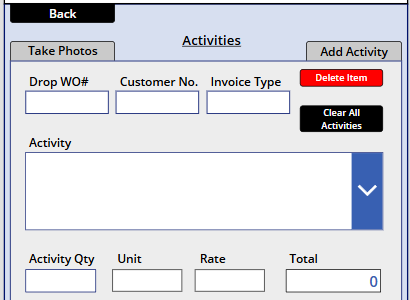
Below is a section of the 'Activity Screen', a gallery.
It is unclear to me why the function of this button is inconsistent.
I have attempted to 'Clear Cache' in the Power Apps player. I have removed
and reinstalled the player; however, the issue keeps occurring.
Is this a device (cell phone, using both an iPhone 15 and a Samsung),
memory issue, a glitch in the Power Apps player?
When it all works, it works great. However, during testing of more than one
project entry this button - and eventually other button stop functioning.
What am I missing?
Categories:
I have the same question (0)
 All responses (
 Answers (










