Does anyone have experience with modern combo boxes in canvas apps? I'm having an issue with selected values not being visible until I click outside of the control.
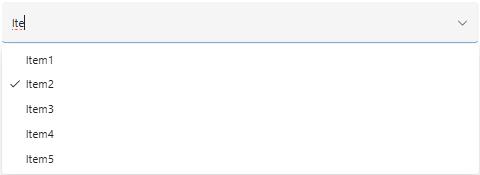
When using modern comboboxes with 'Allowed searching' and only one choice allowed, I would expect the search text in the control to be replaced with the selected value to make it clear for the user that they have selected a value. If I search with some text and select option, the selected option does not display in control until i click outside of the control. This applies for all Trigger output settings. I have tried to tweak the control's OnChange and DefaultSelectedITems properties by storing the selected value before resetting the control, but Power Apps do not allow circular reference. I can find the internal SearchText property, but I can't clear this value.
The first image is of the control when you have selected an option, just displaying the SearchText. The second image is from the same control and the same selection when pressing the control again.

Guess it is a bug for the modern control, since it does not apply to the classic one. But the classic combobox control have the opposite problem: You can search for an option but if you focus out of the control without selecting an option, the SearchText stay in the control, appearing to be selected when in fact no value is selected in the control.


