web
You’re offline. This is a read only version of the page.
close
Skip to main content

Announcements

News and Announcements icon
Community site session details

Community site session details

Session Id :
Power Platform Community / Forums / Power Apps / ASAP Toggle Values/For...
Power Apps
Unanswered

ASAP Toggle Values/Form Data not saved to Sharepoint - Power Apps

(1) ShareShare
ReportReport
Posted on by 27
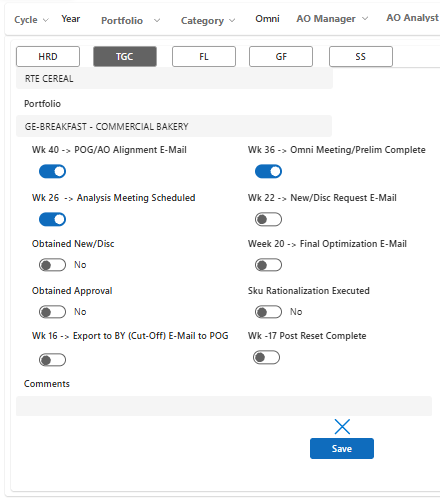
Hello! So I have built a power app on my personal environment, and as a part of that I have used a sharepoint list from my personal account as the data source. Moving away from that, I created a sharepoint list with the same exact data from my list on my team's sharepoint website, (so its collaborative). I have a form functionality, that works to submit any changes to any yes/no columns and toggles and is use a collection to update the UI view for a user, so when I switch between banners/buttons I make changes, click save and then when I click back, those toggle changes should be saved and show up. Now that I check, this functionality works when the data source is the sharepoint list on my personal account but this functionality with the form, and saving the data to the sharepoint list stops working when the datasource is the team sharepoint list. I have checked to make sure this is the right list and there are no errors and the code/format is all the same. Would anyone be able to give me some advice or help on how or where to go from here. I am stuck. I need to use a team sharepoint list because I am a co-op and will be leaving the team. Any help ASAP would really be appreciated.
Categories:
I have the same question (0)
  • WarrenBelz Profile Picture
    155,487 Most Valuable Professional on at
    Firstly the code you use to save would be useful here. If you are simply submitting the Form, what is the DataSource of your Form and what process are you using to change the source from your personal copy to the team domain - this is important, particularly refreshing the datasource and re-saving and publishing the app.
     
    Also how do you update the collection, what type of field/s are you writing all of this to and have you checked SharePoint directly (is it possible it is written and not displayed in Power Apps) ?
  • LE-19051254-0 Profile Picture
    27 on at
         Thank you for your response. The DataSource I use for my form is a sharepoint list, it is the same list I use for the rest of my application. the proccess that I used to change the source from my personal copy of the list to the team list is to just export my list into excel and import it into a new Sharepoint List on our team Sharepoint Website, and then load that list as a datasource and then removing my original list. I have also, replaced all places where the sharepoint list would be used within the new name/reference and then refreshed. I haven't published yet as I am trying to make sure the app works on my end before publishing for my team.  All the fields that I am writing are yes/no columns or single line text. I have checked Sharepoint directly, it is not writing to the sharepoint. Now when I use my personal  list, it is both updating the power app display AND it is writing directly into the sharepoint list. So it seems to only be an issue when I switched to the shared team sharepoint list. It important to also note that I can toggle the different toggles but when I click save, the toggles automatically go back to thier original state, ie. if it was set to false, i make it true, and then click save, and the toggle goes back to false after a flicker. Again, I can confirm that all my code works for when I use my previous sharepoint list, ie. the toggles, and text changes save and they are also saved to the sharepoint list, this has become a problem when I use the sharepoint list I made on our website where nothing saves to the form nor to the list.  It's hosted here for example. Any help would be really appreciated. Thank you!

    For code:
    In my save button OnSelect: 
    SubmitForm(bannersForm)
     
    This is my OnSuccess for the form:
    Refresh(Test2027AOCalendar);
     
    Set(
        varSelectedItem,
        LookUp(
            Test2027AOCalendar,
            ID = bannersForm.LastSubmit.ID
        )
    );
     
    Patch(
        colCalendar,
        LookUp(
            colCalendar,
            ID = bannersForm.LastSubmit.ID
        ),
        bannersForm.LastSubmit
    );

     
    This is my banners' buttons OnSelect for each banner buttton:
    Set(varSelectedBanner, "TGC");
     
    Set(
        varSelectedItem,
        LookUp(
            'colCalendar',
            Title = varSelectedItem.Title &&
            Category = varSelectedItem.Category &&
            Banner.Value = "TGC"
        )
    );
  • WarrenBelz Profile Picture
    155,487 Most Valuable Professional on at
    I think I asked some questions the wrong way (and I few I should have asked before). You mention exporting the data to Excel from your personal copy to the production list, so I assume you are not toggling between them regularly. What I am trying to establish is the differences (if any) between the lists (do they have exactly the same name for each list and the same names and field types for all fields) and how are you testing your personal list (the same app, but connected to the same list as above on a different site ?) .
     
    The only things that matter here is your SubmitForm process (the Collection and the Variable have no bearing on the SharePoint data write) and the Update of the Data Cards containing the relevant controls. So assuming Test2027AOCalendar is the production List can you please post the Item and DataSource of the Form, the Update and Default of the Data Card and Default of the toggle on one of those fields not working and the name and type of field you are writing to in the List.


  • LE-19051254-0 Profile Picture
    27 on at
         Thank you again for your response! As you said, I am not toggling between my list and the production list, I needed to just move all the current data from my personal list to the production list, that is why I exported my copy and moved it into a new sharepoint list for the team. The lists do not have the exact same name, but I went on to first delete the personal list as a data source in my power app, and then add the new production list and rename every area that uses or calls the datasource. The name for each of the fields/colulmns and the field types all match up, if anything just the order in which the columns are in the sharepoint list only change but all names and types match up. I am testing the personal list by creating a copy of my app, and then keeping the current version of my app and then testing the two out side by side. Thank you!
     
    Form:
    Datasource: 
    Test2027AOCalendar
     
    Item:
    varSelectedItem (this gives the selected row record)
     
     
    Datacard:
    Update:
    DataCardValue11_1.Checked
     
    Default:
    ThisItem.'POG/AO Alignment'
     
    Toggle:
    Default/Checked:
    Parent.Default


  • WarrenBelz Profile Picture
    155,487 Most Valuable Professional on at
    OK - that clarifies a few things that were not clear to me before (you have two apps, you are not switching data sources in one), so we need to look at your prod app and see what the issue is. I asked the question regarding SharePoint not refreshing in Power Apps for good reason as this is a very common problem when you use a Variable as the Item of a Form - the Variable does not refresh after you write to SharePoint unless the gallery refreshes (this is another discussion) and you then re-select the record.
     
    The Data Card Update of DataCardValue11_1, the Checked of Parent.Default (you could also use ThisItem.'POG/AO Alignment' the same as the Data Card Default) are all correct and should write the Checkbox value to the Boolean field POG/AO Alignment', however the Item of the Form varSelectedItem will not immediately show this. Firstly change the Item of the Form to
    LookUp(
       Test2027AOCalendar,
       ID = varSelectedItem.ID
    )
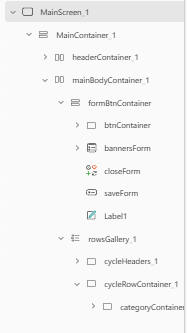
    This queries the List directly and will refresh immediately the Form is submitted. I am also assuming here (I cannot see them in your initial posted tree view) that you have separate Boolean fields for each of those toggles.
     
    Please ✅ Does this answer your question if my post helped you solve your issue. This will help others find it more readily. It also closes the item. If the content was useful in other ways, please consider answering Yes to Was this reply helpful? or give it a Like ♥
    Visit my blog
    Practical Power Apps    LinkedIn  
     
  • LE-19051254-0 Profile Picture
    27 on at
    @WarrenBelz, Hi, and Thank you for your response. I have made the change to my Item property for the form. I have figured out that for some reason when I was exporting the data from my personal sharepoint list and using that table to import into a new sharepoint list, it breaks the form saving logic (ie. changes don't save), but when I just created a new list, it works just fine again. So I just went ahead and created a new list instead of importing my existing list.
  • WarrenBelz Profile Picture
    155,487 Most Valuable Professional on at
    Glad you got it fixed as there was nothing wrong with your code (except the Item suggestion I offered.
     
    I assume this is now solved.

Under review

Thank you for your reply! To ensure a great experience for everyone, your content is awaiting approval by our Community Managers. Please check back later.

Helpful resources

Quick Links

Season of Sharing Community Challenge Launch!

Jump in, show your community spirit, and win prizes!

Kudos to our 2025 Community Spotlight Honorees

Congratulations to our 2025 community superstars!

Congratulations to the April Top 10 Community Leaders!

These are the community rock stars!

Leaderboard > Power Apps

#1
Vish WR Profile Picture

Vish WR 421

#2
Valantis Profile Picture

Valantis 405

#3
timl Profile Picture

timl 337 Super User 2026 Season 1

Last 30 days Overall leaderboard