web
You’re offline. This is a read only version of the page.
close
Skip to main content

Notifications

Announcements

Community site session details

Community site session details

Session Id :
Power Platform Community / Forums / Copilot Studio / Dynamically populating...
Copilot Studio
Answered

Dynamically populating a Question ACE card containing an OptionSet with values from SQL Server

(3) ShareShare
ReportReport
Posted on by 13
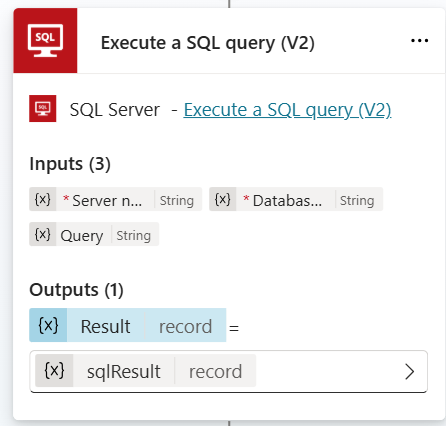
Using the Microsoft CoPilot Studio Canvas I have started to build a topic that makes a query to a SQL Server Table, I am successfully returning data from the query using a Execute a SQL Query v2 node
 
I then output the results to the agent to confirm that I actually have something with
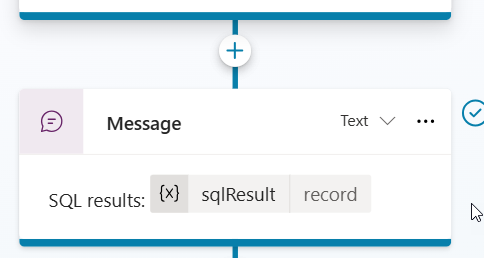
 
This returns the following whcih is stored in sqlResult as a record.
{"OutputParameters":{},"ResultSets":{"Table1":[{"Issue":"Issue 1"},{"Issue":"Issue 2"},{"Issue":"Issue 3"}]}}
 
However, I'm struggling to turn this into a table so I can populate my choices in the ACE card.
Following the guidance I have created a Set Variable node and called it IssueChoices which is a Table.

 
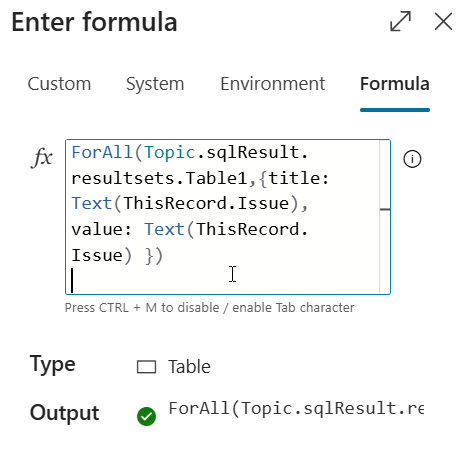
I have added the following formula to extract all of the Issues
I then try and display the value of IssueChoices
 
 
When displayed I just get the text and no value.
 
One thing that I have noticed is that in the sqlResult record the RecordSets has an upper case R and S whereas the function only allows me to use the Topic.sqlResult.recordsets value and throws an error if I try and use RecordSets.
 
I'm then planning on updating the ACE card choices to this Variable so the choices are dynamically populated.
 
Any pointers greatly appreciated.
 
Categories:
I have the same question (0)
  • Verified answer
    sandeep_angara Profile Picture
    424 Super User 2025 Season 2 on at
     
    I've tried copying your sql result data in a variable, and could dynamically populate Adaptive card with those choices. Provided step by step approach below.

    Output:
     
    Step 1: Parse your sqlResult
     
    1. Go to variable management > Parse value
    2. Input Topic.sqlResult
    3. In Data type > select From sample data
    4. Then click on Get schema from sample JSON, in the new popup window, paste your current sqlResult output
    5. After confirm, it automatically detects as record data type and creates a new variable, of nor create new variable and store it
     
     
    Step 2: Extract your choices and store it in another variable
     
    1. Use the same PowerFx but now reference the output variable from your previous Parse value action (here in my case: TestDataRecord)
    2. Now you can see the capital cases of R and S in ResultSet
     
    Step 3: Pass this newly created variable to the choices in adaptive card (Switch to Formula)
     
     
    Reach out if you have any further questions.
     
    If this solves your problem, please consider marking this as an answer.
     
    ----
    Sandeep Angara


Under review

Thank you for your reply! To ensure a great experience for everyone, your content is awaiting approval by our Community Managers. Please check back later.

Helpful resources

Quick Links

Forum hierarchy changes are complete!

In our never-ending quest to improve we are simplifying the forum hierarchy…

Ajay Kumar Gannamaneni – Community Spotlight

We are honored to recognize Ajay Kumar Gannamaneni as our Community Spotlight for December…

Leaderboard > Copilot Studio

#1
Michael E. Gernaey Profile Picture

Michael E. Gernaey 251 Super User 2025 Season 2

#2
Romain The Low-Code Bearded Bear Profile Picture

Romain The Low-Code... 201 Super User 2025 Season 2

#3
S-Venkadesh Profile Picture

S-Venkadesh 93 Moderator

Last 30 days Overall leaderboard