web
You’re offline. This is a read only version of the page.
close
Skip to main content

Notifications

Announcements

Community site session details

Community site session details

Session Id :
Power Platform Community / Forums / Power Apps / SAP ODATA Connector no...
Power Apps
Suggested Answer

SAP ODATA Connector not available in Allowed Connection Types (Gateway Settings)

(0) ShareShare
ReportReport
Posted on by 61

Hi everyone,

I noticed that in the Gateway settings within the Power Platform Admin Center, there is no option to enable the SAP ODATA Connector under Allowed Connection Types for a user.

As a result, no user can assign a gateway for SAP ODATA connections. Interestingly, the SAP ERP Connector is available and can be selected, but the SAP ODATA Connector is missing.
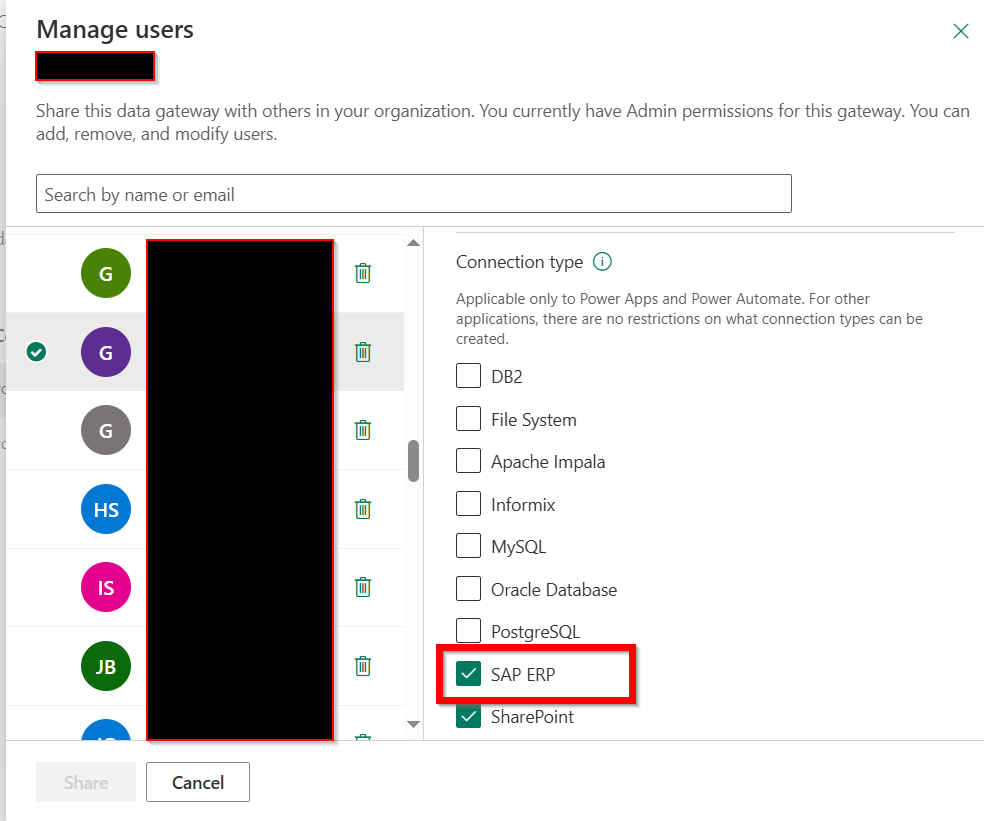
Has anyone encountered this issue before? Is this a limitation, or is there a workaround to allow users to configure a gateway for SAP ODATA?

Thanks in advance for any insights!

I have the same question (0)
  • Pokke Profile Picture
    61 on at

    I found that if I temporarily grant the user admin rights for the gateway, they can then assign the gateway for the SAP ODATA connection. Once the gateway is set up, I can revoke the admin rights, and the connection continues to work.

    But this cant be the real solution for this issue.

  • Suggested answer
    scottwoodall Profile Picture
    Microsoft Employee on at
     
    Thank you for reporting this issue. There are two places where connectors need to be added, and you've discovered an issue where the SAP OData connector is not displaying in the Power Platform Admin Center.

    I've discussed this with the owning team, and they are in the process of fixing it. I don't have a timeline, but I would expect sometime over the next month or two for this to be rolled out to production.
     
    For a workaround, you can use Power Automate to manage on-premises data gateway sharing and the SAP OData connector should be displayed there.

    Cheers,
    Scott

Under review

Thank you for your reply! To ensure a great experience for everyone, your content is awaiting approval by our Community Managers. Please check back later.

Helpful resources

Quick Links

Forum hierarchy changes are complete!

In our never-ending quest to improve we are simplifying the forum hierarchy…

Ajay Kumar Gannamaneni – Community Spotlight

We are honored to recognize Ajay Kumar Gannamaneni as our Community Spotlight for December…

Leaderboard > Power Apps

#1
WarrenBelz Profile Picture

WarrenBelz 765 Most Valuable Professional

#2
Michael E. Gernaey Profile Picture

Michael E. Gernaey 343 Super User 2025 Season 2

#3
Power Platform 1919 Profile Picture

Power Platform 1919 272

Last 30 days Overall leaderboard



