web
You’re offline. This is a read only version of the page.
close
Skip to main content

Announcements

News and Announcements icon
Community site session details

Community site session details

Session Id :
Power Platform Community / Forums / Power Apps / Combobox filter using ...
Power Apps
Unanswered

Combobox filter using gallery items

(1) ShareShare
ReportReport
Posted on by 2
Here i want to filter ComboBox1_15.Selected.Value and filter the gallery with the below code.
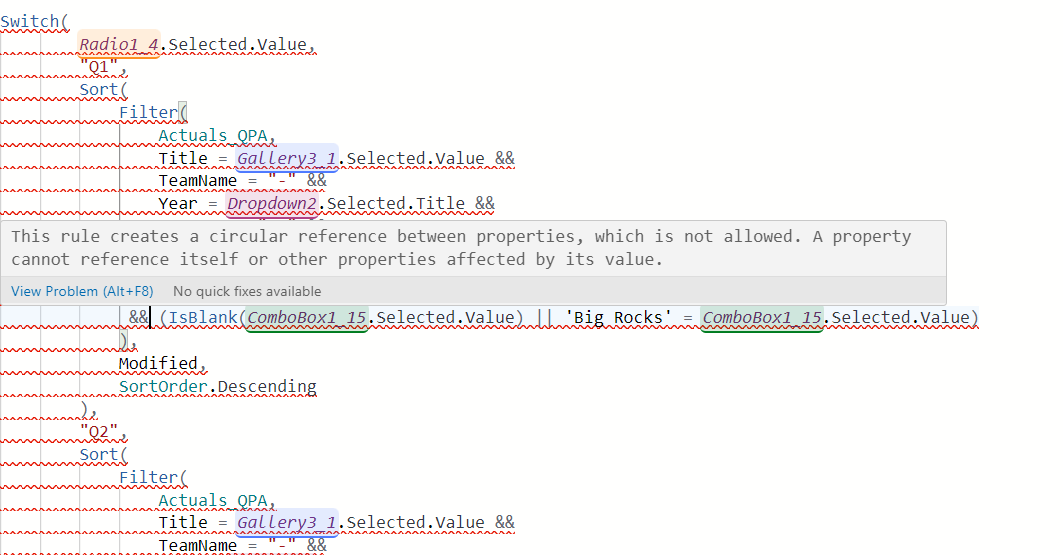
but i have commented this line (IsBlank(ComboBox1_15.Selected.Value) || 'Big Rocks' = ComboBox1_15.Selected.Value) for filtering but if i uncommented its showing the error as shown in image. i have items property of ComboBox1_15 as 
Distinct(
   
        Gallery7_6.AllItems, 'Big Rocks'
       
    ).Value


how to filter using this 
 
Switch(
        Radio1_4.Selected.Value,
        "Q1",
        Sort(
            Filter(
                Actuals_QPA,
                Title = Gallery3_1.Selected.Value &&
                TeamName = "-" &&
                Year = Dropdown2.Selected.Title &&
                Quarter = "Q1" &&
                Active = "Active"
               
             
             // (IsBlank(ComboBox1_15.Selected.Value) || 'Big Rocks' = ComboBox1_15.Selected.Value)
            ),
            Modified,
            SortOrder.Descending
        ),
        "Q2",
        Sort(
            Filter(
                Actuals_QPA,
                Title = Gallery3_1.Selected.Value &&
                TeamName = "-" &&
                Year = Dropdown2.Selected.Title &&
                Quarter = "Q2" &&
                Active = "Active"
             
             // (IsBlank(ComboBox1_15.Selected.Value) || 'Big Rocks' = ComboBox1_15.Selected.Value)
            ),
            Modified,
            SortOrder.Descending
        ),
        "Q3",
        Sort(
            Filter(
                Actuals_QPA,
                Title = Gallery3_1.Selected.Value &&
                TeamName = "-" &&
                Year = Dropdown2.Selected.Title &&
                Quarter = "Q3" &&
                Active = "Active"
             
              //(IsBlank(ComboBox1_15.Selected.Value) || 'Big Rocks' = ComboBox1_15.Selected.Value)
            ),
            Modified,
            SortOrder.Descending
        ),
        "Q4",
        Sort(
            Filter(
                Actuals_QPA,
                Title = Gallery3_1.Selected.Value &&
                TeamName = "-" &&
                Year = Dropdown2.Selected.Title &&
                Quarter = "Q4" &&
                Active = "Active"
             
              // (IsBlank(ComboBox1_15.Selected.Value) || 'Big Rocks' = ComboBox1_15.Selected.Value)
            ),
            Modified,
            SortOrder.Descending
        ),
        "YTD",
        Sort(
            Filter(
                Actuals_QPA,
                Title = Gallery3_1.Selected.Value &&
                TeamName = "-" &&
                Year = Dropdown2.Selected.Title &&
                Active = "Active"
               
                //(IsBlank(ComboBox1_15.Selected.Value) || 'Big Rocks' = ComboBox1_15.Selected.Value)
            ),
            Modified,
            SortOrder.Descending
        )
    )

I have the same question (0)
  • WarrenBelz Profile Picture
    154,889 Most Valuable Professional on at
    Hi rdsi
    You cannot filter a gallery with a data set obtained from the same gallery (it creates a circular reference as you have seen. Your Combo Box Items need to be from somewhere else - probably distinct from your Data Source. You can also save yourself a lot of code on the gallery Items.
    Sort(
       Filter(
          Actuals_QPA,
          Title = Gallery3_1.Selected.Value &&
          TeamName = "-" &&
          Year = Dropdown2.Selected.Title &&
          (
             Radio1_4.Selected.Value = "YTD" || 
             Radio1_4.Selected.Value
          ) &&
          Active = "Active" &&
          (
             Len(ComboBox1_15.Selected.Value) = 0 || 
             'Big Rocks' = ComboBox1_15.Selected.Value
          )
       ),
       Modified,
       SortOrder.Descending
    )
    If you really must get the Combo Box Items from the gallery, you need to duplicate the gallery filter apart from the target field
    Distinct(
       Filter(
          Actuals_QPA,
          Title = Gallery3_1.Selected.Value &&
          TeamName = "-" &&
          Year = Dropdown2.Selected.Title &&
          (
             Radio1_4.Selected.Value = "YTD" || 
             Radio1_4.Selected.Value
          ) &&
          Active = "Active"
       ),
       'Big Rocks'
    )
     
    Please click Does this answer your question if my post helped you solve your issue. This will help others find it more readily. It also closes the item. If the content was useful in other ways, please consider giving it a Like.
    MVP (Business Applications)     Visit my blog Practical Power Apps    Buy me a coffee

Under review

Thank you for your reply! To ensure a great experience for everyone, your content is awaiting approval by our Community Managers. Please check back later.

Helpful resources

Quick Links

Introducing the 2026 Season 1 community Super Users

Congratulations to our 2026 Super Users!

Kudos to our 2025 Community Spotlight Honorees

Congratulations to our 2025 community superstars!

Congratulations to the March Top 10 Community Leaders!

These are the community rock stars!

Leaderboard > Power Apps

#1
11manish Profile Picture

11manish 600

#2
WarrenBelz Profile Picture

WarrenBelz 478 Most Valuable Professional

#3
Valantis Profile Picture

Valantis 322

Last 30 days Overall leaderboard