web
You’re offline. This is a read only version of the page.
close
Skip to main content

Notifications

Announcements

Community site session details

Community site session details

Session Id :
Power Platform Community / Forums / Power Apps / Getting Error on Power...
Power Apps
Answered

Getting Error on Power Apps DatePicker in Power Automate

(0) ShareShare
ReportReport
Posted on by 5,329 Super User 2025 Season 2
I am at my wits end.

I cannot understand why using a Power Apps DatePicker in a Power Automate flow is soooo difficult.

I know it something I'm doing; but in the age of AI, seems this shouldn't be so complicated.

I have Screen1, on which is Button1, which triggers Flow1 to upload images to a SharePoint Library.

I am getting the following error, apparently, because Microsoft doesn't like its own DatePicker.

What am I missing?

Error message -
CreateClientInspectionPDFDocumentLibrary.Run failed: {
"error": {
"code": "TriggerInputSchemaMismatch",
"message": "The input body for trigger 'manual' of type 'Request' did not match its schema definition. Error details: 'String '9/5/2025' does not validate against format 'date'.'."
}
}
**********************************************************************

Button formula -
If(
    CountRows(col_Inspection_Track_Photos) > 0,
        ForAll(
            col_Inspection_Track_Photos,
            CreateClientInspectionPDFDocumentLibrary.Run(
                IP_Client_Name_Fld.Text,
                IP_Inspection_Site_Location_Fld.Text,
                IP_Inspection_Number_Fld.Text,
                IP_Inspection_Start_Date_DatePicker.SelectedDate,
                IP_Inspector_Name_Fld.Text,
                IP_Inspection_Status_Fld.Text,
                IP_Inspection_Type_Fld.Text,
                {
                    file: {
                        contentBytes: ThisRecord.Value,
                        name: ThisRecord.DisplayName
                    }
                }
            ))
        );

Power App Screen -


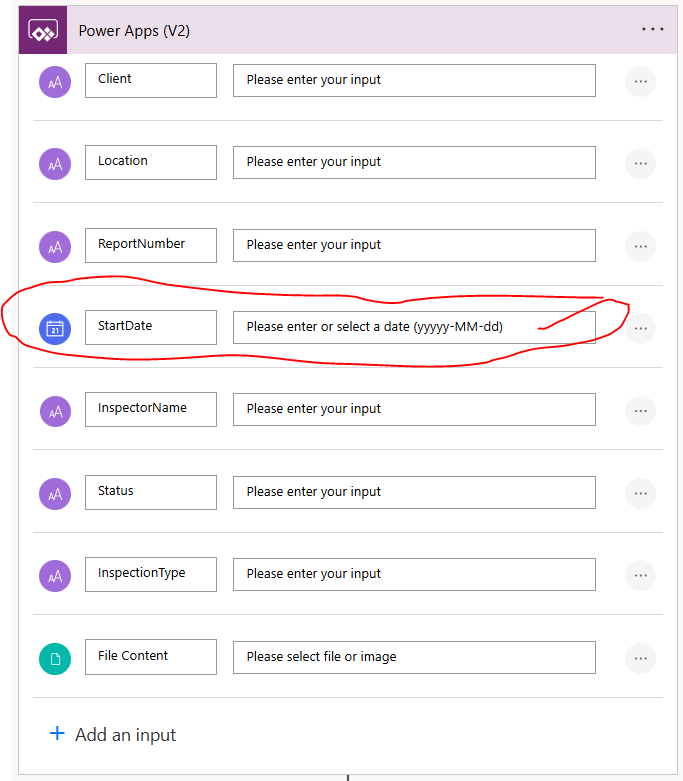
Power Automate Flow Trigger -

Categories:
I have the same question (0)
  • Verified answer
    WarrenBelz Profile Picture
    153,175 Most Valuable Professional on at
    You need to send a date to a flow in a UTC format string
    Text(IP_Inspection_Start_Date_DatePicker.SelectedDate, "yyyy-mm-dd")
    
    This is also noted in the Flow Parameter you have posted - though you need lower case m in Power Apps
     
    Please ✅ Does this answer your question if my post helped you solve your issue. This will help others find it more readily. It also closes the item. If the content was useful in other ways, please consider giving it a Like♥.
    Visit my blog Practical Power Apps    LinkedIn   
  • WarrenBelz Profile Picture
    153,175 Most Valuable Professional on at
    A quick follow-up to see if you received the answer you were looking for or if you need further assistance.

    Please ✅Does this answer your question if my post helped you solve your issue. This will help others find it more readily. It also closes the item. If the content was useful in other ways, please consider giving it a Like♥.
    Visit my blog Practical Power Apps    LinkedIn 

Under review

Thank you for your reply! To ensure a great experience for everyone, your content is awaiting approval by our Community Managers. Please check back later.

Helpful resources

Quick Links

Forum hierarchy changes are complete!

In our never-ending quest to improve we are simplifying the forum hierarchy…

Ajay Kumar Gannamaneni – Community Spotlight

We are honored to recognize Ajay Kumar Gannamaneni as our Community Spotlight for December…

Leaderboard > Power Apps

#1
WarrenBelz Profile Picture

WarrenBelz 537 Most Valuable Professional

#2
Michael E. Gernaey Profile Picture

Michael E. Gernaey 293 Super User 2025 Season 2

#3
MS.Ragavendar Profile Picture

MS.Ragavendar 199 Super User 2025 Season 2

Last 30 days Overall leaderboard