web
You’re offline. This is a read only version of the page.
close
Skip to main content

Announcements

News and Announcements icon
Community site session details

Community site session details

Session Id :
Power Platform Community / Forums / Power Apps / Set the collection in ...
Power Apps
Answered

Set the collection in EditForm not working

(3) ShareShare
ReportReport
Posted on by 108
I have a collection in NewForm when submitted, stores the records in multiple lines of text column in backend separated by semicolon successfully without any issues. Below is the code for the same.
 
I am trying to implement the same logic in EditForm but it doesn't work properly. I created a new collection to split the items which is concatenated with semicolon and then set this new collection as Items property but it doesnt work. I should be able to add or remove items in EditForm as well. May i know how to resolve this?. Screenshot below. 
 
 
Add new Request Screen OnVisible
ClearCollect(
    ColListAvailable,
    Filter(
        DataSource,
        ID>15
    )
);
ClearCollect(
    ColListSelected,
    []
);
Left Gallery Items
ColListAvailable
 
Right Gallery Items
ColListSelected
 
Add Button OnSelect
Collect(
   ColListSelected,
   LeftGallery.Selected.Name
)
Remove Button OnSelect
RemoveIf(
   ColListSelected,
   Value = RightGallery.Selected.Value
)
DataCardUpdate - Multi lines of Text
Concat(
        ColListSelected,
        Value,
        ";"
    )
EditForm OnVisible
ClearCollect(
    ColListSelectedSplit,
    Split(
        varitem.SPColumn,
        ";"
    )
)
EditForm RightGallery Items
ColListSelectedSplit
 
EditForm LeftGallery Items
ColListAvailable
I have the same question (0)
  • timl Profile Picture
    37,152 Super User 2026 Season 1 on at
     
    The call to ClearCollect on the EditForm OnVisible looks as though it should return a correct list based on the  semi-colon delimited value.
     
    Can you clarify what isn't working? Is the EditForm Right Gallery not showing any values?
  • WarrenBelz Profile Picture
    155,350 Most Valuable Professional on at
    I have been involved in multiple posts on this model of yours, so I will keep going with it.
     
    What exactly is the EditForm you refer to - I suspect it is not a different Form (you have not posted any other screenshots), but (I am guessing here) you have those galleries inside a Form ? If so, what is the DataSource and Item of the Form and the Default of the DataCard/s you have those galleries in ? Also, how does it differ from the NewForm you refer to ?
  • Verified answer
    sumit_artesian Profile Picture
    261 on at
     
    So, I had to make some assumptions to make up for the lack of information related to your issue, but I do have something for you.
     
    I have created a demo app with the following assumptions:
    You have a screen where the users can view all the requests.
    The users can either add a new request or edit existing requests.
    You have a screen "Add new Request Screen" that has two galleries (i.e., LeftGallery and RightGallery), at least two buttons (i.e., Add and Remove buttons), and a form pointing to a list with a datacard for a multi-line of text field.
    When adding a new request, your app works as expected. You can add or remove items between galleries, and submitting the form saves the data in your data source as a semi-colon separated string.
    When editing an existing request, your collection is not being populated, and you have issues in your form as well.
     
    In my demo implementation, I have used a variable varFormMode to track whether we navigate to the screen for a new request or to edit an existing request. I have also used the same variable to populate the various galleries and their items as well as the form datacard field. I have mostly used your existing formulas, just tweaked them a little to incorporate the variable I created to track the state.
     
    I have created the two screens on my demo app. I am attaching some reference screenshots and the related code on these screens.
    Screen1:
    The gallery contains the semi-colon separated string from the multi-line of text field on my data source.
     
    Screen1 Components:
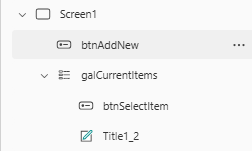
     
    btnAddNew OnSelect:
    Set(varFormMode, "New");
    Navigate(Screen2);
     
    galCurrentItems Data source:
    PP_Community_List
     
    Title1_2 Text:
    ThisItem.Employees // The multi-line of text field
     
    btnSelectItem OnSelect:
    Set(varFormMode, "Edit");
    Navigate(Screen2);
     
    Screen2:
     
    Screen2 Components:
     
    Screen2 OnVisible:
    ClearCollect(
        ColListAvailable,
        Filter(
            Employee,
            ID > 15
        )
    );
    ClearCollect(
        ColListSelected,
        []
    );
    If(
        varFormMode = "Edit",
        ClearCollect(
            ColListSelectedSplit,
            Split(
                galCurrentItems.Selected.Employees,// Replace with your data source multi-line of text fiel
                ";"
            )
        )
    )
     
    btnAdd OnSelect:
    If(
        varFormMode = "New",
        Collect(
            ColListSelected,
            LeftGallery.Selected
        ),
        Collect(
            ColListSelectedSplit,
            LeftGallery.Selected
        )
    )
     
    btnRemove OnSelect:
    If(
        varFormMode = "New",
        RemoveIf(
            ColListSelected,
            Value = RightGallery.Selected.Value
        ),
        RemoveIf(
            ColListSelectedSplit,
            Value = RightGallery.Selected.Value
        )
    )
     
    RightGallery Items:
    If(varFormMode = "New", ColListSelected, ColListSelectedSplit)
     
    LeftGallery Items:
    ColListAvailable
     
    Form2 Data source:
    PP_Community_List
     
    Form2 Default mode:
    If(varFormMode = "New", FormMode.New, FormMode.Edit)
     
    Employees_DataCard2 Update:
    If(
        varFormMode = "New",
        Concat(
            ColListSelected,
            Value,
            ";"
        ),
        Concat(
            ColListSelectedSplit,
            Value,
            ";"
        )
    )
     
    btnSubmitForm OnSelect:
    SubmitForm(Form2)
     

    Please âœ… Does this answer your question if my post helped you solve your issue. This will help others find it more readily. It also closes the item.
    If the content was useful in other ways, please consider answering Yes to Was this reply helpful? or give it a Like! 🩷
  • WarrenBelz Profile Picture
    155,350 Most Valuable Professional on at
    A quick follow-up to see if you received the answer you were looking for. Happy to assist further if not.
     
    Please ✅ Does this answer your question if my post helped you solve your issue. This will help others find it more readily. It also closes the item. If the content was useful in other ways, please consider answering Yes to Was this reply helpful? or give it a Like â™¥
    Visit my blog
    Practical Power Apps    LinkedIn   

Under review

Thank you for your reply! To ensure a great experience for everyone, your content is awaiting approval by our Community Managers. Please check back later.

Helpful resources

Quick Links

Introducing the 2026 Season 1 community Super Users

Congratulations to our 2026 Super Users!

Kudos to our 2025 Community Spotlight Honorees

Congratulations to our 2025 community superstars!

Congratulations to the April Top 10 Community Leaders!

These are the community rock stars!

Leaderboard > Power Apps

#1
Vish WR Profile Picture

Vish WR 875

#2
Valantis Profile Picture

Valantis 530

#3
11manish Profile Picture

11manish 432

Last 30 days Overall leaderboard



