web
You’re offline. This is a read only version of the page.
close
Skip to main content

Notifications

Announcements

Community site session details

Community site session details

Session Id :
Power Platform Community / Forums / Power Apps / Create Virtual Table t...
Power Apps
Answered

Create Virtual Table that Connect to Snowflake but All of the Records is not Showing

(2) ShareShare
ReportReport
Posted on by 63

Hello Microsoft Community,

I hope this message finds you well.

I am currently experiencing an issue with a virtual table that connects to Snowflake within Dataverse. Despite having successfully established connectivity with a role that has the privilege to perform SELECT operations in Snowflake, I am unable to see any records in the virtual table.

Here is the structure I've set up:

  • Primary Key in the Virtual Table: ID -> in snowflake this fields is a varchar
  • Primary Fields in the Virtual Table: FSM_NAME -> in snowflake this fields is a varchar

However, when the virtual table is created there is no error message, but all of the records appear blank, even though there are over 1000 records populated in Snowflake.
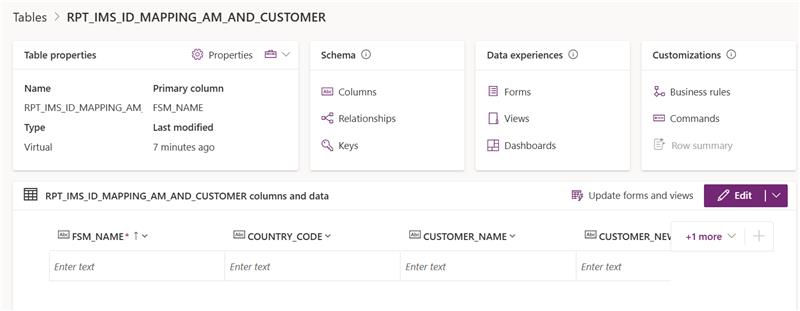
Could anyone please provide guidance on why the records are not displaying correctly? Any help would be greatly appreciated!

Thank you.

I have the same question (0)
  • stampcoin Profile Picture
    5,058 Super User 2025 Season 2 on at
    Please check the doc here, hope it can help you a little bit.
    Verify sowflake returns rows with the same user/role.
     
     
  • Verified answer
    stampcoin Profile Picture
    5,058 Super User 2025 Season 2 on at
    Have you got chance to figure it out ?
    one more thing that create a int column in snowflake table.
  • tasyaaa Profile Picture
    63 on at
    Hi @stampcoin

    yes its finally works, i add some ID that should be identified as GUID in snowflake table and also configure some authentication part

Under review

Thank you for your reply! To ensure a great experience for everyone, your content is awaiting approval by our Community Managers. Please check back later.

Helpful resources

Quick Links

Forum hierarchy changes are complete!

In our never-ending quest to improve we are simplifying the forum hierarchy…

Ajay Kumar Gannamaneni – Community Spotlight

We are honored to recognize Ajay Kumar Gannamaneni as our Community Spotlight for December…

Leaderboard > Power Apps

#1
WarrenBelz Profile Picture

WarrenBelz 765 Most Valuable Professional

#2
Michael E. Gernaey Profile Picture

Michael E. Gernaey 343 Super User 2025 Season 2

#3
Power Platform 1919 Profile Picture

Power Platform 1919 272

Last 30 days Overall leaderboard
