web
You’re offline. This is a read only version of the page.
close
Skip to main content

Announcements

News and Announcements icon
Community site session details

Community site session details

Session Id :
Power Platform Community / Forums / Power Apps / How do I check if the ...
Power Apps
Answered

How do I check if the enabled dynamics option was enabled on Environment creation?

(0) ShareShare
ReportReport
Posted on by 700
Good morning, Braintrust.
 
I googled around for the answer and found some old posts on the forums saying look at resources, and Dynamics 365 app will list any dynamic apps installed.
 
 
Only problem is I could see the same apps listed on Environments I know did not have the option checked on creation.
 
Is there any way to tell if an Environment has the Dynamics Enabled?
 
Thank you
RD
I have the same question (0)
  • Verified answer
    AlbertoCastro Profile Picture
    1,201 Most Valuable Professional on at
    Hi @RandonDept,
    There is no way to identify if an environment is prepared to install Dynamics 365 apps.

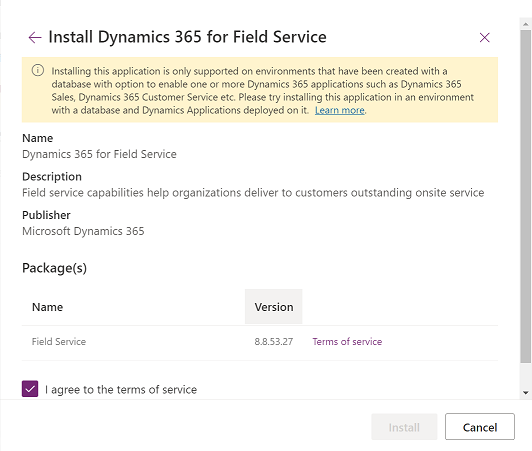
    When you try to install a Dyn365app in a environment and you have this error obviously is not enabled:
    Installing this app is only supported on environments that have been created with a database with option to enable apps.
    https://learn.microsoft.com/en-us/power-platform/admin/manage-apps?WT.mc_id=ppac_inproduct_resources#troubleshooting-installation-error

    ---------------------------
    If the solution works, please kindly ✅ check the box "Does this answer your question?" on the bottom left! This will help others in finding the solution more expediently 😄 Also, a Like would be a great compliment!
     

Under review

Thank you for your reply! To ensure a great experience for everyone, your content is awaiting approval by our Community Managers. Please check back later.

Helpful resources

Quick Links

Introducing the 2026 Season 1 community Super Users

Congratulations to our 2026 Super Users!

Kudos to our 2025 Community Spotlight Honorees

Congratulations to our 2025 community superstars!

Congratulations to the March Top 10 Community Leaders!

These are the community rock stars!

Leaderboard > Power Apps

#1
11manish Profile Picture

11manish 519

#2
WarrenBelz Profile Picture

WarrenBelz 439 Most Valuable Professional

#3
Vish WR Profile Picture

Vish WR 433

Last 30 days Overall leaderboard