




 Share
Share Report
 108
108Hi Everyone,
I am currently building a Power App Survey and am encountering some issues with mapping some questions to my sharepoint list.
Currently I have Questions 1 through to 6 working with Question 4 allowing for multiple choice. However, I am having issues getting Question 7,8 and 9 to map up with various errors poppingup.
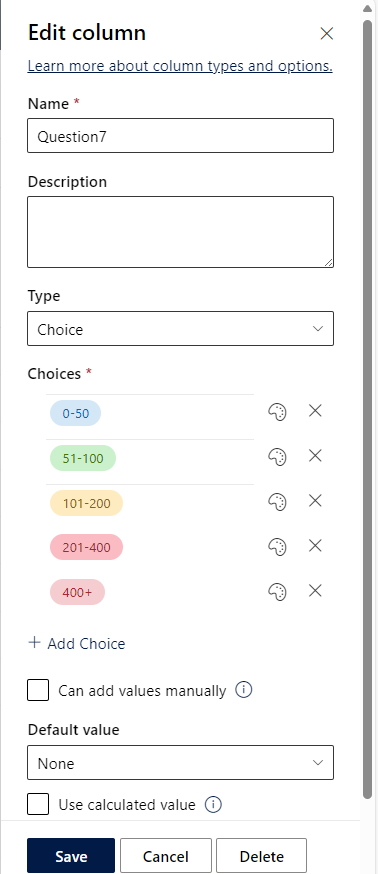
In my SharePoint list the column titles are Question7, Question8 and Question9 and their data types are set up as Choice.
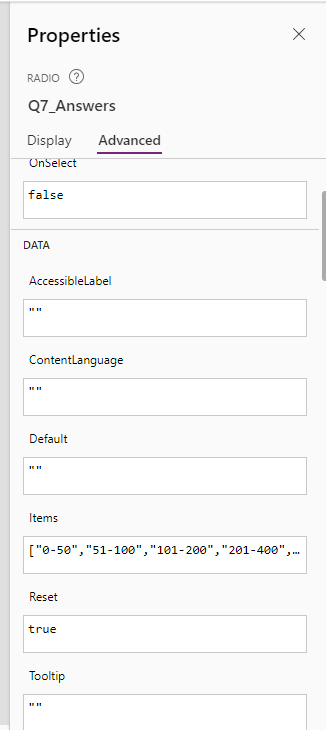
An Example of the answer choices for these questions are "0-50", "51-100", "101-200", "201-400" and "400+" these match-up to the properties of the Question7 radio in powerapps with the items exactly.
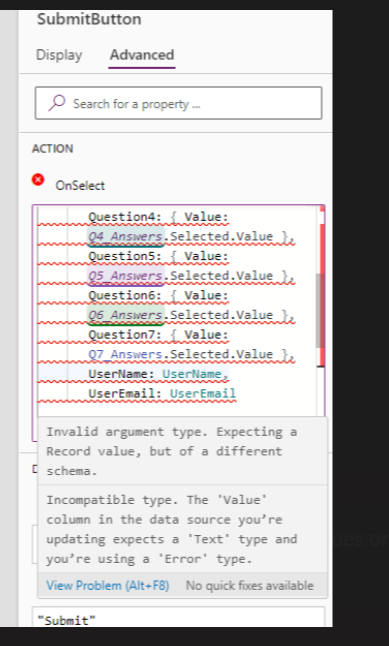
I have provided a screenshot of the Patch code in the OnSelect of the Submit Buttons properties. As shown, q1-6 work as expected but Q7 i get the following error. (See attached) any assistance would be greatly appreciated.

I am currently building a Power App Survey and am encountering some issues with mapping some questions to my sharepoint list.
Currently I have Questions 1 through to 6 working with Question 4 allowing for multiple choice. However, I am having issues getting Question 7,8 and 9 to map up with various errors poppingup.
In my SharePoint list the column titles are Question7, Question8 and Question9 and their data types are set up as Choice.
An Example of the answer choices for these questions are "0-50", "51-100", "101-200", "201-400" and "400+" these match-up to the properties of the Question7 radio in powerapps with the items exactly.
I have provided a screenshot of the Patch code in the OnSelect of the Submit Buttons properties. As shown, q1-6 work as expected but Q7 i get the following error. (See attached) any assistance would be greatly appreciated.
Patch(
'IA Survey Answers',
Defaults('IA Survey Answers'),
{
Title: Q1.Text,
Question1: { Value: Q1_Answers.Selected.Value },
Question2: { Value: Q2_Answers.Selected.Value },
Question3: { Value:Q3_Answers.Selected.Value},
Question4: { Value:
Concat(Q4_Answers.SelectedItems.Value, ", ") },
Question5: { Value:
Q5_Answers.Selected.Value },
Question6: { Value:
Q6_Answers.Selected.Value },
UserName: UserName,
UserEmail: UserEmail
}
);
Categories:
I have the same question (0)
 All responses (
 Answers (










