web
You’re offline. This is a read only version of the page.
close
Skip to main content

Notifications

Announcements

Community site session details

Community site session details

Session Id :
Power Platform Community / Forums / Power Automate / Content Type & Content...
Power Automate
Unanswered

Content Type & Content Type ID coming back blank!

(0) ShareShare
ReportReport
Posted on by

Hey folks ...


I'm super confused. I'm doing something I'd think would be fairly simple ... Trigger on "when a file is created" ... and then trying to just get the Content Type or Content Type ID (preferrably ID) from it. They're both default properties from the trigger ... but when I try to either look at them directly, or pull them into variables, they come back blank.

The library is content type enabled, there are several content types in it, the test item I'm triggering on is a Document Set that certainly has a name & ID but Flow seems to disagree with me...
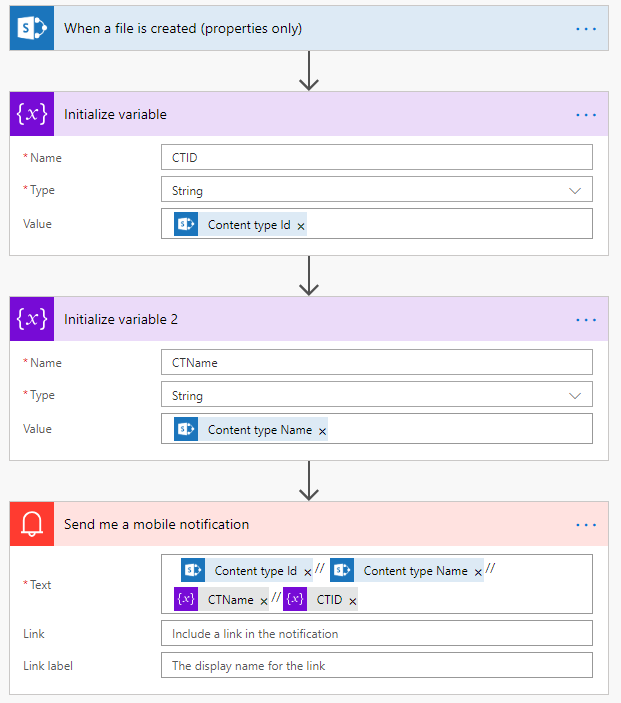


The notification I get is "// ////" because it's all empty... 


What am I missing here?!

Thanks for any help you can offer!

Rhia

Categories:
I have the same question (0)
  • ScottShearer Profile Picture
    25,270 Most Valuable Professional on at

    @Anonymous:


    To the best of my knowledge, Flow is not yet "content type aware" and does not yet function with document sets.


    You may be better of using a Designer 2010 style workflow for your requirement.  Alternatively, you may be able to get where you want to go by using the "Send an HTTP Request to SharePoint" action and calling  one of the SharePoint web services


    If this answers your question, please mark your psot as Solved.


    Scott


  • Community Power Platform Member Profile Picture
    on at

    Hi Scott - 

    I'm not sure that answers it, but, it's interesting regardless.

    My issue issue is that I can't pull back any of the data - even data showing in columns - regarding a content type. For example, in a column in my SP list, in the view I've selected, I've got the name of the Content Type displaying. Yet ... even when I pull that back ... it's blank! Is that expected?

    Cheers,

    Rhia

  • v-yamao-msft Profile Picture
    on at

    Hi @Anonymous,


    Content type and Content type ID are now available for flow.

    Please make sure you have clicked Yes under Allow management of content type of the library.

    I have made the following flow for testing. Before creating the flow, I have enabled content type of the library.

    1.PNG

    Then create a flow likes below. when a file is created in the library, a notification with Content type id and Content type name will be sent to me.

    2.PNG3.PNG

    Please try again with it.

    Please check the following doc on library Content type for a reference:

    https://support.office.com/en-us/article/add-a-content-type-to-a-list-or-library-917366ae-f7a2-47ad-87a5-9689a1884e60


    Best regards,

    Mabel

  • Community Power Platform Member Profile Picture
    on at

    Hi Mabel - 

    Thank you for your response.

    Unfortunately, this is exactly what I am doing and receiving a blank value.

    Content types are allowed in the library - there are several already in there - so "allow management of content types" is already enabled.

    Thoughts?

    rhia

  • v-yamao-msft Profile Picture
    on at

    Hi @Anonymous,


    The issue could not be reproduced by me. Could you share more details on your SharePoint library settings?

    You mentioned that you are trigging on a Document Set, so I have made another test by adding Document set into the library, then create a document set triggered the flow properly. Of course, it returned proper Content type and Content Type ID.

    Could you take a try with another library?


    Best regards,

    Mabel

  • Community Power Platform Member Profile Picture
    on at

    Hi Mabel - 


    Thank you for your responses. I was able to get what I needed using the HTTP SharePoint Request as pointed out by @johnnliu on Twitter. 

    I will try to get the document set content type again on another library when I have a moment to test, and will et you know!

    Cheers,


    Rhia

Under review

Thank you for your reply! To ensure a great experience for everyone, your content is awaiting approval by our Community Managers. Please check back later.

Helpful resources

Quick Links

Forum hierarchy changes are complete!

In our never-ending quest to improve we are simplifying the forum hierarchy…

Ajay Kumar Gannamaneni – Community Spotlight

We are honored to recognize Ajay Kumar Gannamaneni as our Community Spotlight for December…

Leaderboard > Power Automate

#1
Michael E. Gernaey Profile Picture

Michael E. Gernaey 463 Super User 2025 Season 2

#2
Tomac Profile Picture

Tomac 427 Moderator

#3
abm abm Profile Picture

abm abm 245 Most Valuable Professional

Last 30 days Overall leaderboard
