web
You’re offline. This is a read only version of the page.
close
Skip to main content

Announcements

News and Announcements icon
Community site session details

Community site session details

Session Id :
Power Platform Community / Forums / Power Apps / Model-Driven App: Prev...
Power Apps
Answered

Model-Driven App: Prevent Teams from showing up as a drop-down option for record owner (ownerid)

(0) ShareShare
ReportReport
Posted on by 10
I've got a model-driven app that is currently already in production, and the users are looking for some improvements to the dropdown selection of record owner assignment. I saw a lot of recommendations around the web suggesting configuring a view for filtering what owners show up, but this particular field doesn't have the option to filter by a view. Possibly because some limitations on my org's User table? I'm not 100% sure.
 
My available options:
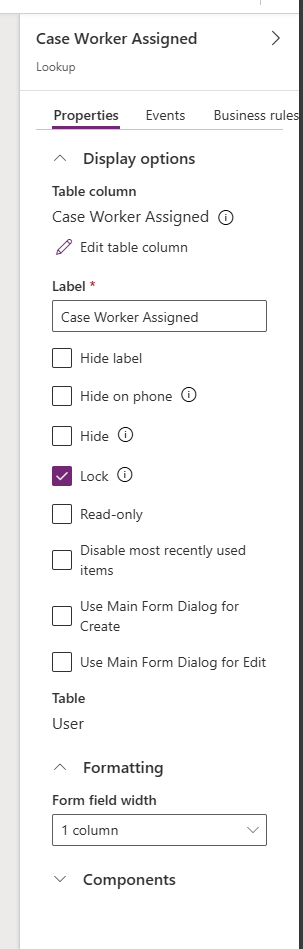
So, I've had to start building component for making customizations. I've managed to filter the User list that appears using Javascript that runs during OnLoad that filters by the Team the users are in, so that the users only have to see other users that have access to the app (I've attached that javascript as a .txt in case anyone is interested).
 
What I haven't been able to do yet is filter out the Results from: Teams
Worse, the drop-down for ownerid shows the Teams at the top, so even though my filter is working, there's enough system groups existing in my org that the relevant users are all buried at the bottom.
Is there a way I can also hide Teams from appearing in this list? A function to also run OnLoad perhaps to just filter them out? The javascript I'm already running build a View for the ownerid (Case Worker Assigned) field, but that view doesn't seem to be the only view that the ownerid lookup field pulls from. I'm open to just running a filter on the Teams list too to reduce it to zero.
Categories:
I have the same question (0)
  • Verified answer
    QuentinDURIEZ Profile Picture
    577 Moderator on at
    Hi,

    You can use the setEntityTypes method from the Client API to achieve this 

    Here are an code example that you that use :
    function limitOwner(executionContext){
    	const formContext = executionContext.getFormContext();
    	const ownerid = formContext.getAttribute('ownerid');
    	ownerid.controls.forEach( c => c.setEntityTypes(['systemuser'])
    }
    Create a JS webresource with this snippet, add the resource in the form and put it to the form OnLoad handler

    Please note this will not work for the "Assign" commands. 

    Regards,

Under review

Thank you for your reply! To ensure a great experience for everyone, your content is awaiting approval by our Community Managers. Please check back later.

Helpful resources

Quick Links

Introducing the 2026 Season 1 community Super Users

Congratulations to our 2026 Super Users!

Kudos to our 2025 Community Spotlight Honorees

Congratulations to our 2025 community superstars!

Congratulations to the April Top 10 Community Leaders!

These are the community rock stars!

Leaderboard > Power Apps

#1
Vish WR Profile Picture

Vish WR 1,055

#2
Valantis Profile Picture

Valantis 666

#2
11manish Profile Picture

11manish 666

Last 30 days Overall leaderboard